
8 AI agents. 100 clicks saved per patient. 2,000 fewer clicks per day. That is what happens when you turn athenahealth into a full AI-powered EHR.
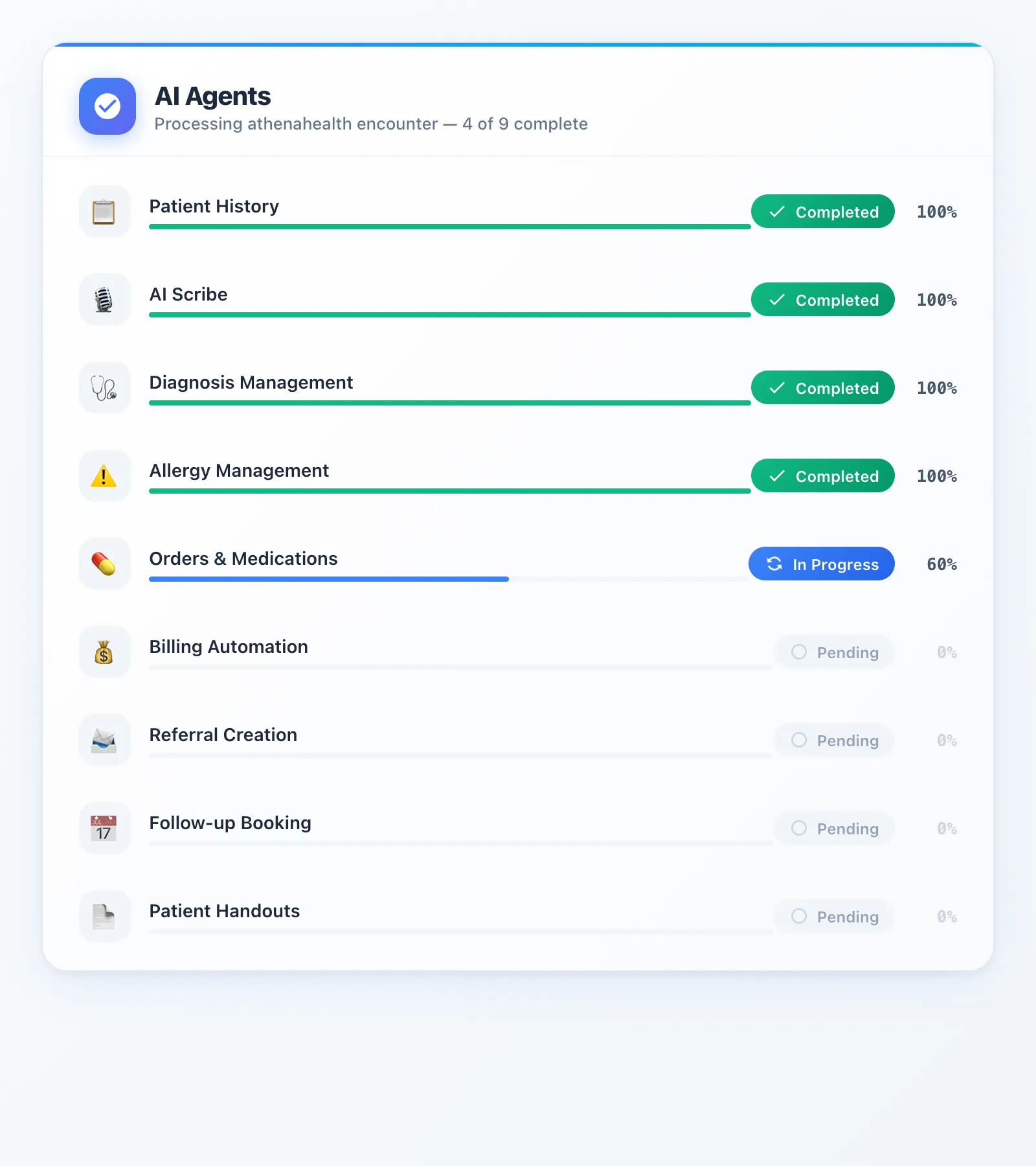
Most AI scribes listen to your encounter and hand you a note to copy-paste. That is one step. DeepCura deploys 8 specialized AI agents that handle the entire encounter workflow — and write everything directly back into athenahealth:
- Patient History — pulls and summarizes the full chart before you walk in
- AI Scribe — ambient note generation, pushed per-section into athenahealth
- Diagnoses — extracts problems, maps to SNOMED + ICD-10, pushes to the chart
- Allergies — captures allergens with severity, validates against athenahealth's database
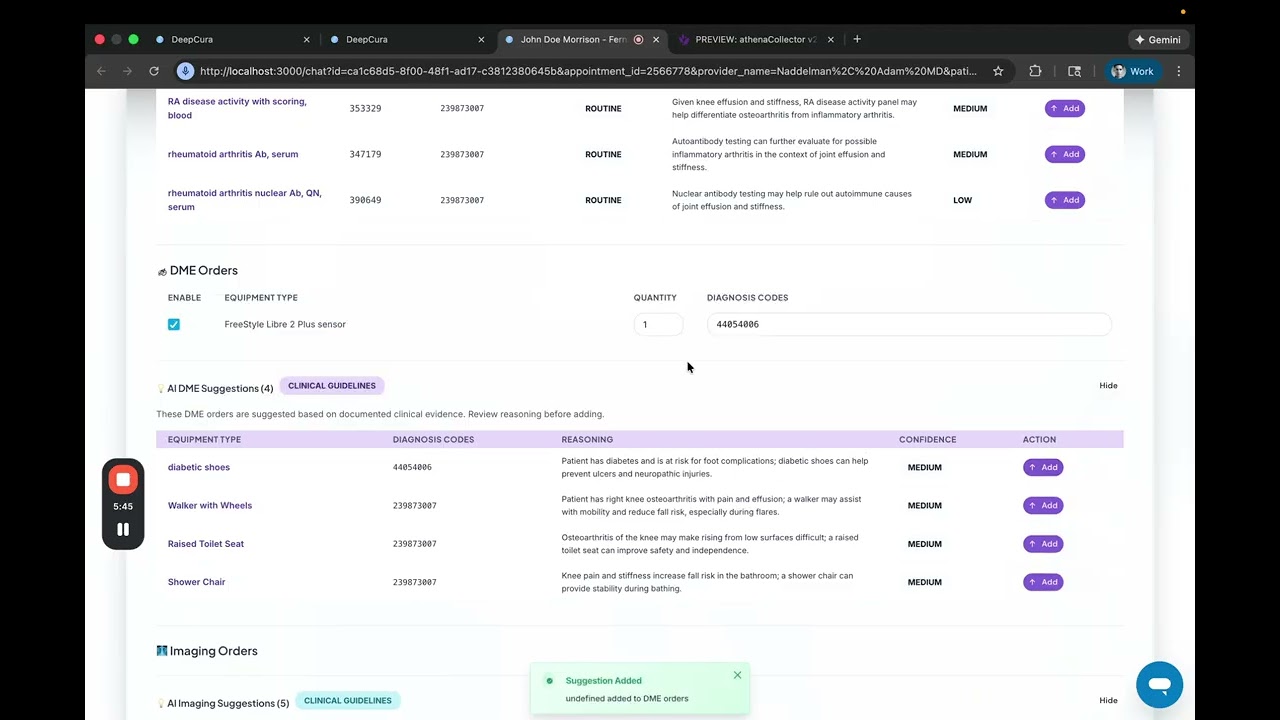
- Orders — labs, imaging, DME, vaccines, medications — placed directly in athenahealth
- Billing — CPT codes with linked diagnoses, pushed to the charge slip
- Referrals — specialist search, clinical justification, authorization — all automated
- Follow-ups — books the appointment in athenahealth's scheduler during the visit
At 20 patients a day, that is ~2,000 clicks eliminated — roughly 5-6 hours of data entry, gone. AthenaAmbient handles about 2 of these 10 workflow steps. DeepCura handles all of them.
If you are searching for the best AI scribe for athenahealth, this guide covers exactly how each agent works, what athenaAmbient does and does not do, and how to evaluate whether a dedicated AI scribe for athenahealth is worth the investment for your practice.
This guide was last updated in February 2026. All technical claims are based on DeepCura's production athenahealth integration (6,700+ lines of integration code). Pricing reflects current publicly available information.
Watch: Full AthenaHealth Integration Demo
See all 8 AI agents working inside an athenahealth encounter — from patient history pull through follow-up booking — in under 10 minutes.
Why Finding the Best AI Scribe for athenahealth Is So Hard
The typical AI medical scribe workflow with athenahealth looks like this: the scribe listens to the encounter, generates a SOAP note, and the clinician copies it into athenahealth. That is essentially a voice-to-text tool with a clipboard. It saves time on the note itself, but it does nothing for the 80% of the encounter workflow that happens after the note is written — diagnoses, allergies, orders, billing, referrals, and scheduling.
AthenaAmbient, athenahealth's own built-in AI scribe, improves on this by pushing basic notes directly into the chart. But it stops there. There is no diagnosis management, no order entry, no billing automation, no referral creation, and no follow-up scheduling. For a platform that already has robust APIs for all of these functions, athenaAmbient leaves most of the automation opportunity on the table.
DeepCura is the only AI scribe platform with full bidirectional athenahealth API write-back across all eight workflow stages. It does not just generate a note and hand it off — it reads patient context from athenahealth, processes the encounter through 8 specialized AI agents, validates every output against athenahealth's own databases, and pushes structured data directly into the correct athenahealth fields. No copy-paste. No manual data entry. No switching between screens. For a detailed comparison of how other AI scribes handle EHR integration, see our Best AI Medical Scribes in 2026 ranking, our Freed AI review, and our Heidi Health review.
The 8 AI Agents
DeepCura's athenahealth integration uses a multi-agent architecture — 8 specialized AI agents that each handle one stage of the clinical workflow. Each agent runs on GPT-4.1 with streaming server-sent events (SSE) for real-time output, and every agent includes a 3-stage validation pipeline: AI extraction, database cross-reference against athenahealth, and clinician confirmation before any data is written to the chart.
Here is what each agent does and why it matters for athenahealth users.
1. Patient History Summarization
Before the encounter begins, the Patient History agent pulls the patient's complete clinical record from athenahealth via C-CDA (Consolidated Clinical Document Architecture). It processes 44 filterable categories of clinical data — medications, allergies, problems, vitals, immunizations, lab results, procedures, referrals, and more — and generates a concise clinical summary that the provider can review in seconds rather than spending 3-5 minutes clicking through athenahealth chart tabs.
This is not a generic patient summary. The agent organizes information by clinical relevance, highlights active problems and recent changes, and flags potential interactions. The provider walks into the encounter with full context, not a blank slate.
2. AI Scribe
The AI Scribe agent captures the ambient encounter audio and generates a comprehensive clinical note with 12 structured SOAP fields — chief complaint, history of present illness, review of systems, past medical history, physical exam, assessment, plan, patient instructions, and more. Each field is formatted in rich HTML that matches athenahealth's native note structure.
What makes this different from other AI scribes: DeepCura pushes notes to athenahealth on a per-section basis. Rather than dumping the entire note into a single text field, each SOAP section writes to the corresponding athenahealth note section. This preserves athenahealth's native formatting, works with athenahealth's built-in note templates, and allows the provider to review and edit individual sections without disrupting the rest of the note.
3. Problem and Diagnosis Management
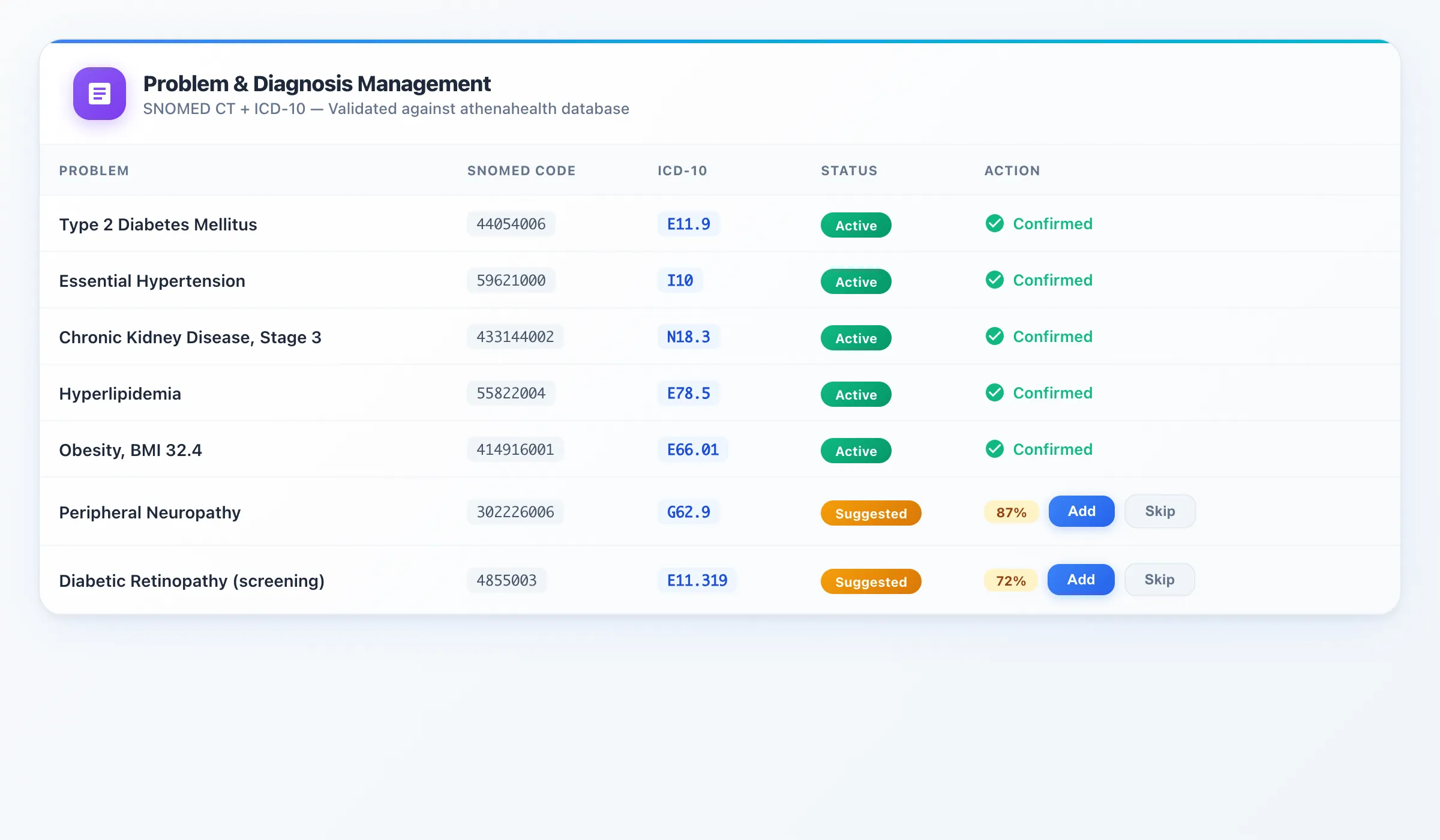
The Problem and Diagnosis agent extracts every clinical problem and diagnosis mentioned during the encounter and maps each one to both SNOMED CT and ICD-10 codes. Before pushing anything to athenahealth, the agent validates each diagnosis against athenahealth's own problem database to ensure code compatibility and avoid entry errors.
The agent also suggests additional diagnoses based on the patient's current medication list, lab results, and clinical context. For example, if a patient is on metformin and their most recent HbA1c is 7.8%, the agent will suggest Type 2 Diabetes (E11.9) if it is not already on the problem list. Each suggestion includes a confidence score so the provider can make an informed decision.
4. Allergy Management
The Allergy agent extracts every allergen mentioned during the encounter — medications, foods, environmental factors — along with severity levels and reaction types. Each allergen is mapped to SNOMED codes and validated against athenahealth's allergen database before being pushed to the chart.
This is critical for patient safety. Manual allergy entry in athenahealth is error-prone — clinicians often enter free-text descriptions that do not trigger drug interaction alerts. By mapping allergens to standardized codes and validating against athenahealth's database, the agent ensures that every allergy entry works with athenahealth's built-in clinical decision support and drug interaction checking.
5. Orders and Medications
The Orders agent handles five distinct order types: Lab Orders, Imaging Orders, DME (Durable Medical Equipment), Vaccines, and Medication prescriptions. For each order mentioned during the encounter, the agent extracts the specific test, study, or medication, adds relevant clinical details (laterality for imaging, dosage for medications), and pushes the order directly into athenahealth's order entry system.
Each order includes a confidence score based on the clinical context. A clearly stated "let's get a CBC and lipid panel" gets a high confidence score and is ready for one-click confirmation. A tentative "we might want to consider an MRI" gets a lower score and is flagged for provider review. This eliminates the manual process of navigating athenahealth's order entry screens, searching for each order, and filling in order-specific fields — typically 8-12 clicks per order.
6. Billing Automation
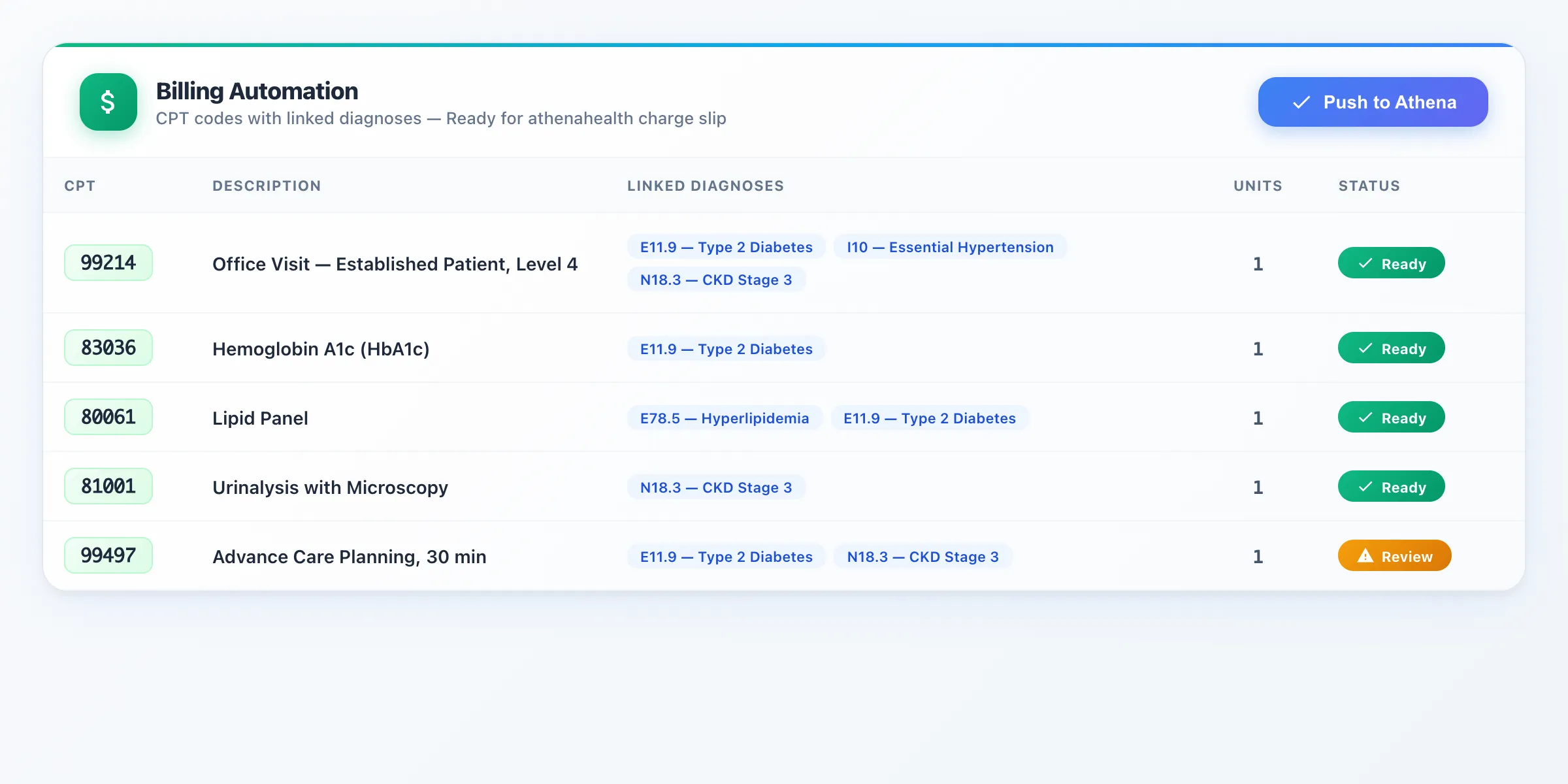
The Billing agent analyzes the entire encounter — the note content, diagnoses, procedures performed, and time spent — and generates appropriate CPT codes with linked ICD-10 diagnosis codes. The agent considers E&M level guidelines, evaluates medical decision-making complexity, and pushes the complete billing entry directly to athenahealth's charge slip.
For a typical office visit, this replaces the manual process of selecting the E&M level, linking diagnoses to the visit code, adding procedure codes for any ancillary services, and verifying that the documentation supports the billed level. That workflow alone takes 15-20 clicks in athenahealth. The Billing agent reduces it to a single confirmation.
7. Referral Creation
The Referral agent extracts referral information from the encounter — the target specialty, urgency level, reason for referral, and any relevant clinical context. It then searches athenahealth's provider directory for appropriate specialists, creates the referral record with all required fields, and initiates the authorization process if applicable.
Referrals are one of the most time-consuming manual processes in athenahealth, requiring the clinician to navigate to the referral module, search for a specialist, fill in clinical justification, attach relevant documents, and submit for authorization. The agent automates the entire workflow from a single mention of "let's get a cardiology referral" during the encounter.
8. Follow-up Appointment Booking
The Follow-up agent listens for scheduling intent during the encounter — "let's see you back in three months" or "schedule a follow-up in two weeks" — extracts the timing, searches athenahealth's appointment slots for availability, and books the appointment directly in athenahealth's scheduling system.
This eliminates the post-encounter handoff where the provider tells the patient to schedule at the front desk, the patient waits in line, the front desk searches for availability, and the appointment may or may not match what the provider intended. The agent handles it in real-time during the encounter.
Bonus: Patient Education Handouts
Beyond the 8 core agents, DeepCura also recommends patient education materials from athenahealth's built-in education library based on the diagnoses and conditions discussed during the encounter. The provider can review and print handouts with a single click — no manual searching through athenahealth's education catalog.
AthenaAmbient vs DeepCura: Head-to-Head
If you are comparing every athenahealth AI scribe option available in 2026, this is the head-to-head breakdown.
| Capability | athenaAmbient (Free) | DeepCura ($99/mo) |
|---|---|---|
| Ambient AI Scribing | Yes | Yes |
| SOAP Note Generation | Yes | Yes (12 fields, rich HTML) |
| Push Notes to Athena | Yes (basic) | Yes (per-section write-back) |
| Patient History Pull | No | Yes (44 categories) |
| Problem/Diagnosis Push | No | Yes (SNOMED + ICD-10) |
| Allergy Management | No | Yes |
| Lab/Imaging/DME/Vaccine Orders | No | Yes (5 types) |
| Medication Orders | No | Yes |
| CPT Billing Automation | No | Yes |
| Referral Creation | No | Yes |
| Follow-up Booking | No | Yes |
| Patient Handouts | No | Yes |
| Workflow Automation Score | 2/10 | 10/10 |
AthenaAmbient is a reasonable starting point for practices that only need basic ambient scribing and are satisfied with athenahealth's native documentation workflow. But for practices that want to automate the full encounter — from patient history through billing and scheduling — it covers roughly 20% of the opportunity.
How Many Clicks Does This Actually Save?
We measured the manual click count for a typical primary care encounter in athenahealth across every workflow stage:
- Patient history review: 12-15 clicks (navigating chart tabs, expanding sections)
- Note documentation: 20-25 clicks (section navigation, field entry, template selection)
- Problem/diagnosis entry: 8-10 clicks (search, select, confirm per diagnosis)
- Allergy updates: 5-8 clicks per allergen
- Order entry: 8-12 clicks per order (search, select, fill details, sign)
- Billing/coding: 15-20 clicks (E&M selection, diagnosis linking, charge entry)
- Referral creation: 15-20 clicks (provider search, clinical details, authorization)
- Follow-up scheduling: 8-12 clicks (calendar navigation, slot selection, confirmation)
Total: approximately 90-110 clicks per patient encounter.
At 20 patients per day, that is roughly 2,000 clicks — the equivalent of 5-6 hours spent on data entry rather than patient care. Over a year, that adds up to approximately 1,200 hours of administrative work.
At an average physician compensation rate of $300/hour, those 1,200 hours represent $360,000 in annual opportunity cost. Even recovering 50% of that time through automation delivers $180,000 in value — for a tool that costs $1,188/year.
Pricing
DeepCura is priced at $99 per month for 1,000 credits, which supports approximately 15-20 patient encounters per day for a typical primary care provider. High-volume practices or those using more credit-intensive features (multi-agent processing across all 8 agents) may see usage closer to $165/month.
For context, here is how that compares:
- athenaAmbient: Free (included with athenahealth subscription), but limited to basic ambient scribing — no orders, billing, referrals, or scheduling automation
- Freed AI: $39-$119/month tiered pricing — no native athenahealth integration, scraping-based EHR push on Premier plan only
- Nuance DAX Copilot: Custom pricing (typically $200-400/month), strong ambient scribing but limited workflow automation beyond notes
- DeepCura: $99/month for 8 AI agents with full athenahealth bidirectional integration
The value proposition is straightforward: for the same price as a scribe-only tool, DeepCura automates 10x more of the workflow.
Start with a free trial to see all 8 agents in action with your own athenahealth environment. No credit card required. Sign up at app.deepcura.com/register.
Getting Started: Connect Athena in 4 Steps
Getting DeepCura connected to your athenahealth instance is straightforward:
- Fill out the DeepCura/Athena Marketplace form — submit the authorization request to connect DeepCura to your athenahealth practice:
Step 1: Click the button below to open the Athena Marketplace authorization form in a new tab:
Open Athena Marketplace Authorization Form →Tip: The A&C form now auto-populates your correct legal name. Just confirm your Context ID before submitting — log in to athenaOne, click your username in the upper-right corner, and note the number in parentheses next to your practice name (e.g., "Family Clinic (12345)"). Approval typically takes a few business days.
- Wait for AthenaHealth authorization — once approved, you will receive a confirmation email from Athena Marketplace Operations with the subject "DeepCura Inc Interface is Authorized!" confirming the connection between your practice and DeepCura is active.
- Sign up for DeepCura at app.deepcura.com/register — free trial, no credit card required.
- Connect your EHR — in the DeepCura dashboard, go to Settings → Profile Settings → Integrations → EHR, then select "athenahealth" and enter your practice ID. DeepCura establishes the API connection and verifies access to your athenahealth environment.
No IT department needed and no multi-week implementation. The Marketplace authorization typically processes quickly, and once approved, the integration uses athenahealth's standard FHIR and proprietary APIs with DeepCura handling all of the authentication and connection management behind the scenes.
Who Is This For?
DeepCura's athenahealth integration is the strongest fit for these practice profiles:
- Primary care providers on athenahealth who spend 2+ hours per day on documentation and data entry beyond the clinical encounter itself.
- Multi-provider practices where consistency in documentation, coding, and order entry across providers is a priority. The AI agents enforce consistent workflows regardless of individual provider habits.
- Practices that want billing at the point of care rather than sending encounters to a billing team after the fact. The Billing agent generates CPT codes in real-time during the encounter, reducing claim lag and denial rates.
- Clinicians frustrated with athenaAmbient's scope who have tried Athena's built-in AI scribe and found that it handles the note but leaves everything else manual.
- Offices processing high referral volumes where the manual referral creation workflow in athenahealth consumes significant staff time.
For providers using other EHR systems, DeepCura also integrates with Epic, eClinicalWorks, OptiMantra, and Veradigm. For eClinicalWorks users, see our eClinicalWorks AI Scribe guide covering 6 AI agents with FHIR R4 write-back. For providers using AdvancedMD, see our AdvancedMD AI Scribe guide which covers the 5 AI agents available for that platform. For international and multilingual practices evaluating alternatives, see our Heidi Health review. For a broader look at AI tools for clinical practice, see our guides to the Best ChatGPT for Doctors and the Best AI Medical Receptionist.
See DeepCura in Action
Watch the full platform demo to see how DeepCura handles ambient scribing, AI chat, patient management, and EHR integration across all supported systems.

Frequently Asked Questions
Does DeepCura integrate with athenahealth?
Yes. DeepCura has a full bidirectional integration with athenahealth — over 6,700 lines of dedicated integration code covering patient history, notes, diagnoses, allergies, orders, billing, referrals, and scheduling. Data flows both directions: DeepCura reads patient context from athenahealth and writes structured clinical data back into the appropriate athenahealth fields. This is not a copy-paste integration — it is direct API write-back into athenahealth's native data structures.
What is the best AI scribe for athenahealth?
For practices that want automation beyond basic ambient scribing, DeepCura is the most comprehensive AI scribe for athenahealth. It is the only platform with 8 specialized AI agents that cover the full encounter workflow — from patient history through billing and scheduling — with direct athenahealth write-back. AthenaAmbient is a reasonable free option for basic note generation, but it covers approximately 20% of the total workflow automation opportunity. For a full comparison of AI scribes, see our Best AI Medical Scribes in 2026 ranking.
Is athenaAmbient a good AI scribe?
AthenaAmbient is a competent basic AI scribe for practices that only need ambient note generation. Its main advantage is that it is free and built directly into athenahealth, so there is no separate app or login to manage. However, athenaAmbient is limited to note generation and basic chart push — it does not automate diagnosis entry, allergy management, order placement, billing, referrals, or scheduling. For practices that want broader workflow automation, athenaAmbient covers roughly 2 out of 10 workflow steps.
How much does DeepCura cost for athenahealth users?
DeepCura costs $99 per month for 1,000 credits, which supports approximately 15-20 patients per day for a typical primary care provider. There is no separate charge for the athenahealth integration — all 8 AI agents and full bidirectional write-back are included in the standard subscription. High-volume practices may see usage closer to $165/month. A free trial is available with no credit card required.
Can DeepCura push notes directly into athenahealth?
Yes. DeepCura pushes notes into athenahealth on a per-section basis — each SOAP section (chief complaint, HPI, ROS, physical exam, assessment, plan, etc.) writes to the corresponding section in athenahealth's note structure. This preserves athenahealth's native formatting and works with athenahealth's built-in note templates. It is not a single text dump into a free-text field.
Does DeepCura handle billing codes for athenahealth?
Yes. The Billing agent analyzes the encounter content, diagnoses, and procedures to generate appropriate CPT codes with linked ICD-10 diagnosis codes. It evaluates E&M level based on medical decision-making complexity and pushes the complete billing entry directly to athenahealth's charge slip. This replaces the manual billing workflow that typically requires 15-20 clicks per encounter.
How does DeepCura compare to Freed AI for athenahealth?
Freed AI is an ambient-only AI scribe that does not integrate with athenahealth beyond copy-paste workflows. It generates notes from encounter audio, but the clinician must manually copy the note into athenahealth and handle all downstream tasks (diagnoses, orders, billing, referrals, scheduling) manually. DeepCura automates all of these steps with direct athenahealth write-back. For a detailed comparison, see our Freed AI review and our DeepCura vs Freed AI breakdown.
My athenahealth A&C form was rejected — what do I do?
Athenahealth has updated the A&C form so that the correct legal name now auto-populates automatically. If your form was previously rejected due to a name mismatch, simply resubmit — the issue should be resolved. Make sure your Context ID is correct (found in the upper-right corner of athenaOne after clicking your username — the number in parentheses next to your practice name). If you still have trouble, contact your athenahealth Customer Success Manager (CSM) for help verifying the legal name on file.
Is DeepCura HIPAA compliant?
Yes. DeepCura is fully HIPAA compliant and provides a Business Associate Agreement (BAA) to all covered entities. All data — including encounter audio, generated notes, and athenahealth API communications — is encrypted in transit (TLS 1.2+) and at rest (AES-256). The platform maintains SOC 2-aligned security practices and undergoes regular security assessments. Audio recordings are processed in real-time and are not stored after note generation is complete.
Final Verdict
AthenaAmbient is a fine starting point — it is free, it is built into athenahealth, and it handles basic ambient note generation competently. But for practices that want to automate the full encounter workflow, athenaAmbient covers roughly 20% of the opportunity.
DeepCura covers 100% — making it the best AI scribe for athenahealth in 2026. Eight specialized AI agents handle every stage from patient history through billing and follow-up booking, with direct bidirectional athenahealth write-back that eliminates manual data entry. At $99/month — the same price as most ambient-only AI scribes — it automates 10x more of the workflow and saves approximately 90-100 clicks per patient encounter.
If you are running your practice on athenahealth and spending hours per day on documentation and data entry, the math is straightforward. Start a free trial and see all 8 agents in action with your own athenahealth environment.
For more on AI-powered clinical documentation, explore our AI Medical Scribe platform overview and our Best AI Medical Scribes in 2026 comprehensive comparison.
References
[1] athenahealth, "Cloud-Based EHR, Revenue Cycle Management, and Patient Engagement," athenahealth.com. athenahealth.com
[2] athenahealth, "athenaAmbient — AI-Powered Clinical Documentation," athenahealth.com. athenahealth.com/product/clinical-documentation
[3] HL7 International, "Consolidated CDA (C-CDA) — Clinical Document Architecture," HL7.org. hl7.org/ccdasearch
[4] SNOMED International, "SNOMED CT — Systematized Nomenclature of Medicine," SNOMED.org. snomed.org
[5] World Health Organization, "International Classification of Diseases, Tenth Revision (ICD-10)," WHO. who.int/classifications/icd
[6] American Medical Association, "CPT — Current Procedural Terminology," AMA-assn.org. ama-assn.org/practice-management/cpt
[7] U.S. Department of Health and Human Services, "HIPAA for Professionals," HHS.gov. hhs.gov/hipaa/for-professionals
[8] DeepCura, "AI Medical Scribe Platform — Ambient Scribing, AI Receptionist, EHR Integration," DeepCura.com. deepcura.com
[9] Freed AI, "AI Medical Scribe — Ambient Clinical Documentation," Freed.ai. getfreed.ai
[10] Nuance Communications, "Dragon Ambient eXperience (DAX) Copilot," Nuance.com. nuance.com