
AI agents that write back into AdvancedMD. 60+ clicks saved per patient. 0% cancellation rate. That is what AdvancedMD looks like when you add AI that actually writes back into the chart.
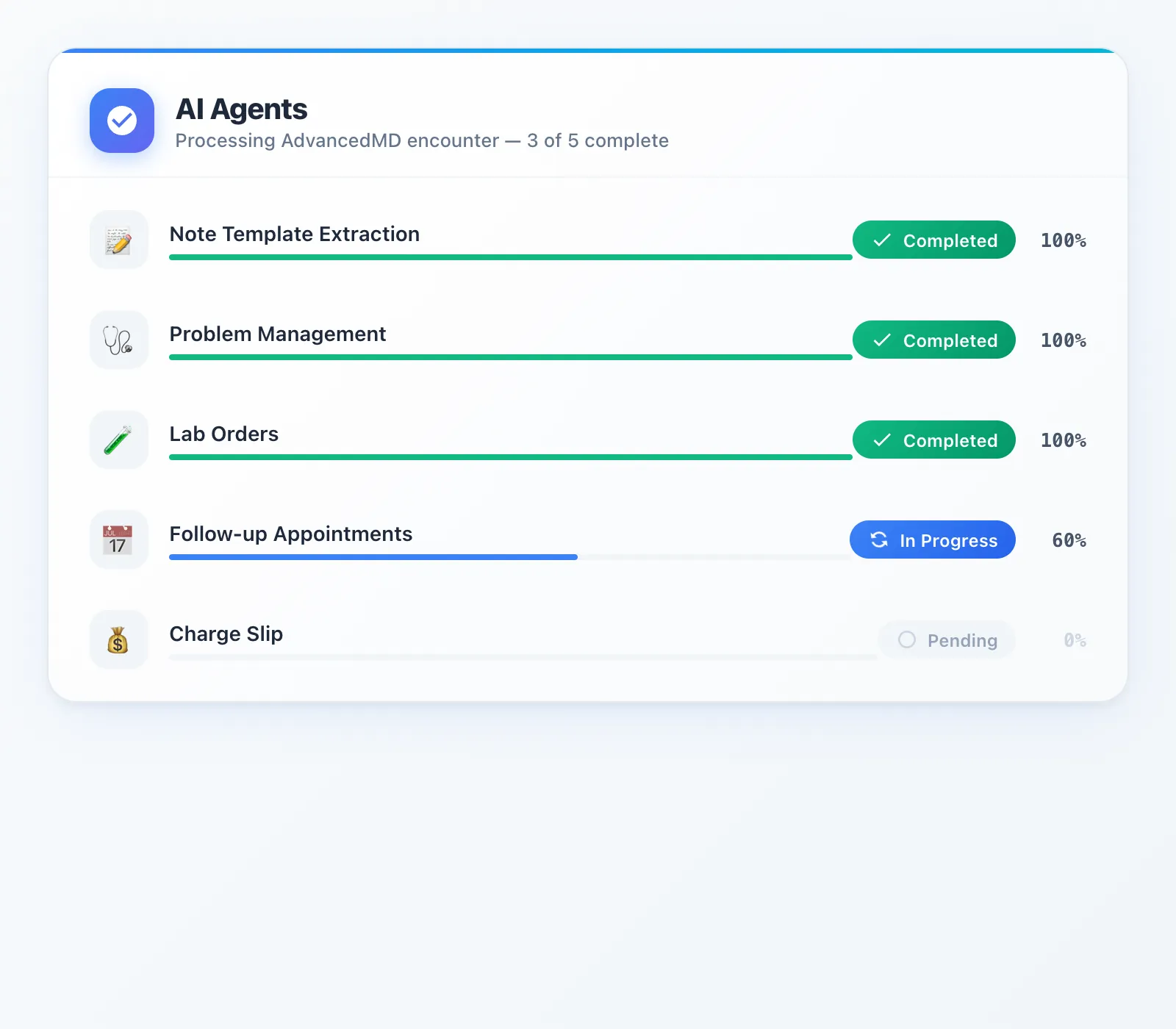
AdvancedMD launched its own AI Clinical Assistant in February 2026 — but it stops at note generation and suggestions. Most third-party scribes are even worse: just a note for you to copy-paste. DeepCura deploys specialized AI agents that handle the full encounter workflow and push structured data directly into AdvancedMD:
- Smart Note Templates — fills every field in your AdvancedMD template (text, dropdowns, checkboxes, dates)
- Diagnoses — extracts problems, maps to ICD-10, pushes to the problem list with status
- Charge Slips — CPT codes with linked diagnoses and E&M level review
- Lab Orders — routes to the correct lab company (Quest, LabCorp, etc.) with diagnosis justification
- Follow-ups — books the appointment in AdvancedMD's scheduler during the visit
At 20 patients a day, that is ~1,400 clicks eliminated — roughly 3-4 hours of data entry. Every practice using this integration has a 0% cancellation rate.
If you are searching for the best AI scribe for AdvancedMD, this guide covers exactly how each agent works, what other AI scribes cannot do, and how to evaluate whether a dedicated AdvancedMD AI scribe is worth the investment for your practice.
This guide was last updated in March 2026. All technical claims are based on DeepCura's production AdvancedMD integration (4,000+ lines of dedicated integration code across 5 workflow modules). AdvancedMD AI Clinical Assistant details are sourced from AdvancedMD's official February 2026 press release and product pages. Pricing reflects current publicly available information.
Watch: Full AdvancedMD Integration Demo
The whole workflow in about seven minutes: connecting AdvancedMD, an appointment syncing into DeepCura, a pre-chart built from the patient's AdvancedMD history, and one click that pushes the note template fields, ICD-10 diagnoses and CPT charge slip into AdvancedMD — then the same data opened inside AdvancedMD. To keep the demo short it pushes the pre-chart summary; a note from a recorded visit goes through the same Push to AdvancedMD step.

Why Finding the Best AI Scribe for AdvancedMD Is So Hard
In February 2026, AdvancedMD officially launched the AI Clinical Assistant as part of their Winter Product Release. CEO Amanda Sharp described it as helping "providers and their staff spend [less time] on tedious documentation and charting tasks." It is a meaningful first step — and the first time AdvancedMD has offered any built-in AI documentation tool. But it has significant limitations that leave most of the encounter workflow still manual.
What the AI Clinical Assistant does:
- Ambient listening and transcription — captures the patient conversation and generates a clinical note. Uses a medical dictionary to filter speech for relevancy and speaker changes.
- Action Items — analyzes the transcript and suggests problems, medical histories, allergies, medications, lab orders, chief complaint, reason for visit, and vitals for the provider to review.
- Pre-visit Summaries — pulls together notes, labs, medications, allergies, and risk factors before the appointment.
What it does not do:
- No charge slip or CPT billing automation. The provider still manually selects E&M levels, links diagnoses to CPT codes, and enters charges — typically 8-10 clicks per encounter.
- No referral creation. Referrals remain a fully manual workflow.
- No follow-up appointment booking. Scheduling is still a post-encounter handoff to the front desk.
- Suggests, does not write. Action Items are suggestions that the provider must review and individually accept. DeepCura writes structured data directly into the correct AdvancedMD fields with one-click confirmation.
- One regeneration limit. If the generated note is inaccurate or incomplete, you can regenerate it exactly once. After that, you are editing manually. DeepCura has no regeneration limit.
- Desktop and telehealth only. Mobile ambient listening is not available yet — AdvancedMD has stated mobile support is planned for mid-2026. Providers who see patients outside a desktop workstation cannot use it.
Early user feedback in AdvancedMD practitioner communities has been mixed. Members of the AdvancedMD User Group on Facebook have reported that the AI Clinical Assistant's note templates are very limited and that the tool is glitchy in practice. To respect the privacy of group members, we encourage readers to review the feedback firsthand in the group rather than quoting individual posts here.
The AI Clinical Assistant handles the note and suggests some clinical data — roughly 2 out of 5 workflow stages. It is a free built-in option, which matters. But for practices that want to automate the full encounter — from structured note template extraction through charge slip automation and follow-up booking — it covers approximately 40% of the opportunity.
DeepCura is the only AI scribe platform with direct AdvancedMD API write-back across all 5 workflow stages. It does not just generate a note and hand it off — it processes the encounter through 5 specialized AI agents, maps outputs to AdvancedMD's specific field structures (including template-based note formats, ICD-10 validated problem lists, and CPT-linked charge slips), and pushes everything directly into AdvancedMD. No copy-paste. No manual data entry. No switching between screens. For a detailed comparison of how other AI scribes handle EHR integration, see our Best AI Medical Scribes in 2026 ranking, our Freed AI review, and our Heidi Health review.
The 5 AI Agents
DeepCura's AdvancedMD integration uses a multi-agent architecture — 5 specialized AI agents that each handle one stage of the clinical workflow. Each agent runs with streaming server-sent events (SSE) for real-time output, and every agent includes validation and clinician confirmation before any data is written to the chart.
Here is what each agent does and why it matters for AdvancedMD users.
1. Smart Note Template Extraction
The Note Template agent is where DeepCura's AdvancedMD integration diverges most sharply from generic AI scribes. Rather than generating a free-text SOAP note that the clinician pastes into AdvancedMD, the agent maps the encounter transcript directly to AdvancedMD's native template fields.
AdvancedMD uses structured note templates with specific field types — text inputs, textareas, dropdowns, date fields, and checkboxes. The Note Template agent identifies each field in the provider's selected template, extracts the relevant information from the encounter transcript, and fills every field with the appropriate content. Dropdown fields are matched to valid options. Date fields are formatted correctly. Checkbox fields are set based on clinical context.
The agent also supports template favoriting, so providers can pin their most-used templates for one-click access. Unicode normalization ensures compatibility with AdvancedMD's character handling. The entire extraction process streams in real-time, showing field-by-field progress as the agent works through the template. One click pushes the completed template directly into the AdvancedMD encounter — saving 30 to 40 clicks compared to manual field entry.
2. Problem and Diagnosis Management
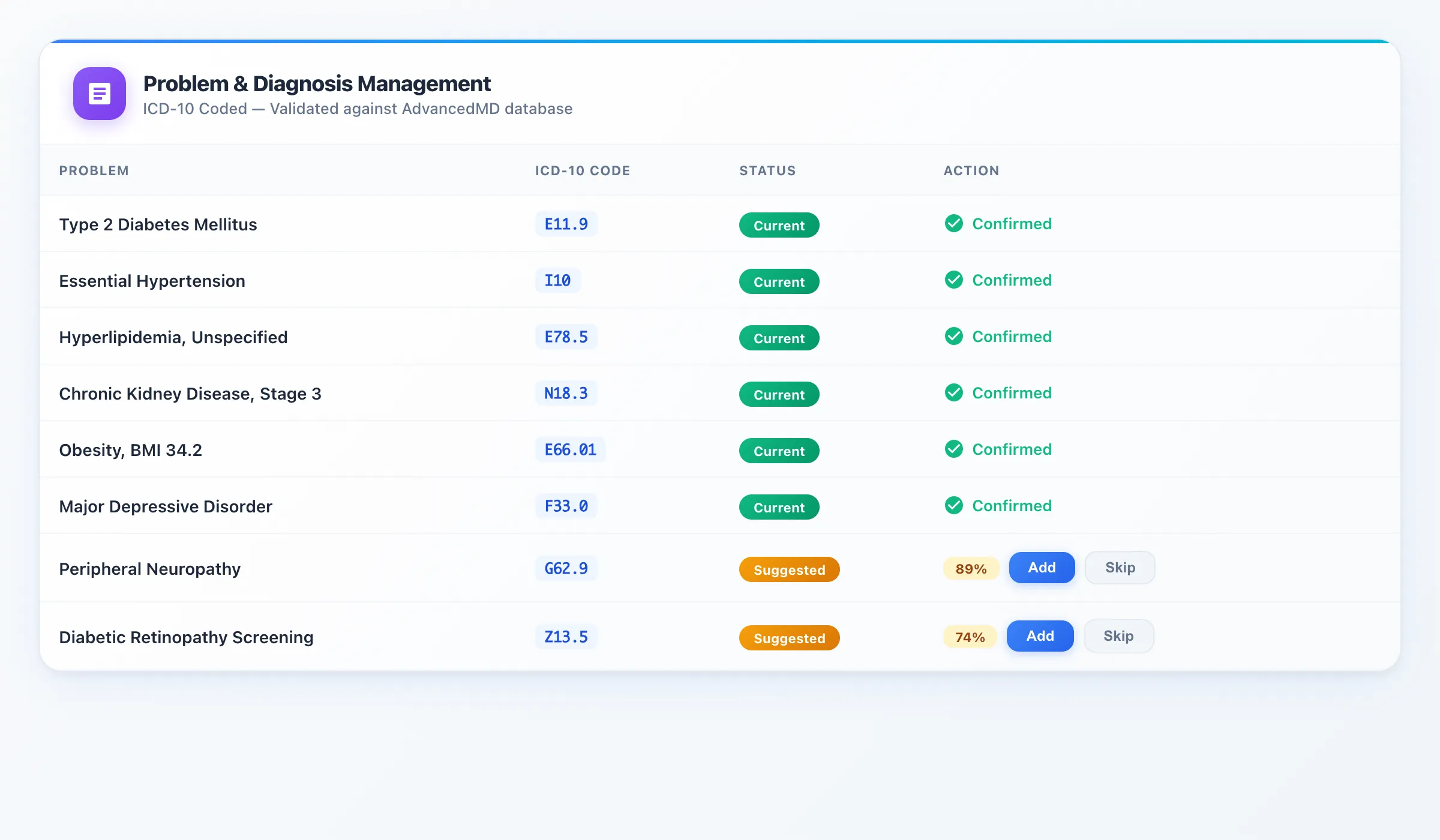
The Problem and Diagnosis agent extracts every clinical problem and diagnosis mentioned during the encounter and maps each one to ICD-10 codes. Before pushing anything to AdvancedMD, the agent validates each diagnosis against AdvancedMD's problem database to ensure code compatibility and avoid entry errors.
The agent also suggests additional diagnoses based on the patient's clinical context. For example, if a patient is on metformin and reports tingling in their feet, the agent will suggest Peripheral Neuropathy (G62.9) if it is not already on the problem list. Each suggestion includes a confidence score so the provider can make an informed decision — add it with one click or skip it.
AdvancedMD's problem list supports statuses including Current, Historical, and Chronic. The agent assigns appropriate statuses based on the encounter context. A single encounter can push 13 or more problems with one click — compared to the manual process of searching for each diagnosis, selecting the ICD-10 code, setting the status, and confirming entry. The agent also includes natural language ICD-10 search, so providers can find codes by describing the condition rather than memorizing code numbers.
3. Charge Slip and Billing Automation
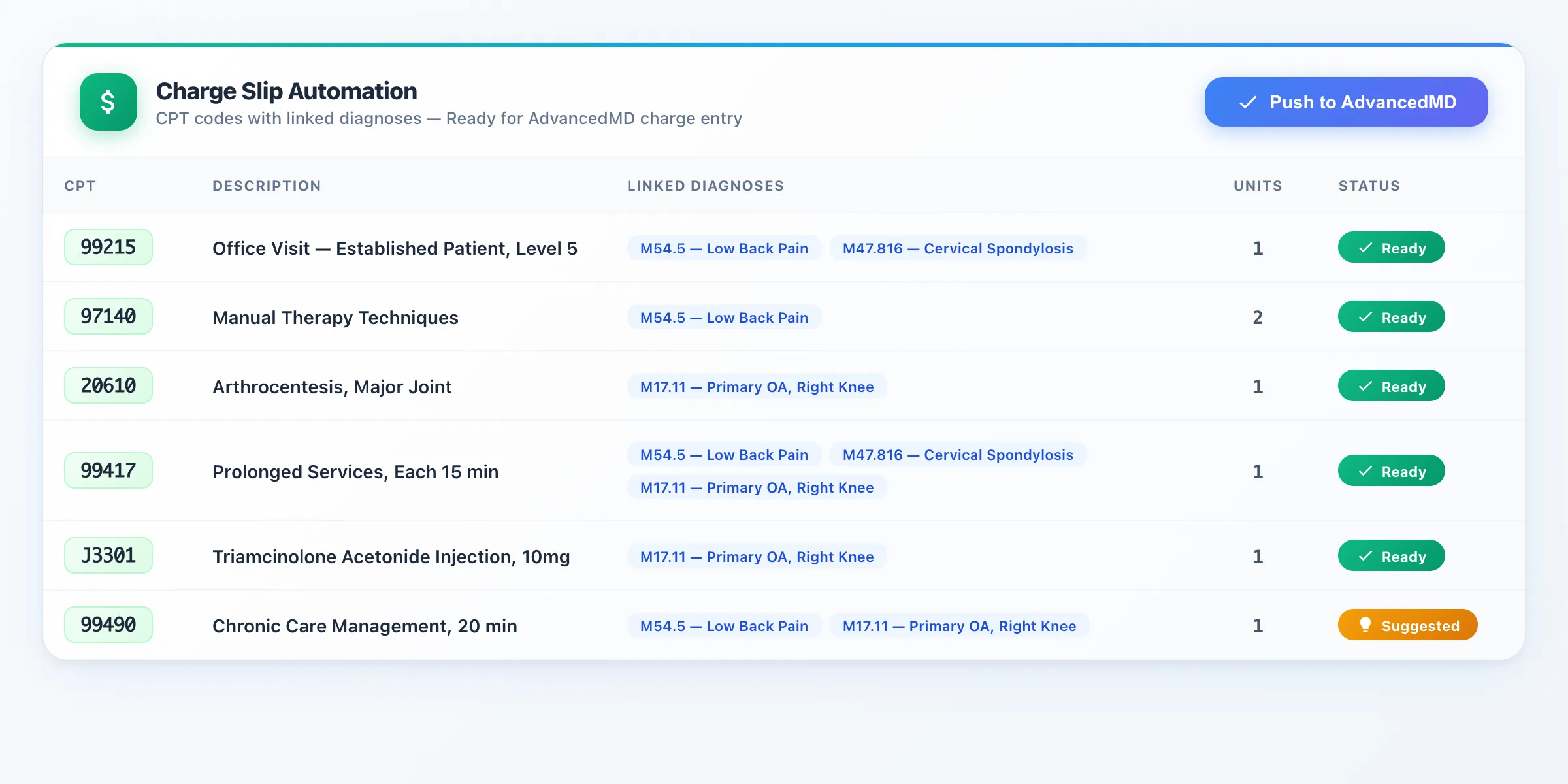
The Charge Slip agent analyzes the entire encounter — the note content, diagnoses, procedures performed, and time spent — and generates appropriate CPT codes with linked ICD-10 diagnosis codes. This is where DeepCura delivers some of the most impactful automation for AdvancedMD practices.
The agent reviews E&M level selection against the encounter documentation and flags when the documentation supports a higher level than what was initially selected. For example, if the encounter documentation supports a Level 5 E&M visit (99215) but the provider initially coded it as a Level 3 (99213), the agent highlights the discrepancy with a confidence score and explains the rationale — time-based criteria, medical decision-making complexity, or data reviewed. Each suggestion is clearly marked so providers can accept or decline with full transparency.
The agent also identifies chronic care management codes (99490), prolonged service codes (99417), and procedure-specific codes that are commonly missed. Every CPT code is linked to the appropriate ICD-10 diagnosis codes, and the complete charge slip is pushed directly to AdvancedMD's charge entry system. Ethical guardrails ensure that suggestions are always clinically justified — the agent never recommends codes that the documentation does not support.
AdvancedMD supports dual-mode payment and copay collection at the point of care. The Charge Slip agent integrates with this workflow, ensuring that charge information is available for immediate patient responsibility calculations.
4. Lab Order Management
The Lab Order agent extracts lab orders mentioned during the encounter and matches them to AdvancedMD's configured lab companies. This is more nuanced than it sounds — AdvancedMD practices often work with multiple lab companies (Quest, LabCorp, local reference labs), and each company has its own test catalog, order codes, and requisition requirements.
The agent identifies which lab company the practice uses for each test type, maps the order to the correct test catalog entry, and attaches the appropriate ICD-10 diagnosis code as clinical justification for each test. If a patient needs a CBC and the practice routes hematology to Quest but chemistry to LabCorp, the agent handles that routing automatically.
The agent also suggests additional relevant labs based on the clinical context. For a diabetic patient, it might suggest an HbA1c if one has not been ordered recently. Each suggestion includes a clinical rationale and can be accepted or declined with one click. Provider-specific questions — fasting requirements, specimen handling instructions — are pre-populated based on the order type.
5. Follow-up Appointment Booking
The Follow-up agent listens for scheduling intent during the encounter — "let's see you back in three months" or "schedule a follow-up in two weeks" — and extracts the timing. It then queries AdvancedMD's scheduling system for real-time slot availability, checks for scheduling conflicts and overlap, and presents available options.
The provider can confirm a slot with one click, and the appointment is booked directly in AdvancedMD's scheduler. No post-encounter handoff to the front desk, no phone calls, no scheduling delays. The agent also supports provider targeting — if the follow-up should be with a specific provider in the practice, the agent searches that provider's schedule specifically.
This eliminates the common workflow where the provider tells the patient to schedule at the front desk, the patient waits in line, the front desk searches for availability, and the appointment may or may not match what the provider intended. The agent handles it in real-time during the encounter.
How Many Clicks Does This Actually Save?
Based on measured workflows in production AdvancedMD environments, here is the click-by-click breakdown for a typical multi-problem encounter:
- Note template filling: 30-40 clicks (navigating template fields, typing content, selecting dropdowns, setting dates)
- Problem/diagnosis entry: 10-15 clicks (searching ICD-10 codes, selecting, confirming — per encounter with 13 problems)
- Charge slip creation: 8-10 clicks (CPT search, diagnosis linking, unit entry, charge confirmation)
- Lab order placement: 5-8 clicks per order (lab company selection, test search, diagnosis justification, requisition details)
- Follow-up appointment booking: 5-8 clicks (calendar navigation, slot search, conflict check, confirmation)
Total: 60-80 clicks saved per patient encounter.
At 20 patients per day, that is roughly 1,400 clicks — the equivalent of 3-4 hours spent on data entry rather than patient care. Over a year, that adds up to approximately 800 hours of administrative work that DeepCura automates away.
AdvancedMD AI Clinical Assistant vs DeepCura: Head-to-Head
If you are comparing every AdvancedMD AI scribe option available in 2026, this is the head-to-head breakdown.
| Capability | AI Clinical Assistant (Built-in) | DeepCura ($129/mo list) |
|---|---|---|
| Ambient AI Scribing | Yes | Yes |
| Note Generation | Yes (free-text) | Yes (template field matching) |
| Push Notes to AdvancedMD | Partial (suggestions to review) | Yes (direct per-field write-back) |
| Problem/Diagnosis Suggestions | Yes (suggested, manual accept) | Yes (ICD-10 validated, one-click push) |
| Allergy Suggestions | Yes (suggested) | Yes (direct chart push) |
| Medication Suggestions | Yes (suggested) | Yes (direct chart push) |
| Lab Order Suggestions | Yes (suggested) | Yes (multi-company routing, direct push) |
| Charge Slip / CPT Billing | No | Yes (CPT + E&M level review) |
| Referral Creation | No | Yes |
| Follow-up Booking | No | Yes (real-time availability) |
| Pre-visit Summaries | Yes | Yes |
| Mobile Support | No (planned mid-2026) | Yes |
| Regeneration Limit | 1 regeneration only | Re-generate as needed (each generation uses credits) |
| Workflow Automation Score | 2/5 | 5/5 |
The AI Clinical Assistant is a reasonable starting point — it is built into AdvancedMD at no additional cost and handles ambient scribing with clinical suggestions. But its action items are suggestions that require individual acceptance, it has no billing automation, no referral creation, no appointment booking, and it limits you to a single regeneration per note. For practices that want to automate the full encounter workflow and push structured data directly into AdvancedMD fields, DeepCura covers the remaining 60% that the AI Clinical Assistant leaves manual.
Pricing
DeepCura is priced at $129 per month per provider (list price; partner pricing may apply — see the pricing page) for 1,000 credits, which supports approximately 15-20 patient encounters per day for a typical primary care provider (a standard note costs 1 credit). All AI agents and full AdvancedMD bidirectional integration are included in the standard subscription — there is no separate charge for AdvancedMD connectivity.
A free trial is available with no credit card required. As one AdvancedMD provider noted during their onboarding: "You didn't even have to pay for the free trial."
Across all practices currently using DeepCura's AdvancedMD integration, the cancellation rate is 0%. Once practices see the full agent workflow in action, the value proposition is clear enough that no one has cancelled.
Start with a free trial to see every agent in action with your own AdvancedMD environment. No credit card required. Sign up at app.deepcura.com/register.
See pricing →$129/mo per provider · 1,000 credits/mo · 1 credit per standard note
Getting Started: Connect AdvancedMD in 3 Steps
Getting DeepCura connected to your AdvancedMD instance takes under 5 minutes:
- Sign up at app.deepcura.com/register — free trial, no credit card required.
- Navigate to Settings > EHR in the DeepCura dashboard and select "AdvancedMD" as your EHR system.
- Enter your AdvancedMD credentials — username, password, and office key. DeepCura establishes the API connection and verifies access to your AdvancedMD environment.
That is it. No IT department needed, no multi-week implementation, no AdvancedMD support tickets. The integration uses AdvancedMD's standard APIs, and DeepCura handles all of the authentication and connection management behind the scenes.
Who Is This For?
DeepCura's AdvancedMD integration is the strongest fit for these practice profiles:
- Independent practices on AdvancedMD who spend 2+ hours per day on documentation and data entry beyond the clinical encounter itself.
- Multi-provider offices where consistency in documentation, coding, and order entry across providers is a priority. The AI agents enforce consistent workflows regardless of individual provider habits.
- Practices that want billing at the point of care rather than sending encounters to a billing team after the fact. The Charge Slip agent generates CPT codes in real-time during the encounter, reducing claim lag and denial rates.
- Clinicians who have tried AdvancedMD's AI Clinical Assistant and found that it handles the note and suggests some action items, but leaves charge slips, referrals, and scheduling completely manual — and limits note regeneration to once.
- Practices processing high lab order volumes where the manual lab ordering workflow in AdvancedMD consumes significant provider time.
- Psychiatry practices charting on their own AdvancedMD note template — DeepCura fills only the fields it has content for (MSE, risk, A&P) and never blanks intake carry-forward; details in the psychiatry AI scribe guide.
For providers using other EHR systems, DeepCura also integrates with athenahealth, Epic, eClinicalWorks, OptiMantra, DrChrono, CharmHealth, and Cerner. For athenahealth users specifically, see our athenahealth AI Scribe guide which covers the AI agents available for that platform. For eClinicalWorks users, see our eClinicalWorks AI Scribe guide covering the AI agents with FHIR R4 write-back. For international and multilingual practices evaluating alternatives, see our Heidi Health review. For a broader look at AI tools for clinical practice, see our guides to the Best ChatGPT for Doctors and the Best AI Medical Receptionist.
See DeepCura in Action
Watch the full platform demo to see how DeepCura handles ambient scribing, AI chat, patient management, and EHR integration across all supported systems.

Frequently Asked Questions
Does DeepCura integrate with AdvancedMD?
Yes. DeepCura has a full bidirectional integration with AdvancedMD — over 4,000 lines of dedicated integration code covering notes, diagnoses, charge slips, lab orders, and follow-up scheduling. Data flows both directions: DeepCura reads patient context from AdvancedMD and writes structured clinical data back into the appropriate AdvancedMD fields. This is not a copy-paste integration — it is direct API write-back into AdvancedMD's native data structures.
What is the best AI scribe for AdvancedMD?
For practices that want automation beyond basic ambient scribing, DeepCura is the most comprehensive AI scribe for AdvancedMD. It is the only platform with 5 specialized AI agents that cover the full encounter workflow — from note template extraction through charge slip automation and appointment booking — with direct AdvancedMD write-back. AdvancedMD launched its own AI Clinical Assistant in February 2026, which handles ambient scribing and suggests action items (problems, allergies, medications, lab orders), but it does not automate billing, referrals, or scheduling, and its suggestions require individual manual acceptance rather than one-click push. For a full comparison of AI scribes, see our Best AI Medical Scribes in 2026 ranking.
How much does DeepCura cost for AdvancedMD users?
DeepCura costs $129 per month per provider (list price; partner pricing may apply — see the pricing page) for 1,000 credits, which supports approximately 15-20 patients per day for a typical primary care provider (a standard note costs 1 credit). There is no separate charge for the AdvancedMD integration — all AI agents and full bidirectional write-back are included in the standard subscription. A free trial is available with no credit card required.
Can DeepCura push notes directly into AdvancedMD?
Yes. DeepCura pushes notes into AdvancedMD using template field matching — each field in the provider's AdvancedMD note template (text, textarea, dropdown, date, checkbox) is filled with the relevant content extracted from the encounter. This preserves AdvancedMD's native template structure and works with any note template the provider has configured. It is not a single text dump into a free-text field.
Does DeepCura handle billing codes for AdvancedMD?
Yes. The Charge Slip agent analyzes the encounter content, diagnoses, and procedures to generate appropriate CPT codes with linked ICD-10 diagnosis codes. It reviews E&M level selection against the documentation and flags when a higher level is supported, with confidence levels and ethical guardrails. The complete charge slip is pushed directly to AdvancedMD's charge entry system. This replaces the manual billing workflow that typically requires 8-10 clicks per encounter.
How does DeepCura compare to Freed AI for AdvancedMD?
Freed AI is an ambient-only AI scribe that does not integrate with AdvancedMD beyond copy-paste workflows. It generates notes from encounter audio, but the clinician must manually copy the note into AdvancedMD and handle all downstream tasks (diagnoses, charge slips, lab orders, scheduling) manually. DeepCura automates all of these steps with direct AdvancedMD write-back across 5 workflow stages. For a detailed comparison, see our Freed AI review.
Is AdvancedMD's AI Clinical Assistant good enough?
AdvancedMD launched the AI Clinical Assistant in February 2026, and it is a meaningful first step — ambient listening with a medical dictionary, transcript-based action item suggestions for problems, allergies, medications, and lab orders, plus pre-visit summaries. However, it has notable limitations: action items are suggestions that require individual manual acceptance (not direct chart push), notes can only be regenerated once, mobile support is not yet available (planned mid-2026), and there is no charge slip automation, referral creation, or follow-up appointment booking. For practices that only need basic ambient scribing, the AI Clinical Assistant may be sufficient. For practices that want to automate the full encounter workflow — including billing, referrals, and scheduling — a dedicated integration like DeepCura covers the gaps.
Is DeepCura HIPAA compliant?
Yes. DeepCura is fully HIPAA compliant and provides a Business Associate Agreement (BAA) to all covered entities. All data — including encounter audio, generated notes, and AdvancedMD API communications — is encrypted in transit (TLS 1.2+) and at rest (AES-256). The platform maintains SOC 2-aligned security practices and undergoes regular security assessments. By default, visit audio is kept with the encounter, so every AI-suggested chart update links to the exact second it was said.
Can DeepCura automate charge slips in AdvancedMD?
Yes. The Charge Slip agent is one of DeepCura's most impactful automation features for AdvancedMD. It extracts CPT codes from the encounter, links them to ICD-10 diagnoses, reviews E&M level selection against the documentation, and pushes the complete charge slip directly into AdvancedMD. It handles E&M level evaluation, chronic care management codes, prolonged service codes, and procedure-specific billing — all validated against the encounter documentation with ethical guardrails.
Final Verdict
AdvancedMD's AI Clinical Assistant — launched in February 2026 — is a solid starting point. It handles ambient scribing and suggests clinical action items (problems, allergies, medications, lab orders) at no extra cost. For practices that only need basic AI documentation, it may be sufficient.
But the AI Clinical Assistant covers roughly 40% of the encounter workflow. It does not automate charge slips, referrals, or follow-up scheduling. Its action items are suggestions that require individual manual acceptance — not structured data pushed directly into AdvancedMD fields. Notes can only be regenerated once. And mobile support is not yet available.
DeepCura fills the remaining 60% — making it the best AI scribe for AdvancedMD in 2026. Specialized AI agents handle every stage from template-matched note extraction through charge slip automation and follow-up booking, with direct bidirectional AdvancedMD write-back that eliminates manual data entry. At $129/month list, it automates 5x more of the workflow and saves at least 60 clicks per patient encounter.
If you are running your practice on AdvancedMD and spending hours per day on documentation and data entry, the math is straightforward. Start a free trial and see every agent in action with your own AdvancedMD environment.
For more on AI-powered clinical documentation, explore our AI Medical Scribe platform overview and our Best AI Medical Scribes in 2026 comprehensive comparison.
References
[1] AdvancedMD, "Cloud-Based EHR, Practice Management, and Medical Billing," AdvancedMD.com. advancedmd.com
[2] AdvancedMD, "Advanced Artificial Intelligence Solutions," AdvancedMD.com. advancedmd.com/ai
[3] AdvancedMD, "AI Clinical Assistant From AdvancedMD: AI Innovation To Help Healthcare Providers Prioritize Patient Care Over Paperwork," AdvancedMD Blog, December 2025. advancedmd.com/blog/ai-clinical-assistant
[4] BusinessWire, "AdvancedMD Rolls Out AI-Enabled Solutions to Streamline Documentation Tasks and Create More Efficient Workflows," February 19, 2026. businesswire.com
[5] World Health Organization, "International Classification of Diseases, Tenth Revision (ICD-10)," WHO. who.int/classifications/icd
[6] American Medical Association, "CPT — Current Procedural Terminology," AMA-assn.org. ama-assn.org/practice-management/cpt
[7] Centers for Medicare & Medicaid Services, "Evaluation and Management (E/M) Visit Coding Guidelines," CMS.gov. cms.gov/medicare/payment/physician-fee-schedule/evaluation-and-management
[8] U.S. Department of Health and Human Services, "HIPAA for Professionals," HHS.gov. hhs.gov/hipaa/for-professionals
[9] DeepCura, "AI Medical Scribe Platform — Ambient Scribing, AI Receptionist, EHR Integration," DeepCura.com. deepcura.com
[10] Freed AI, "AI Medical Scribe — Ambient Clinical Documentation," Freed.ai. getfreed.ai
[11] Nuance Communications, "Dragon Ambient eXperience (DAX) Copilot," Nuance.com. nuance.com