
AI agents that write back into athenaOne. 100 clicks saved per patient. 2,000 fewer clicks per day. That is what happens when you turn athenahealth into a full AI-powered EHR.
Most AI scribes listen to your encounter and hand you a note to copy-paste. That is one step. DeepCura deploys specialized AI agents that handle the entire encounter workflow — and write everything directly back into athenaOne:
- Patient History — pulls and summarizes the full chart before you walk in
- AI Scribe — ambient note generation, pushed per-section into athenahealth
- Diagnoses — extracts problems, maps to SNOMED + ICD-10, pushes to the chart
- Allergies — captures allergens with severity, validates against athenahealth's database
- Orders — labs, imaging, DME, vaccines, medications — placed directly in athenahealth
- Billing — CPT codes with linked diagnoses, pushed to the charge slip
- Referrals — specialist search, clinical justification, authorization — all automated
- Follow-ups — books the appointment in athenahealth's scheduler during the visit
At 20 patients a day, that is ~2,000 clicks eliminated — roughly 5-6 hours of data entry, gone. And in 2026 the work starts before the visit: DeepCura mirrors your athenaOne schedule onto its own calendar and writes a cited AI brief for every appointment overnight.
If you are searching for the best AI scribe for athenahealth, this guide covers how each agent works, what athenahealth's own athenaAmbient and Ambient Notes do and do not do now that athenaAmbient is generally available, and how to decide whether a dedicated AI scribe for athenaOne is worth it for your practice.
Updated August 15, 2026. This guide reflects athenahealth's August 2026 general release of athenaAmbient, the current DeepCura athenaOne schedule mirror and Prechart lens, and current pricing. Technical claims are based on DeepCura's production athenahealth integration (6,700+ lines of integration code) and DeepCura's live listing on the athenahealth Marketplace.
Watch: Full athenahealth Integration Demo
See the AI agents working inside an athenahealth encounter — from patient history pull through follow-up booking — in under 10 minutes.
Heads-up: this walkthrough was recorded on an older version of DeepCura. The workflow — pull history, scribe, push structured data into athenaOne — is unchanged, but we modernized the entire interface in 2026. The screenshots further down show the current scheduling workspace, the chart, and the athenahealth push flow as they look today.
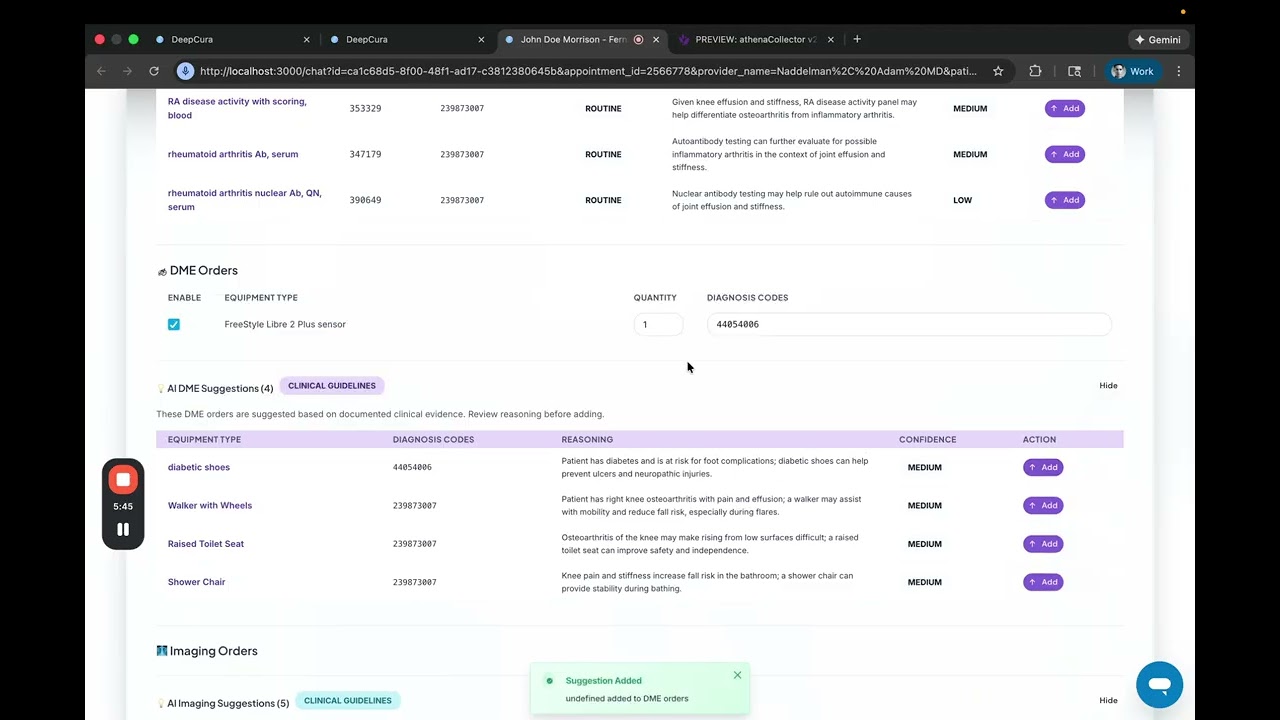
AI Pre-Charting — Your athenaOne Day, Briefed Before You Walk In
Most AI scribes help you after the encounter. DeepCura helps you before it starts — for your whole day, not one patient at a time.
Your athenaOne Schedule, Mirrored Automatically
Connect athenahealth and your appointment book copies itself onto DeepCura's scheduling workspace all day long — refreshed continuously, merged with any DeepCura-native and Google Calendar bookings, and every appointment marked with its source. Cancellations in athenaOne cancel the mirrored copy; completed visits and no-shows are preserved so your day's history stays intact. Every athena appointment carries a Start visit button that drops you straight into the AI scribe with the right patient loaded.
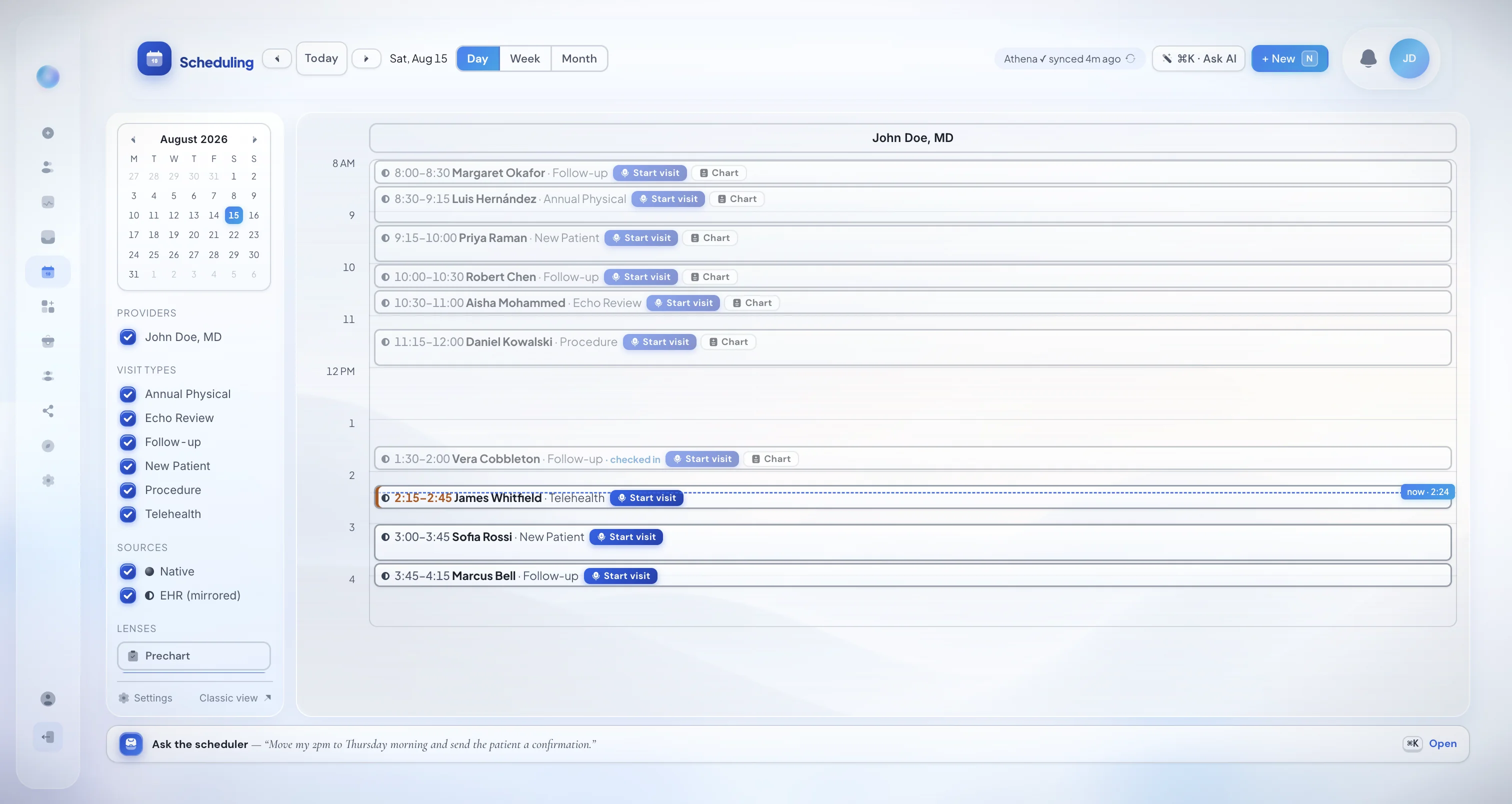
The Prechart Lens — A Cited AI Brief for Every Visit
Switch to the Prechart lens and your day becomes a prepped worklist: one card per visit with a tight AI brief — why the patient is here, what changed since the last visit, what needs your eye. Every line cites the exact chart evidence behind it — tap the chip at the end of a bullet to see the source and its verification tier (clinician-confirmed, EHR-imported, AI-extracted, patient-reported). A claim without a chart source simply does not get written.
Behind each brief, DeepCura consolidates the patient's athenahealth record — problems, medications, allergies, results, encounter notes from the C-CDA export — into their DeepCura chart. Everything imported is labeled "EHR record" with its source attached, and anything that contradicts what you have already confirmed is staged for your decision. Nothing silently overwrites your chart.
Run Prechart now for the whole day in one click — the button shows the live price (1 credit per stale or missing brief; fresh cards cost nothing), and unchanged charts are never re-composed or re-charged.
Scribe-Ready, With the Whole Picture in Context
Hit Start visit on any appointment: the chart opens ready to record, today's visit is checked in automatically, and completing the session marks the appointment done. The payoff — the AI scribe writes with everything you just consolidated in context: the athenaOne problems, meds, allergies and results, plus the history summary. Notes come out grounded in the full record, not just what was said in the room.
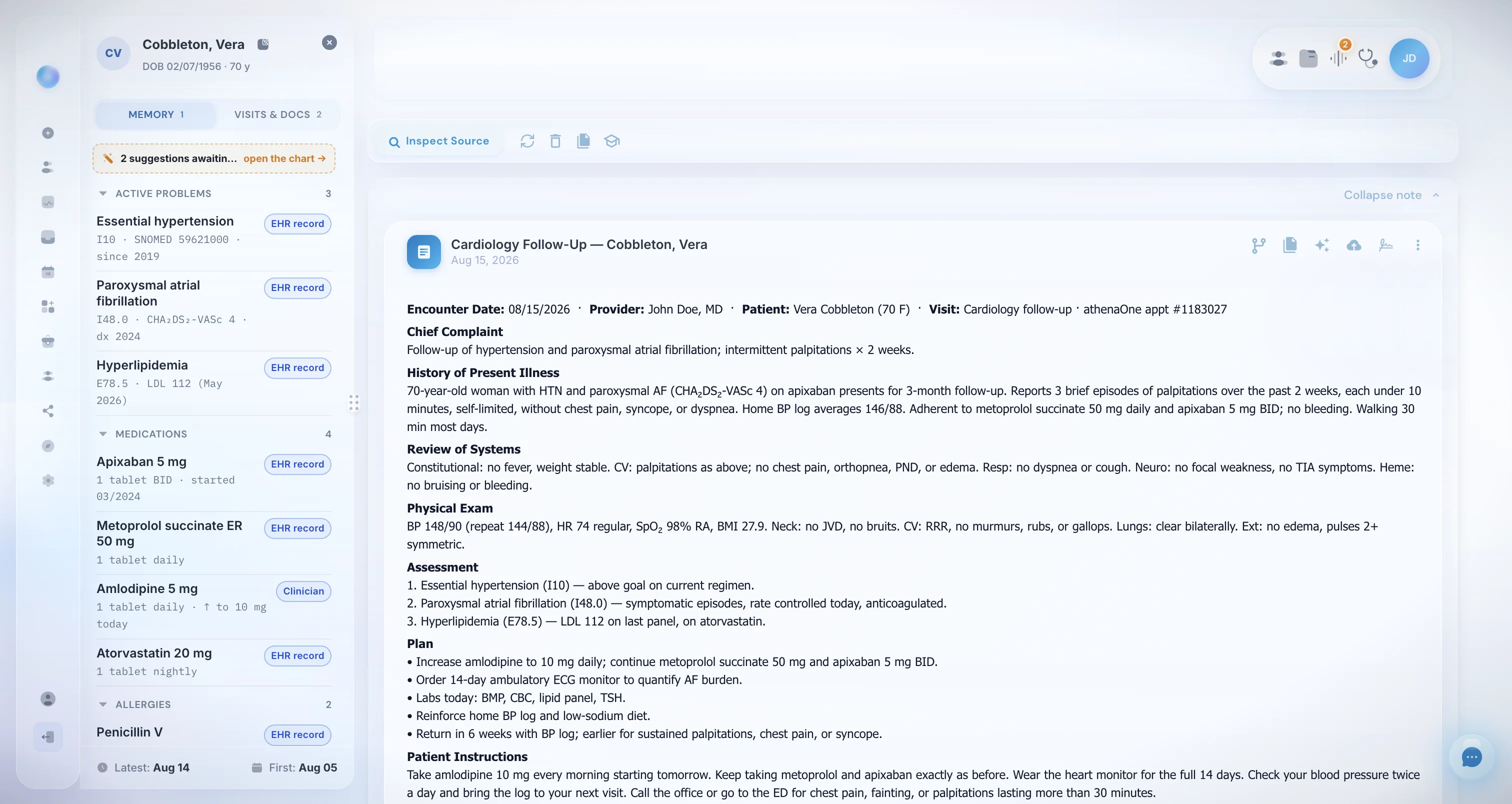
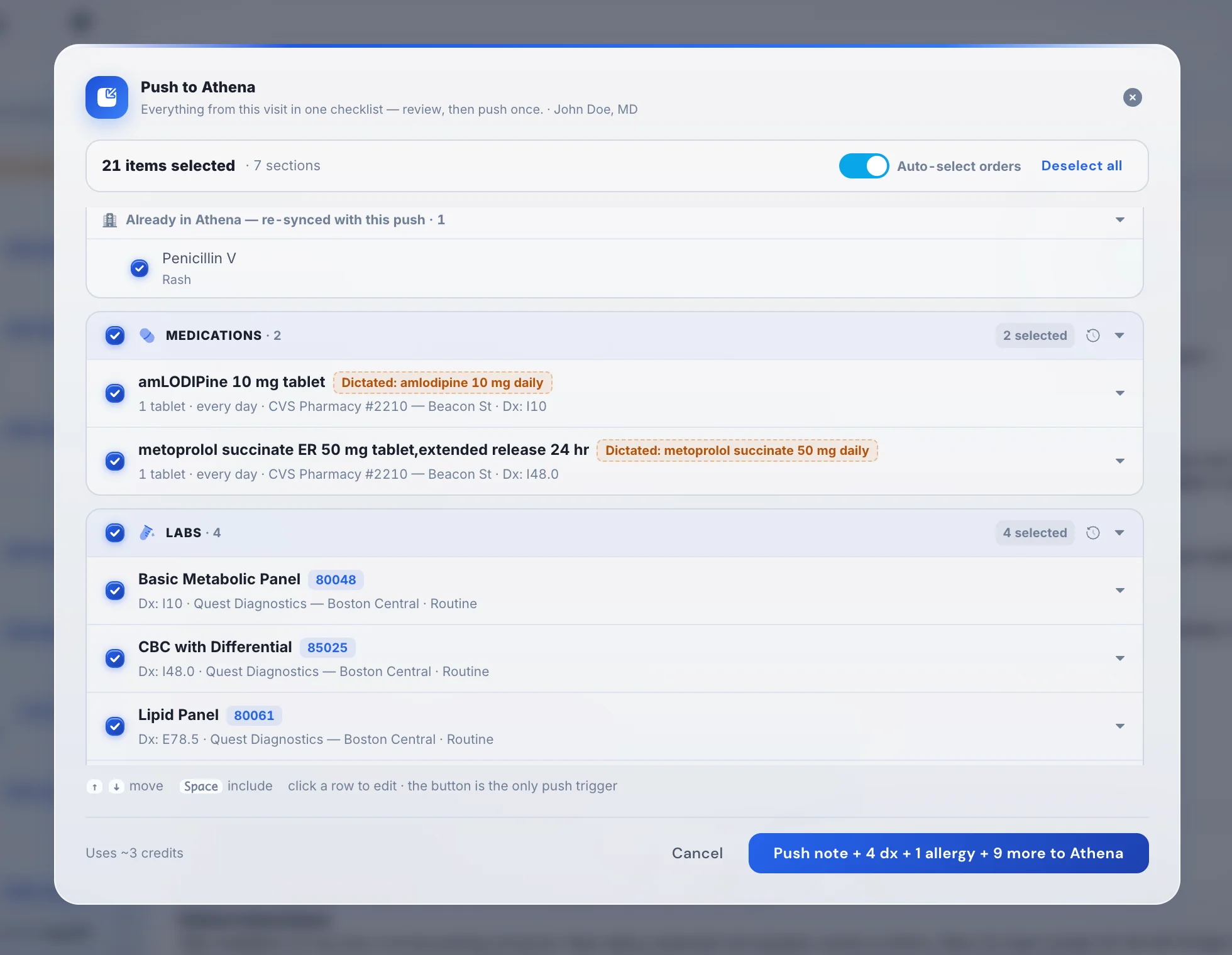
When the note is done, one push modal shows exactly what will be written into athenaOne — the note sections, coded diagnoses, allergies, orders, and charges — each waiting for your confirmation before anything is written:
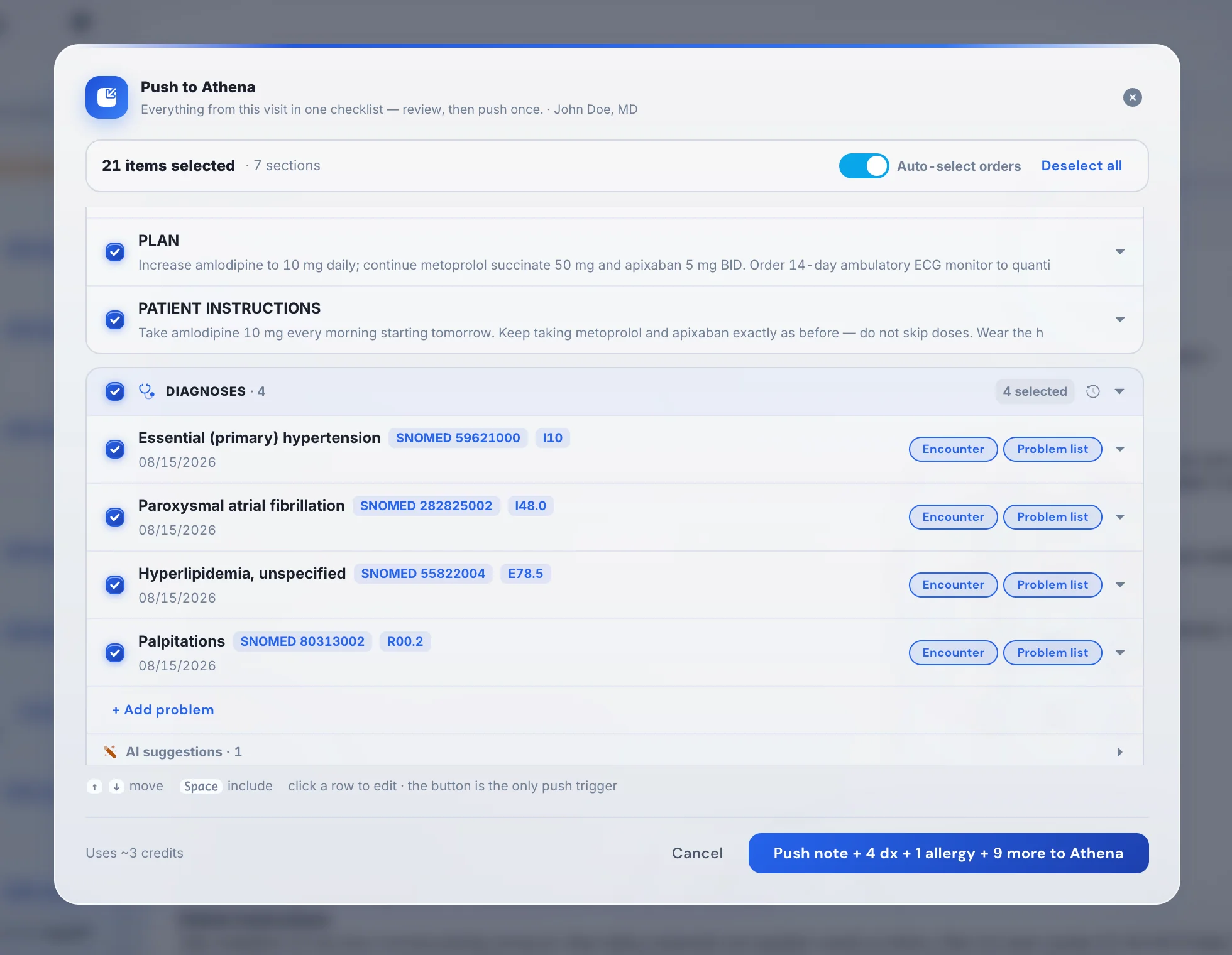
Further down the same checklist, every order is already grounded against athenaOne's own catalogs — medications matched to the exact athenaOne drug entry (with the dictated phrase kept beside it), labs with CPT codes, linked diagnoses and the ordering facility, the imaging order, CPT charges with linked ICD-10 codes, and the follow-up slot picker:
Why Finding the Best AI Scribe for athenahealth Is So Hard
The typical AI medical scribe workflow with athenahealth looks like this: the scribe listens to the encounter, generates a SOAP note, and the clinician copies it into athenahealth. That is essentially a voice-to-text tool with a clipboard. It saves time on the note itself, but it does nothing for the 80% of the encounter workflow that happens after the note is written — diagnoses, allergies, orders, billing, referrals, and scheduling.
athenahealth's answer to this has been evolving quickly, and it now comes in two flavors that get confused constantly:
- Ambient Notes — athenahealth's embedded ambient documentation program inside athenaOne. You pick from multiple third-party ambient models (Abridge, Suki and iScribe have all shipped through the athenahealth Marketplace), each priced by its vendor. It generates the clinical note and drops a note summary into the encounter.
- athenaAmbient — athenahealth's own first-party ambient scribe, generally available across athenaOne since August 2026 and included in the athenaOne subscription at no additional cost. It drafts the clinical note, infers potential diagnoses, recommends order types, and flags care gaps in real time — on desktop and mobile.
Both are real progress. But both stop at the edge of the encounter note: neither manages allergies, generates CPT charges with linked diagnoses, creates referrals, or books the follow-up — and neither exists outside athenaOne. For a platform that already has robust APIs for all of these functions, most of the automation opportunity is still on the table.
DeepCura is the only AI scribe platform with full bidirectional athenahealth API write-back across all eight workflow stages, delivered as an athenahealth Marketplace app (DeepCura AI Agent — used by 55 practices, rated 4.8/5, athenahealth partner since 2024). It reads patient context from athenahealth, processes the encounter through 8 specialized AI agents, validates every output against athenahealth's own databases, and pushes structured data directly into the correct athenahealth fields. No copy-paste. No manual data entry. No switching between screens. For how other AI scribes handle EHR integration, see our Best AI Medical Scribes in 2026 ranking, our Freed AI review, and our Heidi Health review.
The 8 AI Agents
DeepCura's athenahealth integration uses a multi-agent architecture — 8 specialized AI agents that each handle one stage of the clinical workflow. Each agent streams its output in real time (server-sent events), and every agent runs a 3-stage validation pipeline: AI extraction, database cross-reference against athenahealth, and clinician confirmation before any data is written to the chart.
Here is what each agent does and why it matters for athenahealth users.
1. Patient History Summarization
Before the encounter begins, the Patient History agent pulls the patient's complete clinical record from athenahealth via C-CDA (Consolidated Clinical Document Architecture). It processes 44 filterable categories of clinical data — medications, allergies, problems, vitals, immunizations, lab results, procedures, referrals, and more — and generates a concise clinical summary that the provider can review in seconds rather than spending 3-5 minutes clicking through athenahealth chart tabs.
This is not a generic patient summary. The agent organizes information by clinical relevance, highlights active problems and recent changes, and flags potential interactions. The provider walks into the encounter with full context, not a blank slate — and with the Prechart lens, this happens for the whole day before clinic opens.
2. AI Scribe
The AI Scribe agent captures the ambient encounter audio and generates a comprehensive clinical note with 12 structured SOAP fields — chief complaint, history of present illness, review of systems, past medical history, physical exam, assessment, plan, patient instructions, and more. Each field is formatted in rich HTML that matches athenahealth's native note structure.
What makes this different from other AI scribes: DeepCura pushes notes to athenahealth on a per-section basis. Rather than dumping the entire note into a single text field, each SOAP section writes to the corresponding athenahealth note section. This preserves athenahealth's native formatting, works with athenahealth's built-in note templates, and allows the provider to review and edit individual sections without disrupting the rest of the note.
3. Problem and Diagnosis Management
The Problem and Diagnosis agent extracts every clinical problem and diagnosis mentioned during the encounter and maps each one to both SNOMED CT and ICD-10 codes. Before pushing anything to athenahealth, the agent validates each diagnosis against athenahealth's own problem database to ensure code compatibility and avoid entry errors — and it pushes to both the patient's problem list and the encounter's diagnosis boxes.
The agent also suggests additional diagnoses based on the patient's current medication list, lab results, and clinical context. For example, if a patient is on metformin and their most recent HbA1c is 7.8%, the agent will suggest Type 2 Diabetes (E11.9) if it is not already on the problem list. Each suggestion includes a confidence score so the provider can make an informed decision.
4. Allergy Management
The Allergy agent extracts every allergen mentioned during the encounter — medications, foods, environmental factors — along with severity levels and reaction types. Each allergen is mapped to SNOMED codes and validated against athenahealth's allergen database before being pushed to the chart.
This is critical for patient safety. Manual allergy entry in athenahealth is error-prone — clinicians often enter free-text descriptions that do not trigger drug interaction alerts. By mapping allergens to standardized codes and validating against athenahealth's database, the agent ensures that every allergy entry works with athenahealth's built-in clinical decision support and drug interaction checking.
5. Orders and Medications
The Orders agent handles five distinct order types: Lab Orders, Imaging Orders, DME (Durable Medical Equipment), Vaccines, and Medication prescriptions. For each order mentioned during the encounter, the agent extracts the specific test, study, or medication, adds relevant clinical details (laterality for imaging, dosage for medications), and pushes the order directly into athenahealth's order entry system.
Each order includes a confidence score based on the clinical context. A clearly stated "let's get a CBC and lipid panel" gets a high confidence score and is ready for one-click confirmation. A tentative "we might want to consider an MRI" gets a lower score and is flagged for provider review. This eliminates the manual process of navigating athenahealth's order entry screens, searching for each order, and filling in order-specific fields — typically 8-12 clicks per order.
6. Billing Automation
The Billing agent analyzes the entire encounter — the note content, diagnoses, procedures performed, and time spent — and generates appropriate CPT codes with linked ICD-10 diagnosis codes. The agent considers E&M level guidelines, evaluates medical decision-making complexity, and pushes the complete billing entry directly to athenahealth's charge slip.
For a typical office visit, this replaces the manual process of selecting the E&M level, linking diagnoses to the visit code, adding procedure codes for any ancillary services, and verifying that the documentation supports the billed level. That workflow alone takes 15-20 clicks in athenahealth. The Billing agent reduces it to a single confirmation.
7. Referral Creation
The Referral agent extracts referral information from the encounter — the target specialty, urgency level, reason for referral, and any relevant clinical context. It then searches athenahealth's provider directory for appropriate specialists, creates the referral record with all required fields, and initiates the authorization process if applicable.
Referrals are one of the most time-consuming manual processes in athenahealth, requiring the clinician to navigate to the referral module, search for a specialist, fill in clinical justification, attach relevant documents, and submit for authorization. The agent automates the entire workflow from a single mention of "let's get a cardiology referral" during the encounter.
8. Follow-up Appointment Booking
The Follow-up agent listens for scheduling intent during the encounter — "let's see you back in three months" or "schedule a follow-up in two weeks" — extracts the timing, searches athenahealth's appointment slots for availability, and books the appointment directly in athenahealth's scheduling system.
This eliminates the post-encounter handoff where the provider tells the patient to schedule at the front desk, the patient waits in line, the front desk searches for availability, and the appointment may or may not match what the provider intended. The agent handles it in real-time during the encounter — and because DeepCura mirrors the athenaOne schedule, the new slot shows up on your DeepCura calendar too.
Bonus: Patient Education Handouts
Beyond the 8 core agents, DeepCura also recommends patient education materials from athenahealth's built-in education library based on the diagnoses and conditions discussed during the encounter. The provider can review and print handouts with a single click — no manual searching through athenahealth's education catalog.
Multiplayer Mode: Team-Based Clinical Workflows
Because the athenaOne schedule lives in a shared DeepCura workspace, the whole care team works from the same mirrored day. MAs and nurses can see the physician's athenahealth schedule, prep charts, and start the ambient recording; the physician reviews and pushes. Every action lands on one shared timeline, so nobody re-enters what a teammate already captured — and everything still writes back into athenaOne under the right patient and encounter.
athenaAmbient vs Ambient Notes vs DeepCura: Head-to-Head
If you are comparing every athenahealth AI scribe option available in 2026, this is the head-to-head breakdown.
| Capability | athenaAmbient (included in athenaOne) | Ambient Notes (3rd-party models, vendor-priced) | DeepCura ($129/mo list · ~$99 athenahealth partner price) |
|---|---|---|---|
| Ambient AI Scribing | Yes | Yes | Yes |
| SOAP Note Generation | Yes | Yes | Yes (12 fields, rich HTML) |
| Push Notes into athenaOne | Yes | Yes (note summary) | Yes (per-section write-back) |
| Diagnosis Handling | Infers potential diagnoses | Varies by model | SNOMED + ICD-10, validated, pushed to problem list + encounter |
| Order Entry | Recommends order types | Varies by model | 5 order types placed (lab, imaging, DME, vaccines, meds) |
| Whole-Day Pre-Visit Briefs | Problem-Based Summaries (separate athenaOne feature) | No | Yes — cited Prechart brief per visit |
| Schedule Mirror Outside athenaOne | n/a (lives inside athenaOne) | No | Yes (athena + Google + DeepCura on one calendar) |
| Allergy Management | No | No | Yes |
| CPT Billing Automation | No | No | Yes |
| Referral Creation | No | No | Yes |
| Follow-up Booking | No | No | Yes |
| Patient Handouts | No | No | Yes |
| AI Receptionist, AI Fax, Intake, Team Messaging | No | No | Yes (included) |
| Works Across Multiple EHRs | No | No | Yes (athena, eCW, Epic, AdvancedMD, more) |
| Stages of the 8-agent workflow covered | 3 of 8 (notes, diagnoses, order suggestions) | 1-2 of 8 | 8 of 8 |
| Price | Included in athenaOne subscription | Set by each vendor | $129/month per provider list (1,000 credits) — 22.5% athenahealth partnership discount brings it to about $99/month |
athenaAmbient is a genuinely good starting point now — it is free, it is native, and after its August 2026 general release it goes beyond the note into diagnosis and order suggestions. Ambient Notes gives you a choice of best-of-breed note engines. But for practices that want to automate the full encounter — allergies, billing, referrals, follow-ups, plus the pre-visit work for the whole day — the native options still cover a minority of the workflow.
How Many Clicks Does This Actually Save?
We measured the manual click count for a typical primary care encounter in athenahealth across every workflow stage:
- Patient history review: 12-15 clicks (navigating chart tabs, expanding sections)
- Note documentation: 20-25 clicks (section navigation, field entry, template selection)
- Problem/diagnosis entry: 8-10 clicks (search, select, confirm per diagnosis)
- Allergy updates: 5-8 clicks per allergen
- Order entry: 8-12 clicks per order (search, select, fill details, sign)
- Billing/coding: 15-20 clicks (E&M selection, diagnosis linking, charge entry)
- Referral creation: 15-20 clicks (provider search, clinical details, authorization)
- Follow-up scheduling: 8-12 clicks (calendar navigation, slot selection, confirmation)
Total: approximately 90-110 clicks per patient encounter.
At 20 patients per day, that is roughly 2,000 clicks — the equivalent of 5-6 hours spent on data entry rather than patient care. Over a year, that adds up to approximately 1,200 hours of administrative work.
At an average physician compensation rate of $300/hour, those 1,200 hours represent $360,000 in annual opportunity cost. Even recovering 50% of that time through automation delivers $180,000 in value — for a tool that costs about $1,200/year at the athenahealth partner price (list price $1,548/year, or $999/year on the annual plan).
Pricing
DeepCura's list price is $129 per month per provider (or $999/year on the annual plan), and athenahealth practices get a 22.5% partnership discount — a coupon code available to athenahealth users that brings the monthly plan to about $99/month. Every plan includes 1,000 credits — enough for approximately 15-20 patient encounters per day for a typical primary care provider. There is no separate charge for the athenahealth integration: all AI agents, the athenaOne schedule mirror, the Prechart lens, and full bidirectional write-back are included. AI prechart briefs cost 1 credit each, and anything unchanged is never re-charged. Volume discounts apply automatically for teams.
For context, here is how that compares:
- athenaAmbient: Included in the athenaOne subscription at no additional cost — notes, diagnosis inference and order-type recommendations, but no allergies, billing, referrals or follow-up booking
- Ambient Notes (Abridge, Suki, iScribe and other models): Priced by each vendor — typically a per-provider monthly fee for note generation only
- Freed AI: $39-$119/month tiered pricing — no native athenahealth integration, no structured write-back
- Nuance DAX Copilot: Custom enterprise pricing (not published), strong ambient scribing but limited workflow automation beyond notes
- DeepCura: $129/month list — about $99/month for athenahealth practices with the partnership discount — for every AI agent, schedule mirror + Prechart lens, AI receptionist and fax, and full athenahealth bidirectional integration
The value proposition is straightforward: for less than the price of most scribe-only tools, DeepCura automates the whole workflow — before, during, and after the visit.
Start with a free trial to see every agent in action with your own athenahealth environment. No credit card required. Sign up at app.deepcura.com/register.
See pricing →$129/mo per provider · 1,000 credits/mo · 1 credit per standard note
Getting Started: Connect Athena in 4 Steps
Getting DeepCura connected to your athenahealth instance is straightforward:
- Fill out the DeepCura/Athena Marketplace form — submit the authorization request to connect DeepCura to your athenahealth practice:
Step 1: Click the button below to open the Athena Marketplace authorization form in a new tab:
Open Athena Marketplace Authorization Form →Tip: The A&C form now auto-populates your correct legal name. Just confirm your Context ID before submitting — log in to athenaOne, click your username in the upper-right corner, and note the number in parentheses next to your practice name (e.g., "Family Clinic (12345)"). Approval typically takes a few business days. You can also find DeepCura's listing — DeepCura AI Agent — directly on the athenahealth Marketplace.
- Wait for athenahealth authorization — once approved, you will receive a confirmation email from Athena Marketplace Operations with the subject "DeepCura Inc Interface is Authorized!" confirming the connection between your practice and DeepCura is active.
- Sign up for DeepCura at app.deepcura.com/register — free trial, no credit card required.
- Connect your EHR — in the DeepCura dashboard, go to Settings → Profile Settings → Integrations → EHR, then select "athenahealth" and enter your practice ID. DeepCura establishes the API connection, verifies access to your athenahealth environment, and starts mirroring your athenaOne schedule onto the DeepCura calendar.
No IT department needed and no multi-week implementation. The Marketplace authorization typically processes quickly, and once approved, the integration uses athenahealth's standard FHIR and proprietary APIs with DeepCura handling all of the authentication and connection management behind the scenes. Step-by-step setup with screenshots is in our athenahealth setup guide.
Who Is This For?
DeepCura's athenahealth integration is the strongest fit for these practice profiles:
- Primary care providers on athenahealth who spend 2+ hours per day on documentation and data entry beyond the clinical encounter itself.
- Multi-provider practices where consistency in documentation, coding, and order entry across providers is a priority. The AI agents enforce consistent workflows regardless of individual provider habits.
- Practices that want billing at the point of care rather than sending encounters to a billing team after the fact. The Billing agent generates CPT codes in real-time during the encounter, reducing claim lag and denial rates.
- Clinicians who tried athenaAmbient or Ambient Notes and found that the note is handled but allergies, charges, referrals, follow-ups — and the pre-visit prep — are still manual.
- Offices processing high referral volumes where the manual referral creation workflow in athenahealth consumes significant staff time.
- Practices that want one front door for the whole day — a mirrored athenaOne schedule with prechart briefs, plus an AI receptionist and AI fax on the same platform.
- Psychiatric prescribers on athenaOne — the mental status exam is written into the Physical Exam field as a labeled block and the risk assessment into Assessment, with F-codes cross-walked to SNOMED; the psychiatry AI scribe guide walks through it.
For providers using other EHR systems, DeepCura also integrates with Epic, eClinicalWorks, AdvancedMD, OptiMantra, DrChrono, CharmHealth, and Cerner. For eClinicalWorks users, see our eClinicalWorks AI Scribe guide covering the AI agents with FHIR R4 write-back. For providers using AdvancedMD, see our AdvancedMD AI Scribe guide which covers the AI agents available for that platform. For international and multilingual practices evaluating alternatives, see our Heidi Health review. For a broader look at AI tools for clinical practice, see our guides to the Best ChatGPT for Doctors and the Best AI Medical Receptionist.
See DeepCura in Action
Watch the full platform demo to see how DeepCura handles ambient scribing, AI chat, patient management, and EHR integration across all supported systems.

Frequently Asked Questions
Does DeepCura integrate with athenahealth?
Yes. DeepCura has a full bidirectional integration with athenahealth — over 6,700 lines of dedicated integration code covering patient history, notes, diagnoses, allergies, orders, billing, referrals, and scheduling, plus a continuous mirror of your athenaOne appointment book. Data flows both directions: DeepCura reads patient context and the schedule from athenahealth and writes structured clinical data back into the appropriate athenahealth fields. This is not a copy-paste integration — it is direct API write-back into athenahealth's native data structures.
What is the best AI scribe for athenahealth?
For practices that want automation beyond ambient note generation, DeepCura is the most comprehensive AI scribe for athenahealth. It is the only platform with specialized AI agents that cover the full encounter workflow — from a cited pre-visit brief through billing and follow-up booking — with direct athenahealth write-back. athenaAmbient is a strong free option for notes, diagnosis inference and order suggestions inside athenaOne, and Ambient Notes lets you choose a third-party note engine — but neither handles allergies, charges, referrals or follow-ups. For a full comparison of AI scribes, see our Best AI Medical Scribes in 2026 ranking.
What is the difference between athenaAmbient and Ambient Notes?
Ambient Notes is athenahealth's embedded ambient documentation program in athenaOne where you choose from multiple third-party ambient models (Abridge, Suki and iScribe have shipped through the athenahealth Marketplace), each priced by its vendor, and the note summary lands in the encounter. athenaAmbient is athenahealth's own first-party ambient scribe, generally available across athenaOne since August 2026 and included in the subscription at no additional cost — it drafts the note, infers potential diagnoses, recommends order types and flags care gaps. DeepCura is a separate athenahealth Marketplace app that adds allergy management, orders, CPT charges, referrals, follow-up booking, a schedule mirror and prechart briefs on top of the note.
Is athenaAmbient a good AI scribe?
Yes — since its August 2026 general release, athenaAmbient is a capable native scribe. It is included in athenaOne at no additional cost, works on desktop and mobile, and goes beyond the note into diagnosis inference and order-type recommendations. Its limits are scope and place: it does not manage allergies, generate CPT charges with linked diagnoses, create referrals, or book follow-ups, and it only exists inside athenaOne. For practices that want the whole workflow automated — and a mirrored schedule with pre-visit briefs — that is roughly 3 of the 8 workflow stages DeepCura covers.
How much does athenahealth's Ambient Notes cost?
athenaAmbient, athenahealth's first-party scribe, is delivered as a core feature of the athenaOne subscription — no additional subscription or per-user monthly fee. The third-party models offered through Ambient Notes are priced by each vendor, typically as a per-provider monthly fee for note generation. DeepCura lists at $129 per month per provider (or $999 per year); athenahealth practices get a 22.5% partnership discount that brings it to about $99 per month — including the athenahealth integration, every agent, the schedule mirror and the Prechart lens.
How much does DeepCura cost for athenahealth users?
DeepCura's list price is $129 per month per provider (or $999 per year on the annual plan), and athenahealth practices qualify for a 22.5% partnership discount — a coupon code available to athenahealth users — that brings the monthly plan to about $99 per month. Every plan includes 1,000 credits, which supports approximately 15-20 patients per day for a typical primary care provider. There is no separate charge for the athenahealth integration — all AI agents, the athenaOne schedule mirror, prechart briefs and full bidirectional write-back are included. Volume discounts apply automatically for teams, and a free trial is available with no credit card required.
Is DeepCura on the athenahealth Marketplace?
Yes. DeepCura is listed on the athenahealth Marketplace as DeepCura AI Agent — an athenahealth partner since 2024, currently used by 55 practices and rated 4.8 out of 5. The Marketplace authorization form linked above is how your practice grants DeepCura access to your athenaOne environment.
Does DeepCura sync my athenahealth schedule?
Yes. Once connected, DeepCura mirrors your athenaOne appointment book onto its scheduling workspace continuously — merged with DeepCura-native and Google Calendar bookings, each appointment tagged with its source. Cancellations in athenaOne cancel the mirrored copy; completed visits and no-shows are preserved. Every mirrored appointment carries a Start visit button, and the Prechart lens can write a cited AI brief for every visit on the day.
Can DeepCura push notes directly into athenahealth?
Yes. DeepCura pushes notes into athenahealth on a per-section basis — each SOAP section (chief complaint, HPI, ROS, physical exam, assessment, plan, etc.) writes to the corresponding section in athenahealth's note structure. This preserves athenahealth's native formatting and works with athenahealth's built-in note templates. It is not a single text dump into a free-text field.
Does DeepCura handle billing codes for athenahealth?
Yes. The Billing agent analyzes the encounter content, diagnoses, and procedures to generate appropriate CPT codes with linked ICD-10 diagnosis codes. It evaluates E&M level based on medical decision-making complexity and pushes the complete billing entry directly to athenahealth's charge slip. This replaces the manual billing workflow that typically requires 15-20 clicks per encounter.
Can I use DeepCura alongside athenaAmbient?
Yes. DeepCura runs as a Marketplace app next to athenaOne and reads and writes through athenahealth's APIs, so nothing about athenaAmbient or Ambient Notes blocks it. Practices typically keep athenaAmbient available for quick in-athenaOne notes and use DeepCura when they want the full workflow — pre-visit brief, structured note, coded diagnoses, allergies, orders, charges, referrals and the follow-up — written back in one confirmation.
How does DeepCura compare to Freed AI for athenahealth?
Freed AI is an ambient-only AI scribe that does not integrate with athenahealth beyond copy-paste workflows. It generates notes from encounter audio, but the clinician must manually copy the note into athenahealth and handle all downstream tasks (diagnoses, orders, billing, referrals, scheduling) manually. DeepCura automates all of these steps with direct athenahealth write-back. For a detailed comparison, see our Freed AI review and our DeepCura vs Freed AI breakdown.
My athenahealth A&C form was rejected — what do I do?
athenahealth has updated the A&C form so that the correct legal name now auto-populates automatically. If your form was previously rejected due to a name mismatch, simply resubmit — the issue should be resolved. Make sure your Context ID is correct (found in the upper-right corner of athenaOne after clicking your username — the number in parentheses next to your practice name). If you still have trouble, contact your athenahealth Customer Success Manager (CSM) for help verifying the legal name on file.
Is DeepCura HIPAA compliant?
Yes. DeepCura is fully HIPAA compliant and provides a Business Associate Agreement (BAA) to all covered entities. All data — including encounter audio, generated notes, and athenahealth API communications — is encrypted in transit (TLS 1.2+) and at rest (AES-256). The platform maintains SOC 2-aligned security practices and undergoes regular security assessments. By default, visit audio is kept with the encounter, so every AI-suggested chart update links to the exact second it was said.
Final Verdict
athenahealth has closed part of the gap in 2026: athenaAmbient is free, native, generally available, and now reaches into diagnoses and order suggestions; Ambient Notes gives you a choice of third-party note engines. If all you want is a note inside athenaOne, start there.
DeepCura is the best AI scribe for athenahealth in 2026 for practices that want the whole workflow automated. Specialized AI agents handle every stage from a cited pre-visit brief through billing and follow-up booking, with direct bidirectional athenaOne write-back that eliminates manual data entry — and the mirrored athenaOne schedule, Prechart lens, AI receptionist and AI fax come on the same platform. At $129/month list — about $99/month with the athenahealth partnership discount, less than most ambient-only AI scribes — it saves approximately 90-100 clicks per patient encounter and starts working the night before clinic.
If you are running your practice on athenahealth and spending hours per day on documentation and data entry, the math is straightforward. Start a free trial and see every agent in action with your own athenahealth environment.
For more on AI-powered clinical documentation, explore our AI Medical Scribe platform overview and our Best AI Medical Scribes in 2026 comprehensive comparison.
References
[1] athenahealth, "Cloud-Based EHR, Revenue Cycle Management, and Patient Engagement," athenahealth.com. athenahealth.com
[2] athenahealth, "Ambient Notes AI Medical Scribe," athenahealth.com. athenahealth.com/solutions/ambient-notes
[3] HIT Consultant, "How athenaOne's Native Ambient AI Saves Two Workdays Monthly Per Clinician" (athenaAmbient general availability announcement), August 13, 2026. hitconsultant.net
[4] Fierce Healthcare, "Abridge's ambient scribe arrives in athenahealth's EHR," FierceHealthcare.com. fiercehealthcare.com
[5] athenahealth Marketplace, "DeepCura AI Agent," athenaconnect.athenahealth.com. athenaconnect.athenahealth.com/marketplace/product/deepcura-agent
[6] HL7 International, "Consolidated CDA (C-CDA) — Clinical Document Architecture," HL7.org. hl7.org/ccdasearch
[7] SNOMED International, "SNOMED CT — Systematized Nomenclature of Medicine," SNOMED.org. snomed.org
[8] World Health Organization, "International Classification of Diseases, Tenth Revision (ICD-10)," WHO. who.int/classifications/icd
[9] American Medical Association, "CPT — Current Procedural Terminology," AMA-assn.org. ama-assn.org/practice-management/cpt
[10] U.S. Department of Health and Human Services, "HIPAA for Professionals," HHS.gov. hhs.gov/hipaa/for-professionals
[11] DeepCura, "AI Medical Scribe Platform — Ambient Scribing, AI Receptionist, EHR Integration," DeepCura.com. deepcura.com
[12] Freed AI, "AI Medical Scribe — Ambient Clinical Documentation," Freed.ai. getfreed.ai
[13] Nuance Communications, "Dragon Ambient eXperience (DAX) Copilot," Nuance.com. nuance.com