
2 clicks. 0 training. $129/month. Works with Practice Fusion on day one via the DeepCura Chrome Extension.
Most AI scribes sell "simplicity" but hand you a 20-tab settings panel. DeepCura is the opposite: the entire setup is installing one Chrome extension, and every patient encounter inside Practice Fusion is just two clicks.
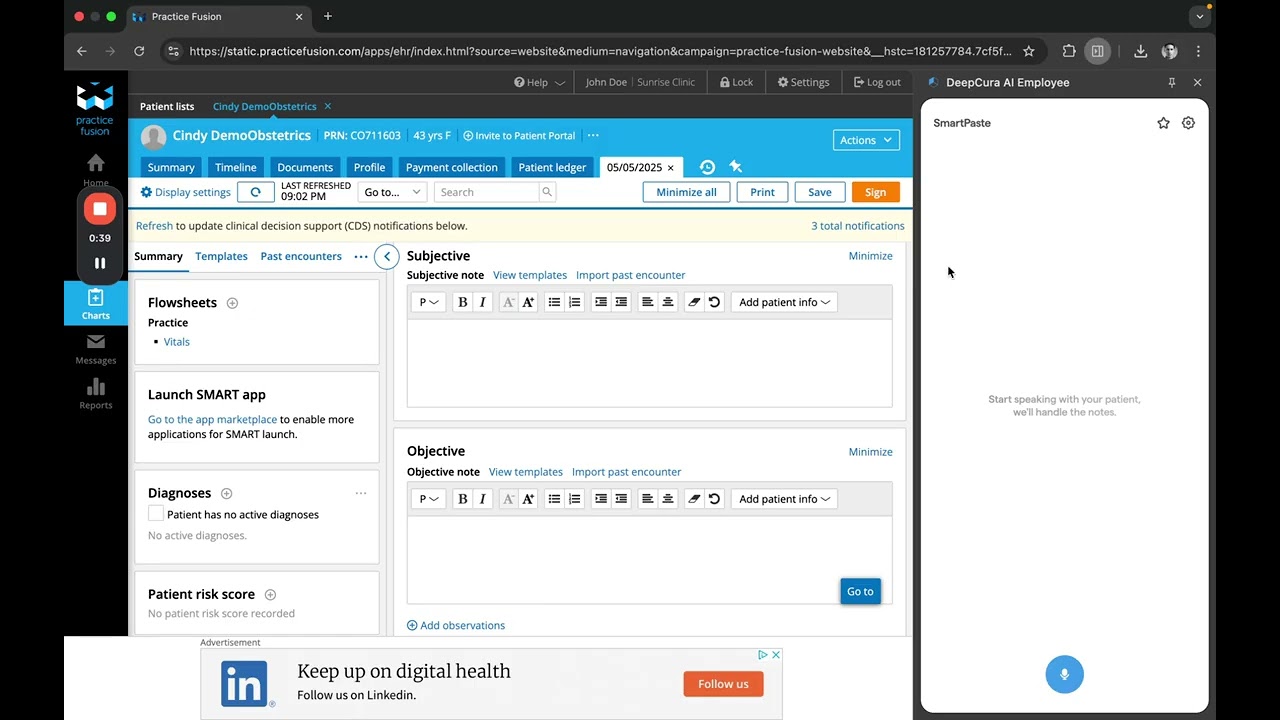
Here is what "two clicks, no training" actually looks like in Practice Fusion:
- Install the DeepCura Chrome Extension — one click from the Chrome Web Store
- Click 1: Start Patient — dictate the encounter or record the patient conversation from the extension inside Practice Fusion
- Click 2: Complete — the note auto-populates into the correct SOAP sections (HPI, exam, assessment, plan) and pastes directly into Practice Fusion's note field
- Pricing: $129/month per provider with 1,000 credits a month (1 credit per standard note) — free trial, no credit card
- Setup time: under 60 seconds from install to first note
If you are searching for the best AI scribe for Practice Fusion, the honest answer is: the one you will actually use every day. This guide shows exactly how DeepCura's Chrome extension and Smart Pace Mode solve the #1 reason AI scribes fail in real practices — training friction — and why a lightweight, in-browser extension often beats a deep API integration for a cloud EHR like Practice Fusion.
This guide was last updated in April 2026. DeepCura's Practice Fusion integration runs entirely through the DeepCura Chrome Extension — the extension sits alongside Practice Fusion in your browser, captures the encounter, generates the SOAP note, and pastes it directly into Practice Fusion's note field. There is no native Practice Fusion API for third-party AI scribes, so the browser-extension workflow is intentional — and dramatically simpler than deep-API scribes that require IT activation, provider enablement, and per-diagnosis mapping.
Watch: Two-Click AI Scribe for Practice Fusion (Live Demo)
See the entire workflow in under 2 minutes — sign-in, EHR selection (Practice Fusion), Smart Pace Mode, dictation, and final paste-ready note output.
Why "Two Clicks" Is the Real Differentiator in 2026
AI scribe adoption has a dirty secret: most providers try one, get frustrated during onboarding, and give up before their second week. The #1 reason is not accuracy — modern AI scribes are all clinically accurate enough. It is training friction: macros to memorize, templates to configure, hot-keys to learn, sections to map, and specialty-specific prompts to tune.
DeepCura's Practice Fusion integration was designed to remove all of that. The workflow is identical to a modern messaging app:
- Install the DeepCura Chrome Extension from the Chrome Web Store (one click — "Add to Chrome")
- Sign in to the extension (Google SSO or email/password — no SAML, no IT ticket)
- Open Practice Fusion in the same browser tab — the DeepCura extension is ready
- Click Start Patient in the extension → speak → click Complete → paste into Practice Fusion
That is the whole app. The note is waiting for you, formatted into SOAP sections, ready to paste into Practice Fusion's chart — without ever leaving the browser tab.
Smart Pace Mode — The One Toggle That Matters
"Smart Pace Mode" is DeepCura's branding for a simple but critical feature: the AI listens in real-time and waits for natural pauses in your narration instead of cutting off mid-sentence. You can dictate freely, pause to examine the patient, return to narration, and the scribe keeps pace without requiring you to hit Start/Stop repeatedly.
For dictation-heavy workflows in Practice Fusion — which most primary care and urgent care practices default to — this is the single biggest quality-of-life improvement over Dragon, Freed, or Heidi. You talk the way you think, not the way a transcription engine prefers.
The 60-Second Setup (via the Chrome Extension)
Here is the full setup workflow, timed:
| Step | Action | Time |
|---|---|---|
| 1 | Install the DeepCura Chrome Extension from the Chrome Web Store ("Add to Chrome") | 10 sec |
| 2 | Pin the extension to your toolbar and click the DeepCura icon | 5 sec |
| 3 | Sign in with Google SSO or create a free account | 10 sec |
| 4 | Open Practice Fusion in the same browser window | 5 sec |
| 5 | Click Start Patient in the extension, speak your first note, click Complete | 30 sec |
| Total | Extension install to first finished, paste-ready SOAP note | 60 sec |
No IT admin. No FHIR app activation. No per-provider enablement. No training webinar. No "implementation" call. Everything runs inside Chrome alongside Practice Fusion.
How the Two-Click Workflow Plays Out in Real Practice
The video demonstration uses a sore-throat visit — the kind of encounter every primary care and urgent care clinician sees 5-10 times per day. Here is what the provider actually does:
Click 1: Start Patient
The provider dictates naturally:
"Patient is a 20-year-old female here for a sore throat that started 3 days ago. She says it hurts more when she swallows and she's also had some mild fatigue, no fever, cough, or runny nose. She's been drinking tea and taking Tylenol, which helps a bit. On exam, throat is red with mild swelling, no pus on the tonsils, no swollen lymph nodes, vitals are normal. Likely viral pharyngitis, doesn't look like strep. Plan is rest, fluids, and continue Tylenol as needed. No antibiotics today. Tell her to come back if symptoms worsen or don't improve in a few days."
Click 2: Complete
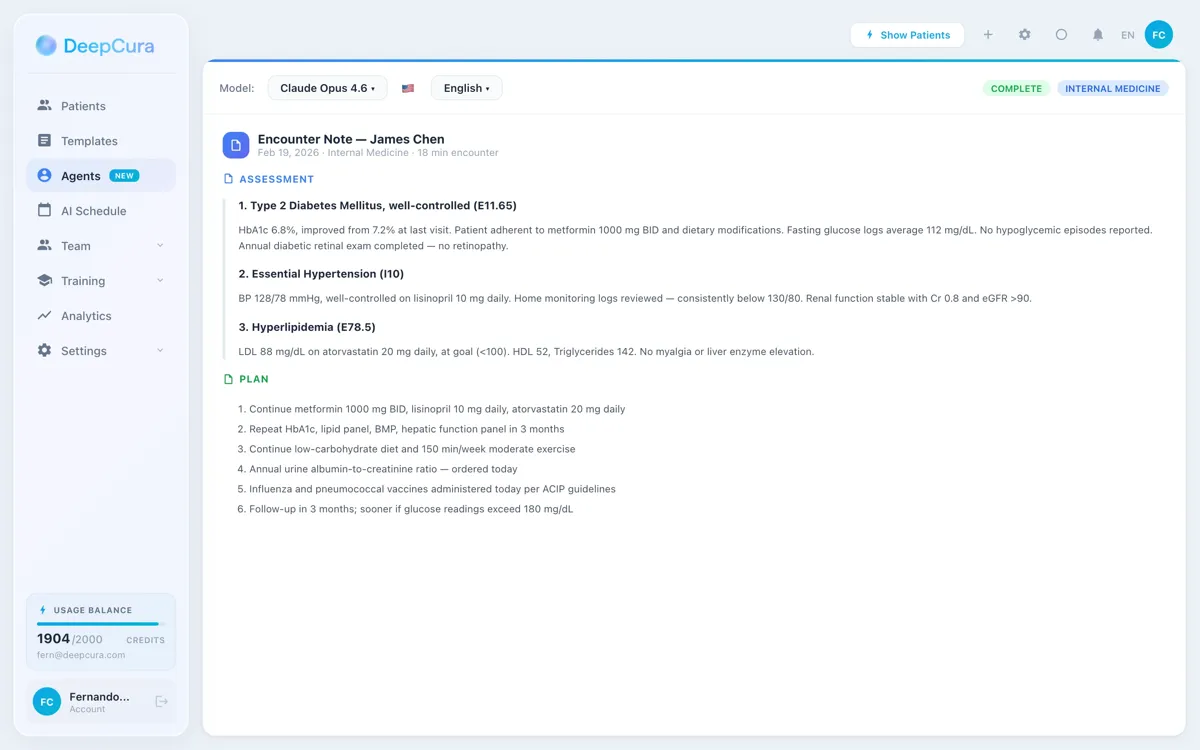
DeepCura auto-structures the dictation into a clean SOAP note:
- S (Subjective): 20-year-old female presents with sore throat x 3 days, worse with swallowing, mild fatigue. Denies fever, cough, rhinorrhea. Has been using tea and Tylenol with partial relief.
- O (Objective): Vitals WNL. Oropharynx erythematous with mild swelling. No tonsillar exudate. No cervical lymphadenopathy.
- A (Assessment): Likely viral pharyngitis. Low clinical suspicion for streptococcal infection.
- P (Plan): Supportive care — rest, fluids, continue Tylenol PRN. No antibiotics indicated. Return precautions discussed: worsening or persistence beyond several days warrants reassessment.
Paste into Practice Fusion's note field. Done.
Honest Disclosure: This Is a Lightweight Integration (Intentionally)
We believe in being transparent about engineering decisions. Unlike DeepCura's integrations with athenahealth, Epic, eClinicalWorks, and AdvancedMD — which use native FHIR APIs for bidirectional structured data — DeepCura's Practice Fusion integration is a paste-in workflow, not a native API push.
Here is why, and why it is actually the right design for Practice Fusion users:
Why There Is No Deep API Integration for Practice Fusion
Practice Fusion does not publish a public FHIR API for third-party AI scribes the way Epic, athenahealth, and eClinicalWorks do. Patient data, problem lists, medications, and chart notes are accessible only inside the Practice Fusion web app. There is no official third-party pipeline to push a note, an ICD-10 code, or a prescription order directly into a Practice Fusion chart from an outside application.
This is not a DeepCura limitation — it is a Practice Fusion platform decision. No AI scribe on the market has a native bidirectional API integration with Practice Fusion, because no such API exists for clinical documentation.
Why the Paste Workflow Is Actually Fine (and Often Better)
In deep-API integrations, every feature comes with a cost: per-provider FHIR enablement, IT admin coordination, OAuth token management, per-diagnosis mapping, and frequent "why didn't my note import?" support tickets. The eClinicalWorks integration alone required 2,000+ lines of code and still requires IT to individually enable each provider in App Configuration (the #1 setup failure we see).
For a cloud-native, single-login EHR like Practice Fusion, a paste workflow is:
- Instant — no activation code, no per-provider enablement, no waiting for IT
- Reliable — no silent import failures from ICD-10 descriptor mismatches or parser edge cases
- Transparent — you see the exact note before it enters the chart, so no hidden auto-import bugs
- No add-on fees — no per-provider API integration fees on the Practice Fusion route, so the total stays $129/month flat
You copy the generated note once, paste it into Practice Fusion's note field, and Practice Fusion applies your own template mapping on the receiving end. Two seconds vs. two minutes of IT paperwork.
Pricing: $129/month, All Features Included
DeepCura for Practice Fusion is $129 per provider per month (or $999/yr) with 1,000 credits a month across every AI agent — a standard note costs 1 credit (3 on premium models, 15 on the deepest reasoning tier) — no seat minimums, no API add-on fees. Here is how that compares to the 2026 market:
| Product | Monthly Price | Practice Fusion Support |
|---|---|---|
| DeepCura | $129/mo (1,000 credits/mo) | Yes (paste-in workflow, Smart Pace Mode) |
| Freed AI | $39–$119/mo | Limited — copy-paste only, no EHR awareness |
| Heidi Health | Free / $150/mo (billed yearly) | Limited — copy-paste only |
| Nuance DAX Copilot | Not publicly priced | Yes (paste workflow; Practice Fusion not a priority) |
| Abridge | Enterprise (not published) | No (enterprise health system focus) |
| Suki AI | Not publicly priced | Limited — copy-paste only |
| DeepScribe | Custom (not published) | Limited — copy-paste only |
For solo practitioners, small primary care groups, and urgent care clinics on Practice Fusion, DeepCura is the only AI scribe purpose-built for the two-click cloud EHR workflow at a price that works for a 1-3 provider practice.
Start with a free trial to see Smart Pace Mode and the two-click workflow in action inside your own Practice Fusion environment. No credit card required. Sign up at app.deepcura.com/register.
Who This Is For
DeepCura's Practice Fusion integration is the strongest fit for:
- Solo primary care and family medicine providers using Practice Fusion who want to dictate the note in natural language and paste it into the chart without learning macros or templates
- Urgent care clinics where visit volume is high and dictation speed matters more than per-diagnosis API push
- Small 2-5 provider practices that do not have dedicated IT staff to manage FHIR app activations
- Clinicians who tried other AI scribes and gave up during onboarding — the "too many features, too much training" crowd
- Practices on a budget that want full AI scribing at the $129/month price point without enterprise sales calls
For providers on different EHR systems, DeepCura has deeper native API integrations. See our guides to the eClinicalWorks AI scribe, athenahealth AI scribe, AdvancedMD AI scribe, and Epic AI scribe guides. For a full cross-EHR comparison of 2026 AI scribes, see our Best AI Medical Scribes in 2026 ranking.
Getting Started in 3 Steps
- Install the Chrome Extension from the DeepCura Chrome Web Store listing — click "Add to Chrome" and pin the icon to your toolbar. Free trial, no credit card required.
- Click the DeepCura icon, sign in with Google SSO (or create a free account), and open Practice Fusion in the same browser window.
- Click Start Patient inside the extension, dictate your first note, click Complete — then paste the structured SOAP output into Practice Fusion's note field.
Every subsequent encounter is the same two clicks, right next to your Practice Fusion tab.
See DeepCura in Action
Watch the full platform demo to see how DeepCura handles ambient scribing, AI chat, patient management, and EHR integration across all supported systems.

Frequently Asked Questions
What is the best AI scribe for Practice Fusion?
For most solo and small-practice Practice Fusion users, DeepCura is the best AI scribe in 2026. It is purpose-built for a two-click, zero-training workflow that matches how Practice Fusion itself feels — cloud-based, simple, no IT overhead. It costs $129/month per provider with 1,000 credits a month (1 credit per standard note), with a free trial and no sales call. For a broader ranking, see our Best AI Medical Scribes in 2026 guide.
Does DeepCura integrate with Practice Fusion?
Yes — via the DeepCura Chrome Extension, with the honest caveat that this is a browser-side paste-in integration, not a native FHIR API push. You install the extension, open Practice Fusion in the same browser, dictate the encounter, and DeepCura generates a SOAP-formatted note ready to paste into Practice Fusion's note field. This is the same underlying approach every AI scribe uses for Practice Fusion, because Practice Fusion does not expose a public API for third-party clinical documentation tools.
Why is the Practice Fusion integration different from the eClinicalWorks or Epic integration?
Practice Fusion does not publish a public FHIR API for third-party AI scribes, while eClinicalWorks, Epic, athenahealth, and AdvancedMD do. For those EHRs, DeepCura uses native API integrations to push structured data (ICD-10 codes, medications, allergies, lab orders) directly into the chart. For Practice Fusion, the workflow is paste-based — you copy the generated note and paste it into Practice Fusion's note field. This is actually simpler for most small practices because there is no IT activation or per-provider enablement required.
How much does DeepCura cost for Practice Fusion users?
DeepCura for Practice Fusion costs $129 per provider per month (or $999/yr) with 1,000 credits a month — a standard note costs 1 credit — and no add-on API fees. A free trial is available with no credit card required.
How many clicks does it take to complete a note?
Two. Click 1 is "Start Patient" — you then dictate the encounter in natural language (or record a live patient conversation). Click 2 is "Complete" — DeepCura auto-structures the content into SOAP sections (HPI, exam, assessment, plan). Paste the output into Practice Fusion and the encounter is documented.
Do I need to train the AI or learn any macros?
No. DeepCura has zero training requirements, zero macros, and zero templates to configure. Smart Pace Mode listens in real-time and adapts to natural narration pace. The only one-time configuration step is installing the DeepCura Chrome Extension and signing in — roughly a 30-second, one-time setup.
What is Smart Pace Mode?
Smart Pace Mode is DeepCura's real-time dictation engine that waits for natural pauses in your narration instead of cutting off mid-sentence. You can dictate freely, pause to examine the patient, return to narration, and the scribe keeps pace without requiring repeated Start/Stop clicks. It is the single most impactful feature for dictation-heavy Practice Fusion workflows.
Can I record a live patient conversation instead of dictating?
Yes. DeepCura supports both ambient recording of live patient conversations and provider dictation. Toggle between modes in the main dashboard. For dictation-heavy practices (most primary care), Smart Pace Mode is optimized for narrative dictation. For ambient visit recording, DeepCura captures the full provider-patient conversation and generates the note from that transcript.
Does DeepCura push notes directly into the Practice Fusion chart?
No — not via API, because Practice Fusion does not publish one for third-party clinical documentation. DeepCura generates a fully structured SOAP note that you paste into Practice Fusion's note field. The paste takes about 2 seconds and gives you full visibility into exactly what enters the chart — no silent import failures, no hidden mapping bugs.
Is DeepCura HIPAA compliant?
Yes. DeepCura is fully HIPAA compliant and provides a Business Associate Agreement (BAA) to all covered entities. All data — including encounter audio, generated notes, and Practice Fusion-destined content — is encrypted in transit (TLS 1.2+) and at rest (AES-256). By default, visit audio is kept with the encounter, so every AI-suggested chart update links to the exact second it was said.
How does DeepCura compare to Freed AI for Practice Fusion?
Freed AI and DeepCura are both AI scribes, but DeepCura ($129/month with 1,000 credits a month) has a purpose-built Practice Fusion EHR mode with Smart Pace Mode, and includes additional features (patient management, an AI receptionist, EHR integrations for deeper systems when you expand) that Freed AI ($39–$119/month) does not. For a detailed head-to-head, see our Freed AI review and our DeepCura vs Freed AI comparison.
How quickly can I get started?
Under 60 seconds. Install the DeepCura Chrome Extension from the Chrome Web Store, sign in with Google SSO, open Practice Fusion in the same browser window, and click Start Patient inside the extension. Your first note will be ready to paste before you finish reading this sentence.
Can I use this for specialties beyond primary care?
Yes. While the two-click workflow is especially well-suited to primary care and urgent care on Practice Fusion, DeepCura generates specialty-appropriate notes for cardiology, dermatology, orthopedics, pediatrics, psychiatry, and more. See the full specialty scribe guides for specialty-specific details.
Is there a free trial?
Yes. DeepCura offers a free trial with no credit card required. Sign up at app.deepcura.com/register.
Final Verdict
For Practice Fusion users in 2026, the "best AI scribe" question does not come down to clinical accuracy — every modern scribe is accurate enough. It comes down to whether you will actually use it every day. That is decided by three things: how fast you can set it up, how many clicks it takes per encounter, and how much it costs.
DeepCura wins the first two outright and keeps the third simple. 60 seconds to set up. Two clicks per encounter. $129/month per provider, every feature included. No IT admin. No FHIR app activation. No per-diagnosis mapping. No templates to configure. Just sign in, select Practice Fusion, toggle Smart Pace Mode, and start charting.
The integration is intentionally lightweight — a paste-in workflow that matches Practice Fusion's own cloud-native, no-overhead philosophy. For solo and small-practice providers on Practice Fusion, that simplicity is the feature.
Start a free trial and generate your first note in under a minute. For a broader look at the AI scribe landscape, explore our AI Medical Scribe platform overview and our Best AI Medical Scribes in 2026 comprehensive comparison.
References
[1] Practice Fusion, "Cloud-Based EHR for Small Practices," practicefusion.com. practicefusion.com
[2] HL7 International, "FHIR R4 — Fast Healthcare Interoperability Resources," hl7.org. hl7.org/fhir
[3] World Health Organization, "International Classification of Diseases, Tenth Revision (ICD-10)," WHO. who.int/classifications/icd
[4] U.S. Department of Health and Human Services, "HIPAA for Professionals," HHS.gov. hhs.gov/hipaa/for-professionals
[5] American Medical Association, "CPT (Current Procedural Terminology)," AMA. ama-assn.org/topics/cpt
[6] DeepCura, "AI Medical Scribe Platform — Ambient Scribing, AI Receptionist, EHR Integration," DeepCura.com. deepcura.com
[7] Apple, "DeepCura AI Medical Scribe," App Store. apps.apple.com
[8] U.S. National Library of Medicine, "Clinical Tables Service — ICD-10-CM Code Search API," NLM. clinicaltables.nlm.nih.gov