
Automatic schedule mirror. Cited AI pre-charting from the chart AND every PDF document. Native API write-back. Scribe It automation. Multiplayer charting. Five layers of eClinicalWorks integration, built from 2+ years of production API development and thousands of real patient encounters.
DeepCura combines a native eClinicalWorks API integration, automated pre-charting, and evidence-cited reads of the chart's unstructured PDF documents — all feeding the scribe. The native API pushes allergies, medications, diagnoses, lab orders, and immunizations directly into the chart with zero copy-paste. But we did not stop there. DeepCura now mirrors your eCW appointment book automatically, consolidates each patient's entire eCW record — the coded chart and its unstructured PDF documents alike — and writes a cited AI brief for every visit before you walk in. And because eCW's API has structural limitations for clinical notes, we built a proprietary AI Scribe It Engine with 3 specialized agents that converts your note into eCW's native Scribe It format with validated ICD-10 codes from your own code library.
The result:
- Before the visit — your eCW book mirrors onto DeepCura's calendar, and every visit gets a cited AI brief built from the consolidated record: the coded chart and its PDF documents
- During the visit — one click starts the ambient AI scribe with that whole consolidated record in context
- After the visit — 3 AI agents format the note for Scribe It import (ICD codes, billing, orders), while the native API handles structured data (allergies, meds, labs, immunizations)
- Across the team — MAs pre-chart on the physician's schedule, physicians pick up seamlessly
If you are searching for the best AI scribe for eClinicalWorks, this guide covers how each layer works, what we learned building a production native API integration, and why we built a proprietary Scribe It engine to handle what the API cannot.
This guide added the new scheduling workspace (automatic eCW schedule mirror), the Prechart lens (cited AI visit briefs), and unstructured PDF document reads in August 2026 — alongside the AI Scribe It Engine and native API write-back — and was last reviewed in October 2026. All technical claims are based on DeepCura's production eClinicalWorks integration. Pricing reflects current publicly available information.
AI Pre-Charting — Your Whole eCW Day, Briefed Before You Walk In
Most AI scribes help you after the encounter. DeepCura helps you before it starts — and in 2026 this went from a per-patient button to an automated pipeline for your entire day.
Your eCW Schedule, Mirrored Automatically
Connect eClinicalWorks and your appointment book copies itself onto DeepCura's scheduling workspace all day long — refreshed about every 15 minutes, merged with any DeepCura-native and Google Calendar bookings, each appointment marked with its source. A sync chip in the header tells you exactly how fresh the mirror is ("eCW ✓ synced 2m ago"), and every appointment carries a Start visit button that drops you straight into the AI scribe.
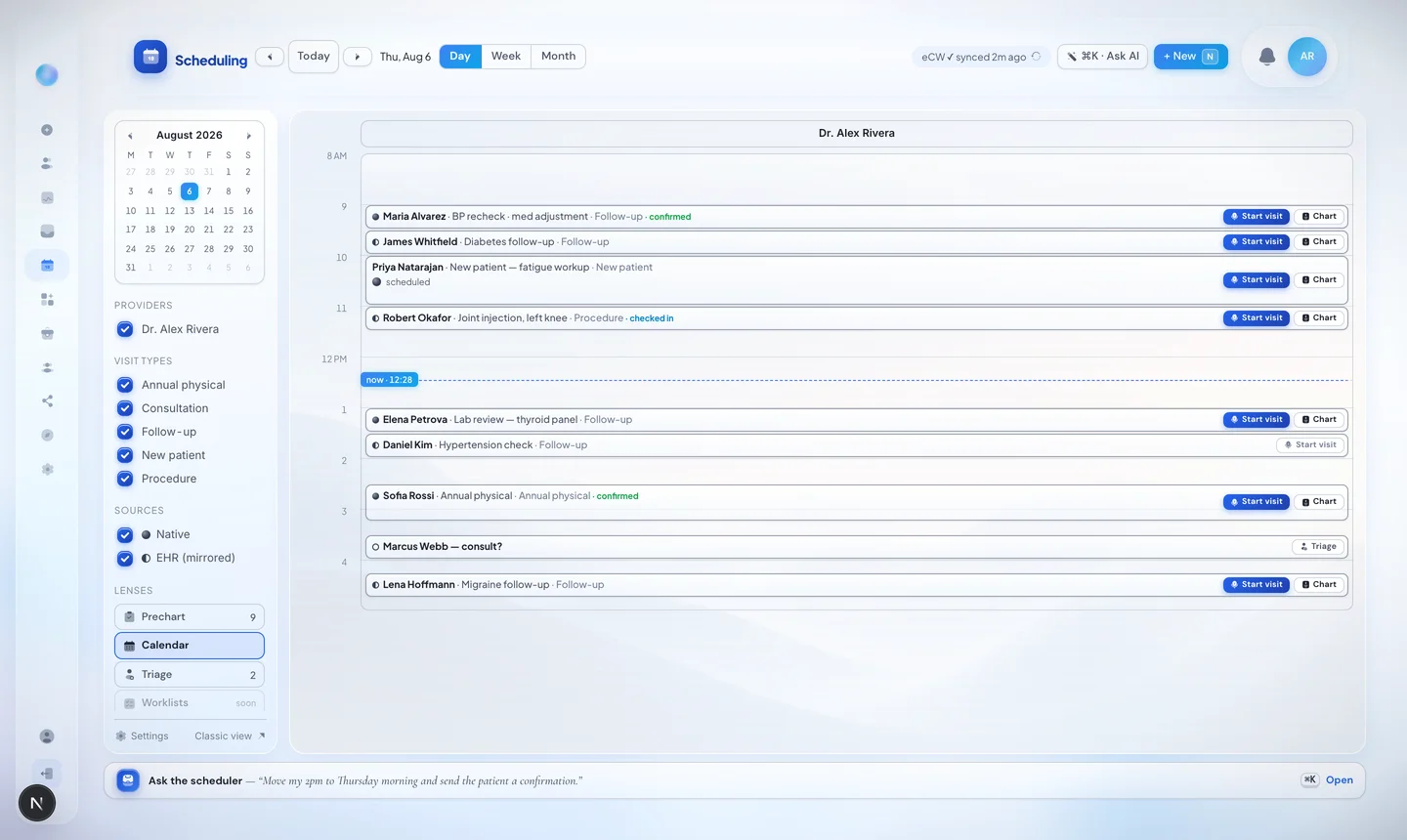
The Prechart Lens — A Cited AI Brief for Every Visit
Switch to the Prechart lens and your day becomes a prepped worklist: one card per visit with a tight AI brief — why the patient is here, what changed since the last visit, what needs your eye. Every line cites the exact chart evidence behind it — tap the chip at the end of a bullet to see the source and its verification tier (clinician-confirmed, EHR-imported, AI-extracted, patient-reported). A claim without a chart source simply does not get written.
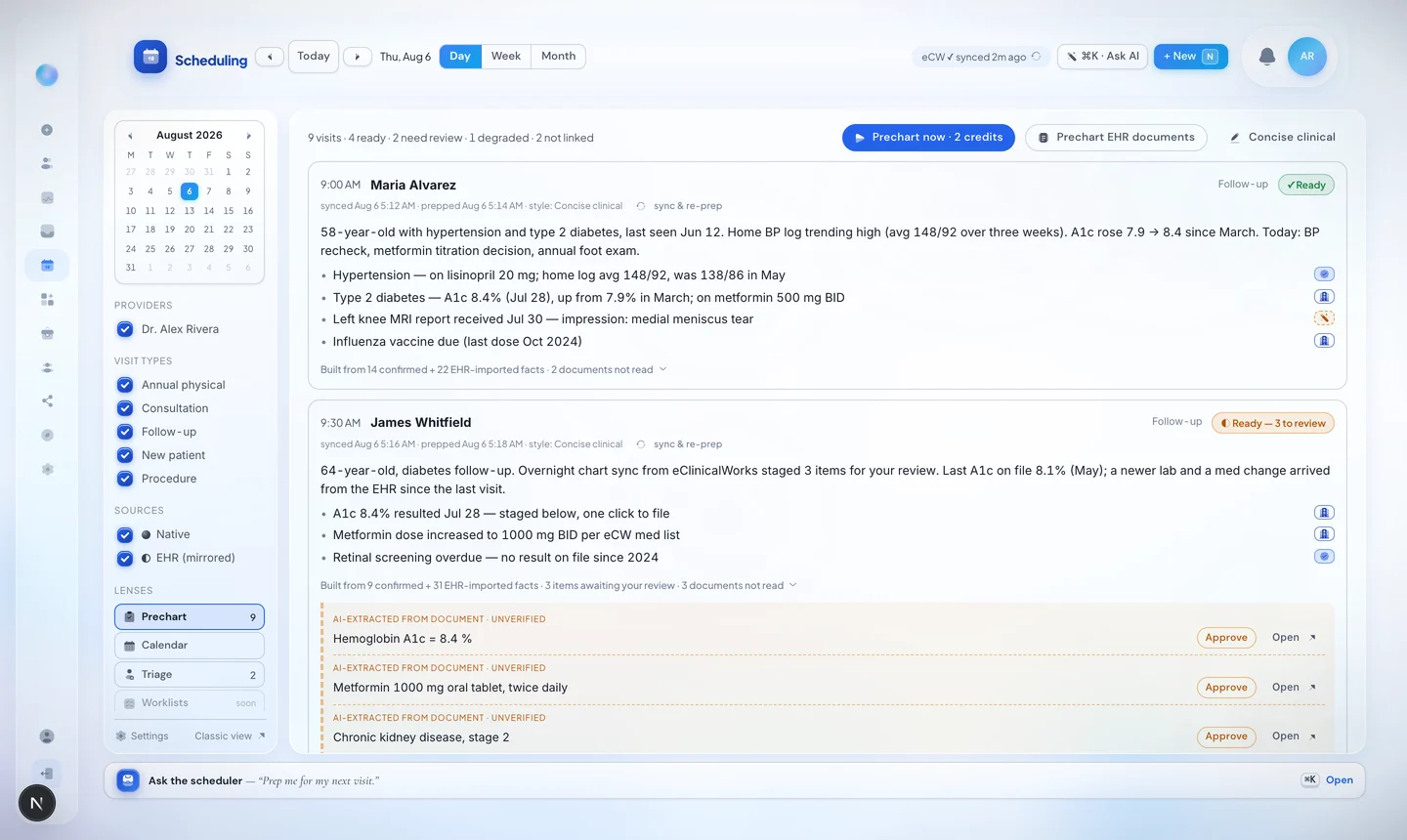
Behind each brief, DeepCura consolidates the patient's coded eCW record — problems, medications, allergies, labs — into their DeepCura chart. Everything imported is labeled "EHR record" with its source attached, and anything that contradicts what you have already confirmed is staged for your decision. Nothing silently overwrites your chart.
New findings appear in an amber review margin right on the schedule — Approve files them onto the chart timeline in one click; complex items open the chart:
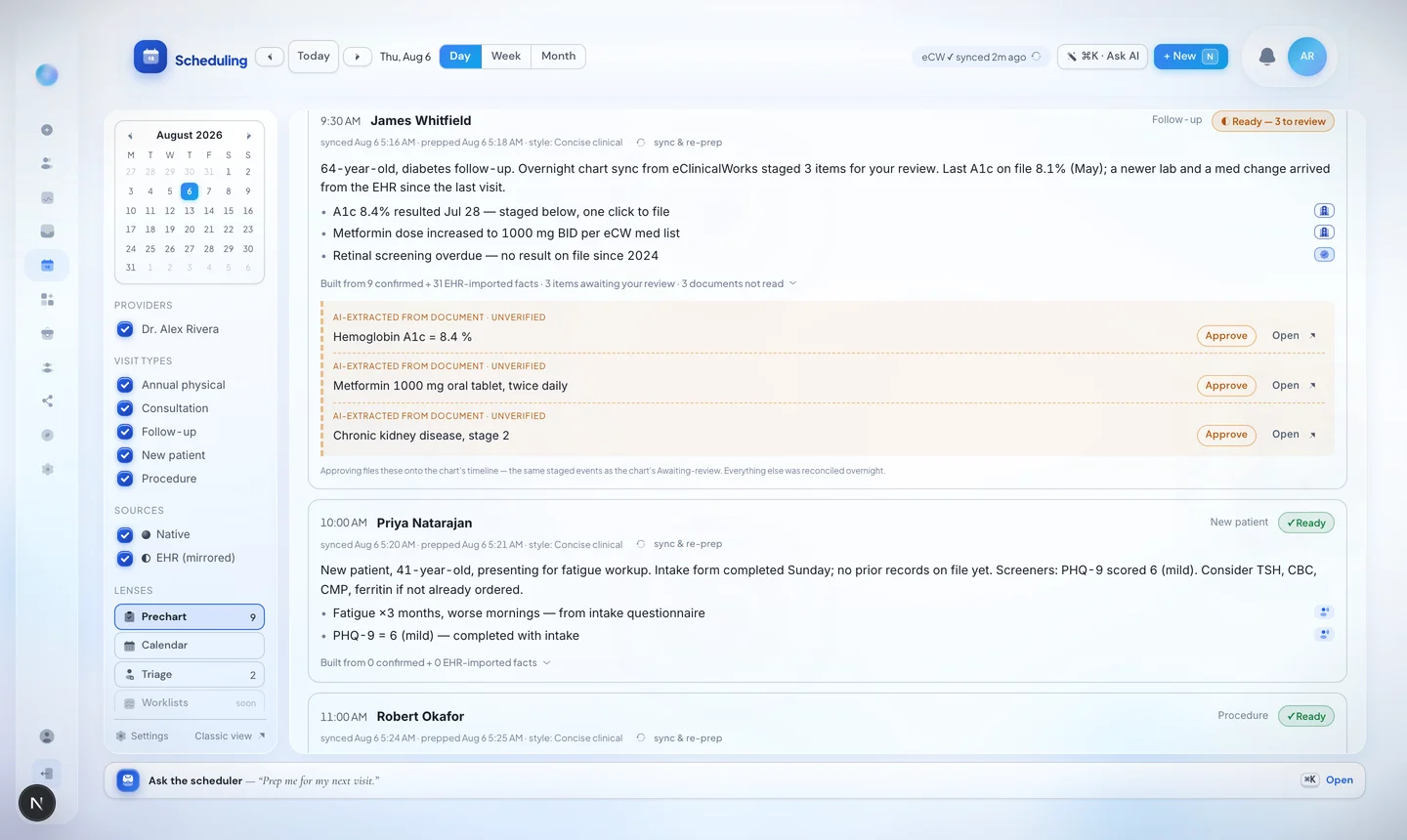
Run Prechart now for the whole day in one click — the button shows the live price (1 credit per stale or missing brief; fresh cards cost nothing), and unchanged charts are never re-composed or re-charged. Automatic overnight runs are rolling out practice by practice.
Not Just the Chart — Every Unstructured PDF Document Too
This is the most-requested capability we have ever shipped for eClinicalWorks: DeepCura does not stop at the coded chart. It discovers every unstructured PDF document in the patient's eCW record as well — consult letters, discharge summaries, imaging reports, lab report PDFs, scanned attachments — the half of the patient story that never makes it into structured data.
One batch modal lists every patient's documents for the day, grouped by visit. Discovery is free. Pick the documents that matter at 1 credit per read, and the AI reads each PDF into structured, cited chart findings staged for your review — the complete patient picture, coded and uncoded alike. Documents you have read before show "✓ read · 0 credits" and can never be charged twice; failed reads are never charged.
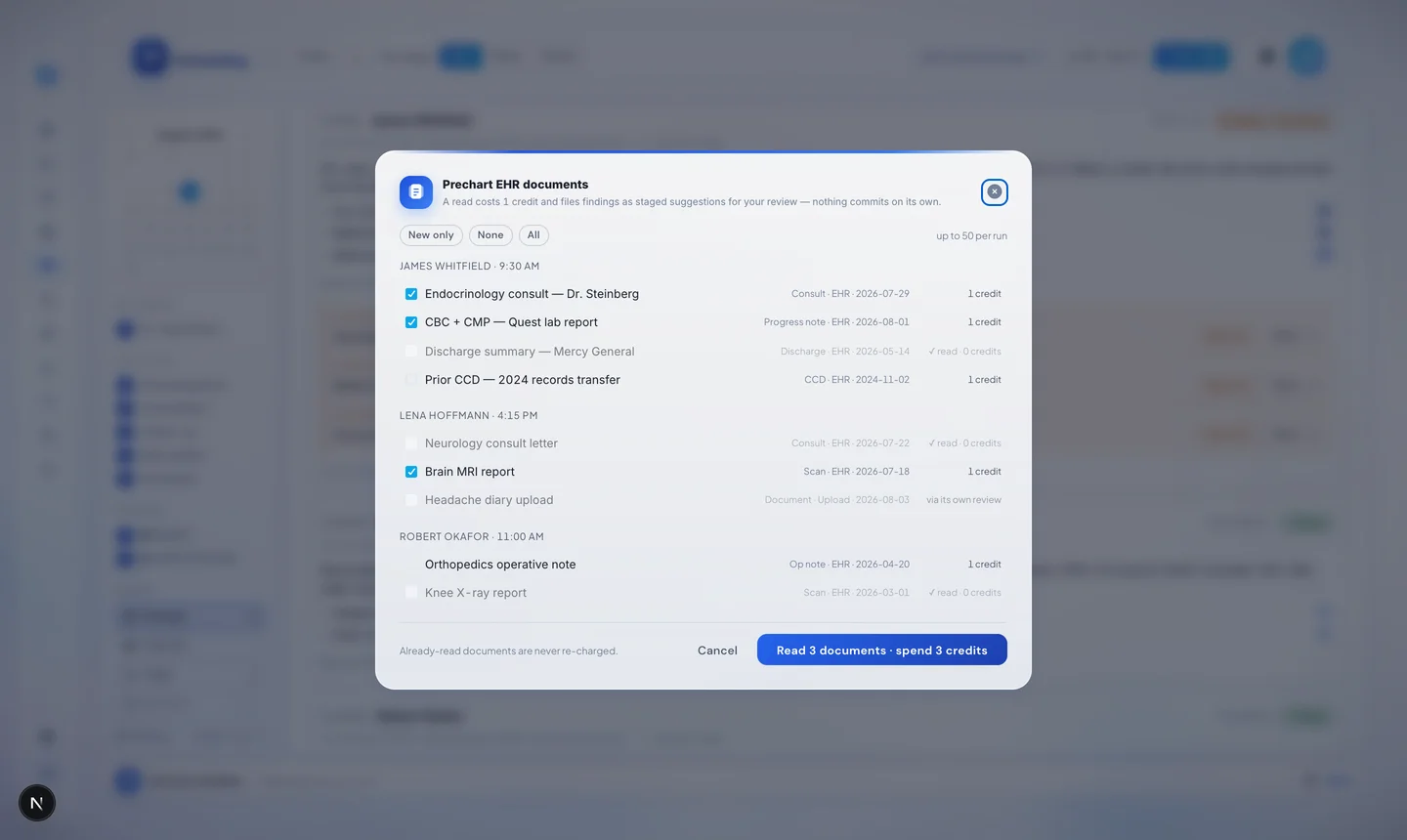
Scribe-Ready, With the Whole Picture in Context
Hit Start visit on any appointment: the chart opens ready to record, today's visit is checked in automatically, and completing the session marks the appointment done. The payoff — the AI scribe writes with everything you just consolidated in context: the eCW problems, meds, and labs, plus the findings you approved from its PDF documents. Notes come out grounded in the full record, not just what was said in the room.
Automatic Patient Data Import
When you start an encounter from the calendar, DeepCura automatically imports the patient's date of birth, email address, and phone number from the eCW patient data. DOB is displayed on the schedule card to help distinguish patients with similar names. Previously, this data required manual entry — now it flows automatically from eClinicalWorks the moment you click Start visit.
The AI Scribe It Engine — Why We Built It and How It Works
This section tells the full story — including what did not work. We think transparency about engineering decisions builds more trust than pretending everything was seamless.
The FHIR API: What It Does Well and Where It Falls Short
DeepCura has a production native API integration with eClinicalWorks — over 2,000 lines of dedicated code covering 7 resource types. We are grateful to the eCW FHIR team for developing and supporting this API. For structured data, the native API works well:
- Allergies — SNOMED CT-coded allergens with criticality levels write to the allergy section reliably
- Medications — RxNorm-coded prescriptions (MedicationRequest) and reconciliation (MedicationStatement) flow through correctly
- Lab and imaging orders — LOINC-coded ServiceRequests with clinical justification push cleanly
- Immunizations — CVX codes with site, route, dose, and lot tracking import accurately
- Problems and diagnoses — ICD-10 + SNOMED severity write to the problem list
These are real, valuable automations that eliminate clicks every day. We still use the native API for all of these workflows, and they work on day one after connecting.
But the native API has structural limitations for the data clinicians need most — the clinical note itself and the clinical workflows built around it:
- No vitals push — vital signs captured during the encounter cannot be written back through the API
- No assessment-to-treatment-note linkage — the native API cannot create per-diagnosis Treatment Note objects, which is how eCW links care plans to specific diagnoses for billing, follow-up, and patient portal visibility
- No billing code automation — E&M codes and CPT procedure codes cannot be pushed through the API
- No order-to-diagnosis linkage — lab orders pushed via FHIR are not linked to their justifying diagnosis, which matters for insurance pre-authorization
In practice, 100% of our eClinicalWorks customers told us the same thing: the native API handles the "easy" data well, but it cannot push the critical clinical workflow data — the treatment plans, billing codes, and order linkages that drive downstream revenue and compliance.
We needed a different approach.
The Solution: eCW's Native Scribe It Parser
eClinicalWorks has a powerful built-in feature called Scribe It — a line-based text parser in the progress note editor. When a provider pastes formatted text with specific trigger patterns, Scribe It recognizes each pattern and auto-imports the content into the correct eCW fields: Assessment, Treatment Notes, Orders, Billing codes, and more.
Scribe It can do things the native API cannot:
- Create per-diagnosis Treatment Note objects linked to specific ICD-10 codes
- Push E&M and CPT billing codes directly
- Create order-to-diagnosis linkages for insurance pre-authorization
- Import structured data into the exact eCW fields the provider's workflow expects
The challenge: Scribe It is extremely precise. The ICD-10 code descriptors must match eCW's internal database exactly — character for character. A single word difference causes a silent import failure. And the colon character is eCW's parser delimiter, so stray colons in clinical text shift content into wrong sections.
No human can reliably format a clinical note to meet these requirements. But an AI system with access to the right databases can.
Two Conversion Modes: Lossless and Assisted
As of August 2026 the Scribe It converter offers three modes. Assisted, the default, is the AI-powered mode described in the next section — it drafts the eCW Scribe commands from any note. Mapped keeps every sentence word-for-word while AI maps the note's structure and proposes the ICD-10 code on each diagnosis line (the one thing it writes — each proposal is checked against the official database and flagged for review), with an independent verification that returns your original note unchanged on any deviation. Lossless is an opt-in for practices whose note template already writes Scribe It format: a formatting-only conversion with no AI in the path, where every clinical sentence transfers word-for-word and only eCW-required structural fixes are applied, each listed in a change log. Read the plain-English guide to both modes.
3 AI Agents, Running in Parallel (Assisted Mode)
In Assisted mode, DeepCura's AI Scribe It Engine uses 3 specialized AI agents to convert your finalized clinical note into production-ready Scribe It format:
Agent 1: Clinical Data Normalizer
This agent takes your finalized encounter note — the 14-section clinical document generated by DeepCura's AI Scribe — and restructures it into eCW Scribe It syntax. It maps each clinical section to the correct Scribe It trigger pattern:
- Assessment findings become
ICDtrigger lines with per-diagnosis Treatment Notes - Care plans become
Treatment notes:blocks linked to each diagnosis (external, patient-visible in the eCW portal) - Internal clinical reasoning becomes
Clinical Notes:blocks (provider-only, not patient-visible) - Follow-up scheduling becomes
Next Appointment:triggers
The agent also runs a post-processing colon sanitizer — scanning all clinical text for stray colons that would break eCW's parser and stripping them before output. This single step prevents an entire class of silent import failures.
Agent 2: ICD-10 Code Resolver
This agent solves the #1 Scribe It failure mode: ICD-10 descriptor mismatches.
eCW Scribe It validates every ICD-10 code against the provider's internal database. If the description does not match exactly — even a single word difference — the import silently fails. The AI writes "Type 2 diabetes" but eCW expects "Type 2 diabetes mellitus without complications," and the diagnosis disappears without any error message.
Our ICD-10 agent cross-references every code against the official medical code database AND the provider's own imported code library. When we analyzed real EBO data from eClinicalWorks practices, we found that 51% of ICD-10 codes had different descriptions for the same code across different providers within the same practice. The agent knows which version YOUR eCW instance uses and matches it exactly.
You can import your own codes in seconds — upload your EBO report (the spreadsheet your practice already has), select your name from the provider list, and the system deduplicates and stores your exact code descriptions. From that point on, every Scribe It conversion uses your codes, not generic ones.
Agent 3: CPT/E&M Code Resolver
The billing agent determines the appropriate E&M service code (99213, 99214, 99215, etc.) based on encounter complexity, and identifies any CPT procedure codes mentioned during the visit. Each code is formatted as an Add EM or Add CPT trigger line for Scribe It import.
When the provider has imported their code library, the agent validates CPT codes against it. When they have not, it uses standard AMA CPT guidelines.
All three agents run in parallel using streaming server-sent events (SSE), so the Scribe It output appears in real-time as each agent completes its work.
Import Your Own ICD-10 Codes from Your EBO Report
One of the most powerful features of the Scribe It Engine is the ability to import your own ICD-10 code library directly from your eClinicalWorks Business Optimizer (EBO) report — the XLSX file your practice receives from insurance payers.
Here is what happens when you upload an EBO file:
- Auto-detection — the parser scans the spreadsheet and identifies every provider listed in the file (we have seen single EBO files with 66+ providers from a multi-provider practice)
- Provider selection — you select your name from the detected list, and the system filters to only your codes
- Deduplication — when the same ICD-10 code appears with different descriptions across payers (51% of codes in our analysis), the system keeps the description with the highest usage count for your specific provider
- Library creation — your personal code library is stored in DynamoDB, and Agent 2 checks it on every Assisted-mode Scribe It generation (Lossless mode reads the same library when verifying descriptors)
This means the ICD-10 descriptors in your Scribe It output will match exactly what your eCW instance expects — because they came from your own billing data. No more silent import failures from descriptor mismatches.
Per-Diagnosis Linked Objects (Not a Text Blob)
Most AI scribes that support any form of eCW integration dump the entire note into a single text field. DeepCura's Scribe It Engine uses a per-diagnosis trigger pattern that creates separate linked objects in eCW for each diagnosis:
Each Treatment notes: trigger repeats before each ICD line, creating a separate Treatment Note object linked to that specific diagnosis. Click on "Otitis media" in the eCW problem list and you see only its treatment note. Click on "Dermatitis" and you see only that one. This is how eCW is designed to work — per-diagnosis linkage that supports billing audits, follow-up visits, and patient portal visibility.
In Assisted mode, the engine also handles the distinction between Treatment Notes (external, patient-visible in the portal) and Clinical Notes (internal, provider-only) — routing care plans to the patient-facing field and sensitive clinical reasoning to the provider-only field. Lossless mode never creates Clinical Notes blocks; content stays where you wrote it.
Native API Structured Data Automation
While the AI Scribe It Engine handles clinical notes and billing, DeepCura's native API integration handles structured data types where the API excels. These features work instantly on day one after connecting your eCW account — no Scribe It formatting needed.
Problem and Diagnosis Management
The Problem and Diagnosis agent extracts every clinical problem mentioned during the encounter and maps each one to both ICD-10-CM codes and SNOMED CT severity levels (Mild, Moderate, or Severe). Each condition is categorized as either an encounter-diagnosis (this visit only) or a problem-list-item (ongoing chronic condition).
The agent also suggests additional diagnoses based on the patient's current medication list, lab results, and clinical context. For example, if a patient is on metformin and their most recent HbA1c is 7.8%, the agent will suggest Type 2 Diabetes (E11.9) if it is not already on the problem list. Each suggestion includes a confidence score.
Allergy Management
The Allergy agent extracts every allergen mentioned during the encounter — medications, foods, and environmental factors — along with SNOMED CT substance codes, criticality levels (low, high, or unable-to-assess), and reaction types. By mapping allergens to standardized SNOMED CT codes and assigning proper criticality levels, the agent ensures that every allergy entry works with eCW's built-in drug interaction checking.
Medications — Prescriptions and Reconciliation
The Medications agent handles two distinct FHIR resource types: MedicationRequest for new prescriptions and MedicationStatement for medication reconciliation. Every medication is coded using RxNorm codes exclusively — eClinicalWorks returns error code 2027 when NDC (National Drug Code) identifiers are used. Each prescription includes the medication name, RxNorm code, dosage instructions, route of administration, and frequency.
Lab and Imaging Orders
The Lab Orders agent creates FHIR ServiceRequest resources with LOINC codes. Each order includes clinical justification text for insurance pre-authorization workflows. The agent includes confidence scoring to prevent false positives — a clearly stated "let's get a CBC" gets high confidence, while a tentative "we might want to consider an MRI" is flagged for provider review.
Immunization Records
The Immunization agent captures every vaccination and creates FHIR Immunization resources with CDC-maintained CVX codes. Each record includes site codes (Left Arm, Right Arm, Left Thigh, Right Thigh), route codes (Intramuscular, Subcutaneous, Nasal Inhalation), dose quantity, and lot number for tracking and recall purposes. This is particularly valuable for pediatric practices where immunization tracking is a significant administrative burden.
Multiplayer Mode: Team-Based Clinical Workflows
DeepCura's department-based scheduling turns eClinicalWorks from a single-provider tool into a team platform. This is not just "shared calendar view" — it is a full multiplayer clinical workflow.
How It Works
MAs and PAs can view their physician's eClinicalWorks schedule — and physicians can view their team's schedule — directly from DeepCura's calendar. Permissions are managed through DeepCura departments:
- MAs/PAs see the physician's encounter list and can start charting before the provider enters the room — syncing charts, reading eCW documents, and approving staged findings so everything is ready
- Physicians see which patients their MA has already started, with real-time "last accessed by" tracking so nothing falls through the cracks
- Any department member can start, continue, or finish a patient chart — the encounter context (EHR patient link, DOB, email, phone, prechart brief) is shared automatically
The Pre-Chart Workflow
This is where multiplayer mode and the Prechart lens combine into something genuinely new:
- The MA opens the physician's schedule in DeepCura at the start of the day — every visit already carries a cited AI brief
- Where a chart moved overnight, one click re-syncs it; where new eCW documents arrived, the MA reads the ones that matter and approves the staged findings
- When the physician walks into the room, the brief is on screen — what changed, what needs an eye, every line cited to its chart source
- The physician hits Start visit — the appointment checks in automatically and the AI Scribe records with the consolidated record in context
- One click generates the Scribe It output with validated ICD-10 codes and billing — the physician pastes it into eCW
Zero handoff friction. The MA saves the physician 5-10 minutes per patient on chart review alone, and the physician never has to piece together a patient's history from fragmented encounter notes again.
eCW Prism AI vs DeepCura: Head-to-Head
If you are comparing every eClinicalWorks AI scribe option available in 2026, this is the head-to-head breakdown.
| Capability | eCW Prism AI (Built-in) | DeepCura ($129/mo total) |
|---|---|---|
| Ambient AI Scribing | Yes | Yes |
| Note Generation | Yes (unstructured) | Yes (14-section structured) |
| AI Scribe It Engine | No | Yes (3 AI agents) |
| Per-Diagnosis Treatment Notes | No | Yes (linked objects in eCW) |
| ICD-10 Code Validation | No | Yes (NLM API + provider library) |
| E&M/CPT Billing Codes | No | Yes (auto-generated) |
| EBO Code Library Import | No | Yes (XLSX auto-parse) |
| AI Prechart Briefs | No | Yes (per-visit, every line cited to chart evidence) |
| Unstructured PDF Document Reads | No | Yes (free discovery, 1 credit per read, staged findings) |
| Automatic Schedule Mirror + Merged Calendar | n/a (inside eCW only) | Yes (eCW + DeepCura + Google on one calendar) |
| Problem/Diagnosis Push (API) | No | Yes (ICD-10 + SNOMED) |
| Allergy Management (API) | No | Yes (SNOMED + criticality) |
| Medication Orders (API) | No | Yes (RxNorm) |
| Lab/Imaging Orders (API) | No | Yes (LOINC) |
| Immunization Records (API) | No | Yes (CVX + site/route) |
| Team Schedule Sharing | No | Yes (department-based multiplayer) |
| Auto-Import DOB/Email/Phone | No | Yes (from eCW patient data) |
Prism AI is a reasonable starting point for practices that only need basic ambient scribing. But for practices that want to automate the full encounter — from pre-chart through billing — it covers roughly 15% of the opportunity.
How Many Clicks Does This Actually Save?
We measured the manual click count for a typical primary care encounter in eClinicalWorks across every workflow stage:
- Note documentation: 20-25 clicks (section navigation, field entry, template selection)
- Problem/diagnosis entry: 8-10 clicks per diagnosis (search, select, confirm, set severity)
- Allergy updates: 5-8 clicks per allergen (search, select, set criticality, confirm)
- Medication orders: 10-12 clicks per medication (search, select, dosage, route, frequency, sign)
- Lab/imaging orders: 8-10 clicks per order (search, select, justification, sign)
- Immunization recording: 6-8 clicks per vaccine (search, select, site, route, lot, confirm)
- Billing code entry: 4-6 clicks per code (search E&M level, add CPT codes)
Total: approximately 75-100 clicks per patient encounter.
At 20 patients per day, that is roughly 1,700 clicks — the equivalent of 4-5 hours of data entry, gone. Over a year, that adds up to approximately 1,000 hours of administrative work.
At an average physician compensation rate of $300/hour, those 1,000 hours represent $300,000 in annual opportunity cost. Even recovering 50% of that time through automation delivers $150,000 in value — for a tool that costs $1,548/year ($129/month total).
Pricing
DeepCura for eClinicalWorks costs $129/month total. This includes the $50/month integration fee charged by eClinicalWorks for API access — you pay one price and get everything: the AI Scribe It Engine, AI synopsis, native API write-back, and multiplayer scheduling.
The plan includes 1,000 credits, which supports approximately 15-20 patient encounters per day for a typical primary care provider. AI prechart briefs and eCW document reads cost 1 credit each — and anything unchanged or already read is never re-charged.
For context, here is how that compares:
- eCW Prism AI: Included with eClinicalWorks subscription, but limited to basic ambient scribing — no Scribe It automation, no synopsis, no structured write-back
- Freed AI: $39-$119/month tiered pricing — no native eClinicalWorks integration, no structured write-back
- Nuance DAX Copilot: Custom pricing (typically $200-400/month), strong ambient scribing but limited workflow automation beyond notes
- DeepCura: $129/month total (includes $50/month eCW API fee) for AI Scribe It Engine + AI synopsis + native API write-back + multiplayer
The value proposition is straightforward: at $129/month total — less than most competitors offering ambient-only scribing — DeepCura automates the full eCW workflow from pre-chart synopsis through billing code entry.
Start with a free trial to see the AI Scribe It Engine and AI synopsis in action with your own eClinicalWorks environment. No credit card required. Sign up at app.deepcura.com/register.
Getting Started: Connect eCW to DeepCura
Most of DeepCura's eClinicalWorks integration features are available instantly after you connect your eCW account — no waiting, no meetings, no approval queues. Schedule sync, AI synopsis, native API structured data write-back, and the AI Scribe It Engine all work on day one.
What Works Instantly (Day 1)
As soon as you connect your eClinicalWorks account to DeepCura, these features are ready to use:
- Automatic schedule mirror — your eCW appointment book copies onto the DeepCura calendar all day long, refreshed about every 15 minutes, with a sync-freshness chip
- Prechart lens — a cited AI brief for every visit, with one-click chart consolidation and staged-finding approval right on the schedule
- eCW document discovery — every unstructured PDF in the patient's record listed free, read on demand at 1 credit per document
- AI Scribe It Engine — generate Scribe It-formatted output with validated ICD-10 codes and billing for paste-and-import into eCW
- Pushing problems and diagnoses — ICD-10 + SNOMED-coded conditions write directly to the patient's problem list
- Pushing allergies — SNOMED CT-coded allergens with criticality levels write to the allergy section
- Pushing medications — RxNorm-coded prescriptions and reconciliation write to the medication list
- Pushing lab and imaging orders — LOINC-coded ServiceRequests with clinical justification
- Pushing immunizations — CVX-coded vaccine records with site, route, dose, and lot tracking
- Multiplayer scheduling — team members can view each other's schedules and share encounter context
Activate FHIR APIs in eClinicalWorks (IT Admin)
Your IT administrator or eCW admin user will need to enable the integration inside eClinicalWorks:
- Go to Admin > Product Activation in your eCW instance.
- Scroll to FHIR APIs and click Settings.
- Under Provider Centric Apps, click Setup and enter the DeepCura activation code:
7e760cdae0c34b94 - Click Add, then Continue, then Approve.
- The request will show as Pending — contact DeepCura support (via the in-app chat or email) so we can approve it on our end. This is a one-time step.
- Once approved, return to FHIR APIs > Provider Centric Apps, find DeepCura in the list, and click Activate — select all permission checkboxes and click Next.
- Critical — Go to App Configuration and enable each specific provider who will use DeepCura. See the warning below — skipping this step is the #1 setup failure we see.
The #1 Setup Mistake: Skipping "App Configure" for Each Provider
After activating DeepCura in Product Activation, you must also go to App Configuration and explicitly enable each provider who will use the integration. This is a separate step that many admins miss.
If you skip this step, the provider will see a "FHIR App not enabled for this user" error when they try to connect their eClinicalWorks account to DeepCura. The integration will not work — no schedule sync, no synopsis, no write-back, nothing.
How to fix it: Go back to Admin > Product Activation > FHIR APIs > Settings, then click App Configuration (not just Activate). Select each provider by name and grant them access to the DeepCura app. Once enabled, the provider can immediately log in and connect without any further steps.
This is a per-provider setting — if your practice has 5 providers, all 5 must be individually enabled in App Configuration. Activating the product at the practice level is not enough.
Connect DeepCura to Your eCW Instance
- Sign up at app.deepcura.com/register — free trial, no credit card required.
- In the DeepCura dashboard, go to Settings > EHR and select eClinicalWorks as your EHR system.
- Enter your Practice ID — this is your eClinicalWorks practice identifier (a 6-digit code). See below if you are not sure where to find it.
- Click Submit — you will be prompted to log into your eClinicalWorks account to complete the OAuth authorization.
- Click Continue and Approve on the authorization windows, and the connection is live.
Can't find your Practice ID? Try one of these:
- Contact eCW Support (fastest) — ask your eCW representative: "Can you provide our practice's 6-digit OEM/Practice Code for third-party integrations?" They can retrieve it immediately.
- Check Support Tickets — if you have ever opened integration tickets, search for terms like "OEM Code," "Practice Code," or "Interface Code" in the ticket notes.
- Contact DeepCura — reach out via the in-app chat and we will provide your practice code directly.
Once connected, tokens auto-refresh so you never need to re-authenticate. All features — synopsis, Scribe It Engine, native API write-back, and multiplayer scheduling — work immediately.
Who Is This For?
DeepCura's eClinicalWorks integration is the strongest fit for these practice profiles:
- Primary care providers on eClinicalWorks who spend 2+ hours per day on documentation and data entry beyond the clinical encounter itself.
- Multi-provider practices where consistency in documentation, coding, and order entry across providers is a priority. The AI agents enforce consistent workflows regardless of individual provider habits.
- Pediatric practices where immunization volume is high and the manual vaccine recording workflow in eCW consumes significant staff time. The Immunization agent with CVX codes, site tracking, and lot numbers automates the entire process.
- Practices frustrated with Scribe It formatting who know Scribe It is powerful but cannot reliably format notes to meet its exact syntax requirements. The AI Scribe It Engine handles the precision formatting — validated ICD-10 descriptors, colon sanitization, per-diagnosis triggers — that no human can do consistently.
- Clinicians frustrated with Prism AI's scope who have tried eCW's built-in AI assistant and found that it handles basic dictation but leaves everything else — diagnoses, medications, labs, billing — completely manual.
- Team-based practices where MAs, PAs, and physicians need to share scheduling and patient context without manual handoffs.
- Psychiatric prescribers on eCW who need the mental status exam and risk assessment as their own sections, E&M plus psychotherapy add-on codes from what was said, and clinical reasoning kept in the provider-only Clinical Notes field — the psychiatry AI scribe guide shows the exact routing.
For providers using other EHR systems, DeepCura also integrates with athenahealth, Epic, AdvancedMD, OptiMantra, DrChrono, CharmHealth, and Cerner. For athenahealth users specifically, see our athenahealth AI Scribe guide which covers the AI agents available for that platform. For AdvancedMD users, see our AdvancedMD AI Scribe guide covering the AI agents with direct write-back. For international and multilingual practices evaluating alternatives, see our Heidi Health review. For a broader look at AI tools for clinical practice, see our guides to the Best ChatGPT for Doctors and the Best AI Medical Receptionist.
See DeepCura in Action
Watch the full platform demo to see how DeepCura handles ambient scribing, AI chat, patient management, and EHR integration across all supported systems.

Frequently Asked Questions
Does DeepCura integrate with eClinicalWorks?
Yes. DeepCura has a full bidirectional integration with eClinicalWorks — a AI-powered pre-chart synopsis, a 3-agent AI Scribe It Engine for native eCW import, and native API write-back for structured data (diagnoses, allergies, medications, labs, immunizations). Data flows both directions: DeepCura reads patient context from eCW and writes structured clinical data back into the appropriate eCW fields.
What is the best AI scribe for eClinicalWorks?
For practices that want automation beyond basic ambient scribing, DeepCura is built for eClinicalWorks: a dedicated AI Scribe It Engine converts clinical notes into eCW's native Scribe It format with validated ICD-10 codes and billing — plus AI synopsis and native API write-back across 5 resource types. For a full comparison of AI scribes, see our Best AI Medical Scribes in 2026 ranking.
What is the AI Scribe It Engine?
The AI Scribe It Engine is DeepCura's proprietary system for converting finalized clinical notes into eClinicalWorks' native Scribe It format. It uses 3 specialized AI agents running in parallel: Agent 1 restructures the note into Scribe It syntax with per-diagnosis Treatment Note triggers, Agent 2 resolves ICD-10 codes using the NLM Clinical Tables API and the provider's own imported code library, and Agent 3 determines E&M and CPT billing codes. The output is ready to paste directly into eCW's Scribe It page for one-click import into the chart.
Why did you build the Scribe It Engine instead of using the native API for everything?
The eCW native API works well for structured data — allergies, medications, lab orders, immunizations, and problem lists. We use it for all of those. But the native API has structural limitations for clinical notes: it cannot create per-diagnosis Treatment Note objects, cannot push billing codes, and cannot link orders to their justifying diagnoses. These are the data types clinicians need most for downstream workflows. The Scribe It Engine fills that gap by using eCW's own native Scribe It parser, which supports all of these features.
How does the ICD-10 code library work?
You can import your own ICD-10 codes from your eClinicalWorks Business Optimizer (EBO) report — the XLSX file your practice receives from insurance payers. The parser auto-detects all providers in the file (we have seen 66+ in a single EBO), lets you select your name, then deduplicates codes keeping the highest-usage description. In our analysis, 51% of ICD-10 codes had different descriptions for the same code across providers. Your imported library ensures that Scribe It output uses the exact descriptors your eCW instance expects.
Is eCW Prism AI a good AI scribe?
Prism AI is a competent basic ambient dictation tool for practices that only need note generation. Its main advantage is that it is included with the eClinicalWorks subscription, so there is no separate app or additional cost. However, Prism AI is limited to basic dictation — it does not automate Scribe It formatting, ICD-10 validation, billing code entry, diagnosis management, allergy management, medication orders, lab ordering, or immunization recording. For practices that want broader workflow automation, Prism AI covers roughly 1 out of the full workflow.
How much does DeepCura cost for eClinicalWorks users?
DeepCura costs $129 per month total for eClinicalWorks users. This includes the $50/month integration fee charged by eClinicalWorks for API access — you pay one price and get everything. The plan includes the AI Scribe It Engine, AI synopsis, native API write-back, multiplayer scheduling, and 1,000 credits supporting approximately 15-20 patients per day. A free trial is available with no credit card required.
Can DeepCura push notes directly into eClinicalWorks?
Yes, through two methods. The AI Scribe It Engine generates Scribe It-formatted output that you paste into eCW's native Scribe It page — eCW then auto-imports each section (diagnoses, treatment notes, billing codes, orders) into the correct chart fields as linked objects. For structured data (allergies, medications, labs, immunizations, problems), DeepCura pushes directly via the native API with no paste step needed.
Does DeepCura handle medication reconciliation for eCW?
Yes. The Medications agent handles two distinct FHIR resource types: MedicationRequest for new prescriptions and MedicationStatement for medication reconciliation. This means both new medication orders and updates to existing medications (dose changes, discontinuations, continuations) are processed through the correct eCW workflows. All medications use RxNorm codes exclusively — eCW returns error code 2027 when NDC codes are used.
How does DeepCura compare to Freed AI for eClinicalWorks?
Freed AI is an ambient-only AI scribe that does not integrate with eClinicalWorks beyond copy-paste workflows. It generates notes from encounter audio, but the clinician must manually format and enter everything into eCW. DeepCura automates the full workflow: AI synopsis for pre-charting, AI Scribe It Engine for native eCW import with validated codes and billing, and native API write-back for structured data. For a detailed comparison, see our Freed AI review and our DeepCura vs Freed AI breakdown.
What is the AI Pre-Chart Synopsis?
The per-patient synopsis has evolved into the Prechart lens — a full pre-charting workspace for your entire day. Every visit on your mirrored eCW schedule gets a tight AI brief: why the patient is here, what changed since the last visit, and what needs your review, with every line cited to the exact chart evidence behind it (tap the chip to see the source and its verification tier). Behind each brief, DeepCura consolidates the patient's coded eCW record into their DeepCura chart, and new findings are staged for one-click approval right on the schedule. It is the same chart review a physician does mentally before walking into a follow-up visit — generated for the whole day at once.
Does DeepCura import unstructured PDF documents from eClinicalWorks?
Yes — and this is one of our most-requested capabilities. DeepCura discovers every unstructured PDF document in the patient's eCW record — consult letters, discharge summaries, imaging reports, lab report PDFs, scanned attachments — and lists them for free, grouped by visit, in one batch modal. You pick the documents that matter at 1 credit per read; the AI reads each PDF into structured, cited chart findings staged for your review. Already-read documents show "read · 0 credits" and can never be charged twice, and failed reads are never charged. Combined with the coded chart sync, this gives you the complete patient picture — structured and unstructured alike.
Does DeepCura sync my eClinicalWorks schedule automatically?
Yes. Once connected, your eCW appointment book copies itself onto DeepCura's calendar all day long — refreshed about every 15 minutes and merged with any DeepCura-native and Google Calendar bookings on one grid, each appointment marked with its source. A sync chip shows exactly how fresh the mirror is, and if the eCW authorization ever expires, the chip turns amber and points you to reconnect. Mirrored appointments are deliberately read-only in DeepCura — the EHR owns its own book, so changes made in eCW flow in on the next refresh and the two systems can never fight over the same appointment.
Can MAs and PAs see the physician's eClinicalWorks schedule in DeepCura?
Yes. DeepCura's department-based scheduling allows any team member in the same department to view each other's eClinicalWorks schedules. MAs can see the physician's mirrored encounter list, review each visit's prechart brief, sync charts, read eCW documents, and approve staged findings before the provider enters the room. The physician picks up where the MA left off with full encounter context shared automatically. Permissions are managed through DeepCura's department settings, not through eClinicalWorks.
Does DeepCura automatically import patient DOB, email, and phone from eClinicalWorks?
Yes. When you click "Start AI Scribe" from the calendar, DeepCura automatically reads the patient's date of birth, email address, and phone number from the eCW patient data and stores them on the patient record. DOB is also displayed on the schedule card to help distinguish patients with similar names. Previously, this data required manual entry — now it flows automatically from eClinicalWorks.
Is DeepCura HIPAA compliant?
Yes. DeepCura is fully HIPAA compliant and provides a Business Associate Agreement (BAA) to all covered entities. All data — including encounter audio, generated notes, and eClinicalWorks API communications — is encrypted in transit (TLS 1.2+) and at rest (AES-256). The platform maintains SOC 2-aligned security practices and undergoes regular security assessments. By default, visit audio is kept with the encounter, so every AI-suggested chart update links to the exact second it was said.
Do all features work immediately after connecting eClinicalWorks?
Yes — everything works on day one. Schedule sync, clinical pre-chart synopsis, the AI Scribe It Engine, and pushing structured data (problems, allergies, medications, labs, immunizations) all work instantly after connecting. There is no separate mapping meeting or additional setup required. Just connect your eCW account, import a patient chart, and start using the full suite.
Why am I seeing "FHIR App not enabled for this user" when trying to connect?
This means your eClinicalWorks admin activated DeepCura at the practice level but did not enable your specific provider account in App Configuration. Activating the product in Product Activation is not enough — the admin must also go to App Configuration and explicitly grant access to each provider who will use DeepCura. Once your admin enables your provider account there, the error disappears and you can connect immediately.
Final Verdict
Prism AI is a fine starting point — it is included with eClinicalWorks and handles basic ambient dictation. But for practices that want to automate the full encounter workflow, Prism AI covers roughly 15% of the opportunity.
DeepCura covers the full stack — making it the best AI scribe for eClinicalWorks in 2026. Your eCW book mirrors onto one calendar automatically. The Prechart lens consolidates each patient's entire record — the coded chart and its unstructured PDF documents — and writes a cited AI brief for every visit before you walk in. Start visit drops you into the scribe with that whole picture in context. The AI Scribe It Engine then converts your note into native Scribe It format with validated ICD-10 codes, per-diagnosis Treatment Notes, and billing codes — one paste and eCW handles the import — while native API write-back pushes structured data (allergies, medications, labs, immunizations) directly into the chart. And multiplayer scheduling lets your team pre-chart before you even enter the room.
At $129/month total (includes the $50 eCW integration fee), it automates more of the eClinicalWorks workflow than any other AI scribe on the market. Start a free trial and see the full suite in action with your own eCW environment.
For more on AI-powered clinical documentation, explore our AI Medical Scribe platform overview and our Best AI Medical Scribes in 2026 comprehensive comparison.
References
[1] eClinicalWorks, "Cloud-Based EHR, Practice Management, and Patient Engagement," eclinicalworks.com. eclinicalworks.com
[2] eClinicalWorks, "Prism AI — AI-Powered Clinical Documentation," eclinicalworks.com. eclinicalworks.com/prism
[3] HL7 International, "FHIR R4 — Fast Healthcare Interoperability Resources," hl7.org. hl7.org/fhir
[4] HL7 International, "HL7 v2 ORU^R01 — Observation Result/Unsolicited," hl7.org. hl7.org/implement/standards
[5] SNOMED International, "SNOMED CT — Systematized Nomenclature of Medicine," SNOMED.org. snomed.org
[6] World Health Organization, "International Classification of Diseases, Tenth Revision (ICD-10)," WHO. who.int/classifications/icd
[7] U.S. National Library of Medicine, "RxNorm — Normalized Names for Clinical Drugs," NLM. nlm.nih.gov/research/umls/rxnorm
[8] Regenstrief Institute, "LOINC — Logical Observation Identifiers Names and Codes," loinc.org. loinc.org
[9] Centers for Disease Control and Prevention, "CVX — Vaccines Administered Code Set," CDC. cdc.gov/vaccines/programs/iis
[10] U.S. Department of Health and Human Services, "HIPAA for Professionals," HHS.gov. hhs.gov/hipaa/for-professionals
[11] DeepCura, "AI Medical Scribe Platform — Ambient Scribing, AI Receptionist, EHR Integration," DeepCura.com. deepcura.com
[12] Freed AI, "AI Medical Scribe — Ambient Clinical Documentation," Freed.ai. getfreed.ai
[13] U.S. National Library of Medicine, "Clinical Tables Service — ICD-10-CM Code Search API," NLM. clinicaltables.nlm.nih.gov