
The average physician spends 2 hours on documentation for every 1 hour of patient care. Ambient dictation eliminates that ratio entirely. Instead of typing notes after hours or dictating into a microphone between patients, clinicians talk to their patients — and the AI handles everything else. The clinical note writes itself.
Ambient dictation is the fastest-growing category in healthcare AI, and for good reason. It attacks the single largest source of physician burnout — documentation — without requiring clinicians to change how they practice medicine. No voice commands. No templates to fill mid-visit. No "pajama time" charting at 11 PM.
This guide covers everything a practice needs to know about ambient dictation in 2026: what it is, how the technology works step by step, how it compares to traditional dictation and manual documentation, the five best ambient dictation tools ranked and compared, a complete setup guide with implementation checklist, and specialty-specific recommendations. Whether you are evaluating ambient dictation for the first time or comparing tools before purchasing, this is the resource that replaces the rest.
This guide was last updated in March 2026. Tool pricing and features reflect publicly available information at the time of writing.
What Is Ambient Dictation?
Ambient dictation is AI technology that passively listens to the natural doctor-patient conversation and automatically generates structured clinical documentation. The clinician does not dictate into a microphone, narrate findings for a transcriptionist, or type notes into the EHR during or after the visit. The AI captures the encounter in the background — hence "ambient" — and produces a complete clinical note within minutes.
The technology combines several AI capabilities into a single workflow: automatic speech recognition converts the spoken conversation to text, speaker diarization separates the doctor's voice from the patient's voice, natural language processing extracts clinically relevant information — symptoms, history of present illness, review of systems, physical exam findings, assessment, and plan — and a large language model organizes that information into a structured note format such as SOAP, H&P, or a custom template.
Ambient dictation is also referred to as "ambient clinical documentation," "ambient AI scribing," or "ambient listening." The terminology varies across vendors and publications, but the core concept is identical: passive audio capture during a clinical encounter that produces structured documentation without active clinician input. The term "ambient" specifically distinguishes this technology from traditional dictation, where the physician must actively speak into a recording device and narrate findings in a specific format.
The distinction matters clinically. Traditional dictation reduced documentation time but still required a separate step — the doctor had to stop seeing patients and dictate. Ambient dictation eliminates documentation as a separate activity entirely. The documentation happens during the encounter, as a byproduct of the patient conversation, rather than as an additional task layered on top of it. For clinicians who spend 10 to 16 minutes per encounter on documentation, that distinction translates to 1 to 2 hours reclaimed every day.
How Ambient Dictation Works: Step by Step
Understanding the technical workflow helps clinicians evaluate tools and set realistic expectations for accuracy and turnaround time. Here is how ambient dictation works from encounter start to EHR integration.
Step 1: Activate the session. The clinician opens their ambient dictation tool — on a phone, tablet, or desktop — and taps "Start" before the patient encounter begins. Some tools activate automatically when an appointment starts in the EHR. The activation step takes fewer than five seconds and requires no configuration. Most tools display a simple recording indicator so both the clinician and patient know the session is active.
Step 2: Conduct the visit naturally. The doctor-patient conversation proceeds as normal. There is no need to dictate into a microphone, repeat information for the AI, or follow a script. The ambient AI captures everything in the background. Clinicians can move around the exam room, conduct physical examinations, and have sidebar conversations — the AI handles the complexity of separating clinically relevant dialogue from ambient noise.
Step 3: The AI processes the conversation. The ambient dictation engine performs real-time or post-encounter processing depending on the tool. The processing pipeline includes: speech-to-text transcription using medical-grade automatic speech recognition, speaker diarization to separate the doctor's statements from the patient's statements, extraction of clinically relevant data points including chief complaint, history of present illness, past medical history, medications, allergies, review of systems, physical examination findings, assessment, and plan. Advanced tools also identify implied clinical reasoning — for example, if the doctor discusses a differential diagnosis verbally, the AI captures that reasoning in the assessment section.
Step 4: A structured note is generated. Within one to two minutes of ending the encounter, the AI produces a complete clinical note — typically in SOAP, H&P, progress note, or custom format depending on the tool and the clinician's configuration. The output is a structured clinical document, not raw transcription text. Sections are labeled, findings are organized logically, and the note follows the documentation conventions of the selected format. Many tools also suggest ICD-10 diagnosis codes and CPT procedure codes based on the encounter content.
Step 5: The clinician reviews and approves. The doctor reviews the AI-generated note, makes any necessary edits, and approves the final version. For standard two-speaker encounters — a typical outpatient visit — edits are usually minimal. Complex encounters, multi-speaker visits, or highly specialized terminology may require more review. Most clinicians report that reviewing and approving an ambient-generated note takes one to three minutes, compared to 10 to 16 minutes for writing the note from scratch.
Step 6: The note integrates into the EHR. Depending on the tool, the approved note is either automatically pushed into the EHR via native API integration, transferred via scraping-based automation, or copied manually by the clinician. Native API integration — where structured data flows directly into EHR fields — provides the cleanest workflow. Scraping-based push automates the copy-paste action but does not write structured data. Manual copy-paste is the fallback for tools without EHR integration. The integration method significantly impacts long-term efficiency and should be a primary factor in tool selection.
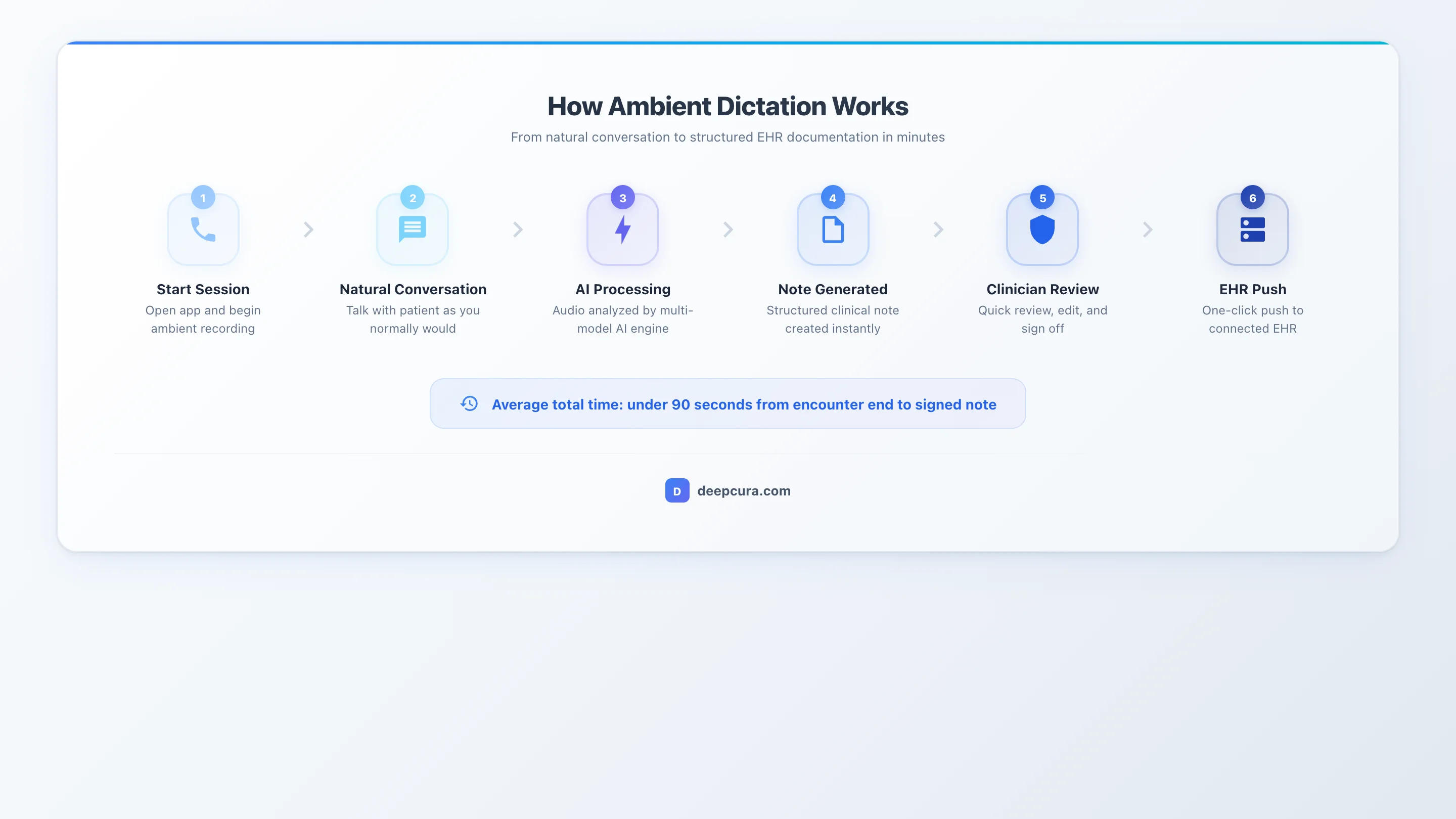 Infographic: Ambient dictation workflow — from patient conversation through AI processing to EHR-ready clinical note.
DeepCura: Ambient Dictation + Full Platform
Ambient AI scribing, EHR integration, AI receptionist, and billing automation — all in one. $129/mo per provider.
+1 (415) 549-1829Available 24/7 · Set up in seconds · No credit card required
Ambient vs. Traditional Dictation vs. Manual Documentation
Ambient dictation did not emerge in a vacuum. It is the third generation of clinical documentation technology, following manual charting and traditional dictation. Understanding the differences helps clinicians appreciate what ambient dictation actually solves — and where the older approaches still have a place.
| Feature | Manual Documentation | Traditional Dictation | Ambient Dictation |
|---|---|---|---|
| Clinician Input | Type notes manually | Speak into microphone | Talk to patient naturally |
| Time Per Encounter | 10-16 minutes | 3-5 minutes | Under 2 minutes |
| Workflow Disruption | High (typing during/after visit) | Moderate (separate dictation step) | None (passive listening) |
| Output Format | Whatever clinician types | Raw text (requires formatting) | Structured note (SOAP, H&P) |
| Patient Eye Contact | Poor (looking at screen) | Moderate (dictating after visit) | Excellent (focused on patient) |
| EHR Integration | Direct typing into EHR | Copy-paste or Dragon integration | Native API push (varies by tool) |
| Cost | $0 (clinician time) | $79-$99/mo (Dragon) | $39–$150/mo self-serve (enterprise tools custom-priced) |
| Learning Curve | None | Moderate (voice commands) | Minimal (just start talking) |
| After-Hours Documentation | Common (pajama time) | Reduced | Eliminated |
Manual documentation — typing directly into the EHR during or after the visit — remains the default for most physicians despite being the most time-consuming approach. It costs nothing in software, but the hidden cost is enormous: the nearly 2:1 EHR-and-desk-work-to-patient-care ratio documented by Sinsky et al. in the Annals of Internal Medicine means that for every hour a physician spends with patients, nearly two hours go to EHR and administrative tasks. That ratio drives burnout, reduces patient throughput, and degrades the quality of the doctor-patient interaction as clinicians split attention between the screen and the patient.
Traditional dictation — products like Nuance Dragon Medical One — reduced documentation time by letting physicians narrate their notes into a microphone. The speech-to-text output still required formatting, template management, and manual EHR entry. The physician had to mentally reconstruct the encounter and narrate it in a structured format, which is a separate cognitive task from the encounter itself. Traditional dictation improved efficiency but did not eliminate documentation as a distinct workflow step.
Ambient dictation is the only approach that eliminates documentation as a separate task from patient care. The note is a byproduct of the encounter, not a product of additional clinician effort after the encounter ends. Traditional medical dictation software reduced the problem. Ambient dictation solved it.
Top 5 Ambient Dictation Tools in 2026
The ambient dictation market has consolidated around several distinct approaches: full-platform solutions that bundle ambient scribing with broader clinical workflow automation, focused ambient scribes that do one thing well, enterprise-grade solutions built for health systems, and specialized tools optimized for voice navigation or evidence-linked documentation. Here are the five best options ranked by overall value for clinical practices.
#1. DeepCura — Best Full-Platform Ambient AI
Ambient dictation is one component of DeepCura's complete clinical AI platform — and that is what sets it apart from every other tool on this list. Where competitors offer ambient scribing as a standalone product, DeepCura delivers ambient dictation alongside AI receptionist, billing automation, fax management, patient intake, and native EHR integration. The result is a single platform that replaces three to five separate tools at a lower total cost.
The ambient scribe listens to patient encounters in real time and generates structured clinical notes — SOAP, H&P, progress note, or custom formats — in under two minutes. Clinicians choose their AI engine: GPT-4o, Claude, or Gemini. That flexibility matters because different models perform differently across specialties and encounter types. A psychiatrist may prefer Claude's nuanced language handling, while a primary care physician may favor GPT-4o's speed. The ability to switch models without switching platforms is unique to DeepCura.
Native EHR integration covers athenahealth, eClinicalWorks, AdvancedMD, OptiMantra, Epic, DrChrono, CharmHealth, and Cerner. Notes push directly into the patient chart via API — no copy-paste, no scraping workarounds. Beyond documentation, DeepCura suggests ICD-10 and CPT codes with E&M integrity checks, automates prior authorization language, manages inbound faxes with AI-powered summarization, and runs a 24/7 AI receptionist that handles calls and scheduling. For practices evaluating ambient dictation, the question is whether scribing alone justifies the cost — or whether a full-platform solution at a comparable price delivers more value. At $129/month, DeepCura answers that question decisively. For a deeper look at the full platform, see our AI medical scribe overview.
Pricing: $129/month per provider (or $999/yr) — all features included, with 1,000 credits a month across every AI agent (a standard note costs 1 credit).
Best for: Practices that want ambient dictation as part of a complete clinical workflow platform.
#2. Freed AI — Best Simple Ambient Dictation
Freed AI is the simplest ambient dictation tool on the market. It does exactly one thing — listen to encounters and generate notes — and it does that one thing with minimal friction. There is no EHR native API integration, no billing automation, no receptionist, and no fax management. For clinicians who want a scribe and nothing else, that focused simplicity is the appeal.
The ambient capture process mirrors the standard workflow: start recording, see the patient, stop recording, and receive a structured note within one to two minutes. Freed AI supports SOAP, H&P, and custom note templates. The interface is clean and intuitive — most clinicians are productive within five minutes of first use. On the Apple App Store, Freed AI holds a 4.9 out of 5 rating, reflecting genuine user satisfaction with the core ambient scribing experience.
The limitation is scope. Freed AI's Premier plan at $119/month adds scraping-based EHR push and beta billing code suggestions, bringing its price within $10 of full-platform solutions like DeepCura that include native EHR write-back, AI receptionist, and billing automation. The Starter plan at $39/month caps notes at 40 per month, making it viable only for very low-volume providers. For details, see our Freed AI review and our DeepCura vs. Freed AI comparison.
Pricing: $39-$119/month (tiered). Best for: Solo doctors wanting the simplest possible ambient scribe.
#3. Nuance DAX Copilot — Best Enterprise Ambient
Nuance DAX Copilot is the ambient dictation solution built for large health systems — particularly those running Epic. Backed by Microsoft's infrastructure and integrated with the Microsoft Cloud for Healthcare, DAX Copilot represents the enterprise end of the ambient dictation spectrum. It is the successor to Dragon Medical One, evolving Nuance's legacy dictation platform into a fully ambient AI product.
DAX Copilot captures clinical encounters and generates notes that flow into Epic workflows with the deepest integration available from any vendor. The system handles complex multi-provider environments, supports enterprise-grade compliance frameworks, and offers administrative dashboards for monitoring usage, accuracy, and adoption across departments. For health systems with thousands of providers, that enterprise infrastructure is non-negotiable.
The trade-offs are cost and deployment time. DAX Copilot pricing is custom and not published — it is sold on enterprise contracts and generally lands well above independent alternatives. Deployment requires months of IT coordination, Epic configuration, and organizational change management. For large health systems with dedicated IT teams and enterprise budgets, that investment may be justified. For independent practices and small groups, it is prohibitive. DAX Copilot is the right choice when enterprise scale is the requirement — not when simplicity or cost-efficiency is the priority.
Pricing: Not publicly priced (custom enterprise). Best for: Large health systems, particularly those running Epic.
#4. Suki AI — Best Voice-First Ambient
Suki AI takes a voice-first approach to ambient clinical documentation. While other tools focus exclusively on passive listening, Suki combines ambient encounter capture with voice command navigation — allowing clinicians to interact with the AI conversationally during and between encounters. A clinician can say "Suki, add that the patient reports seasonal allergies" mid-visit, and the information is incorporated into the note in real time.
The ambient dictation core works like other tools: Suki listens to the encounter, processes the conversation, and generates a structured note. The differentiator is the voice-command layer that extends the AI's utility beyond documentation. Clinicians can use voice commands to navigate the EHR, pull patient information, and issue clinical instructions without touching a keyboard. For physicians who find that ambient-only tools miss specific details they want to emphasize, Suki's voice-command supplement provides a middle ground between fully passive ambient capture and active dictation.
Suki integrates with several EHR systems and supports a growing list of specialties. The company has invested heavily in specialty-specific language models that improve accuracy for fields like cardiology, orthopedics, and oncology. Suki does not publish pricing (contact sales); it is positioned between focused ambient scribes and enterprise solutions — generally priced higher than Freed AI or DeepCura but offering the unique voice-command interaction model that some clinicians prefer. For a detailed assessment, see our Suki AI review.
Pricing: Not published — contact sales. Best for: Doctors who want ambient dictation plus voice command navigation.
#5. Abridge — Best for Linked Evidence
Abridge takes a transparency-first approach to ambient clinical documentation. The platform captures clinical encounters, generates structured notes, and — critically — links every statement in the generated note back to the specific moment in the transcript where that information was discussed. If the AI writes "Patient reports worsening knee pain over the past two weeks" in the note, the clinician can click that sentence and hear the exact portion of the conversation where the patient described the symptom.
That linked-evidence model addresses one of the primary concerns healthcare systems have with AI-generated documentation: auditability. When a note is linked to its source audio, clinicians can verify accuracy at a granular level, compliance teams can audit documentation quality, and the organization has a defensible record of how each note was generated. For health systems operating under regulatory scrutiny or malpractice risk frameworks, that audit trail has real value.
Abridge has secured partnerships with several large health systems and integrates with Epic and other enterprise EHRs. The platform is designed for institutional deployment rather than individual practice adoption. Pricing is custom and enterprise-oriented, which puts it out of reach for independent practices. For health systems that prioritize documentation transparency and compliance auditability, Abridge offers a differentiated approach that no other ambient dictation tool matches. For a deeper look, see our Abridge review.
Pricing: Custom (enterprise). Best for: Health systems that want transcript-linked documentation for auditing.
For a broader comparison that includes additional tools beyond ambient dictation, see our Best AI Medical Scribes in 2026 ranking and our guide to medical transcription software.
How to Set Up Ambient Dictation in Your Practice
Selecting a tool is step one. Implementation determines whether that tool delivers on its promise. The following six-step guide covers everything from initial workflow assessment through full rollout — designed for independent practices and small groups that do not have a dedicated IT department managing the deployment.
Step 1: Evaluate Your Documentation Workflow
Before choosing a tool, quantify the problem. Track documentation time across your practice for one to two weeks. Measure time per note for each provider, total after-hours charting time, note completion rates within 24 hours of the encounter, and the types of encounters that generate the most documentation burden. This baseline gives you a concrete metric to measure ambient dictation's impact against.
Key questions to answer during evaluation: How many notes does each provider generate per day? What note formats does your practice use — SOAP, H&P, progress notes, procedure notes? Which specialties are represented? What EHR system does your practice run? What is the current monthly cost of documentation-related tools, transcription services, or scribe labor? The answers determine which ambient dictation tool fits your practice — and establish the ROI case for the investment.
Step 2: Choose the Right Tool
Match the tool to your practice's specific requirements. Use the following decision framework:
- Budget under $50/month per provider and low volume: Freed AI Starter ($39/month, 40 notes/month cap)
- Budget $100-$150/month and want a complete platform: DeepCura ($129/month, all features included)
- Voice command interaction preferred: Suki AI (pricing not published)
- Enterprise health system on Epic: Nuance DAX Copilot (custom pricing)
- Audit trail and linked evidence required: Abridge (custom pricing)
EHR compatibility is often the deciding factor. If your practice runs Epic, eClinicalWorks, athenahealth, or any of the EHRs DeepCura supports natively (athenahealth, eClinicalWorks, AdvancedMD, OptiMantra, Epic, DrChrono, CharmHealth, and Cerner), prioritize tools with API-level integration over those that rely on copy-paste or scraping. The time savings from ambient dictation erode quickly if the last-mile EHR transfer is manual.
Step 3: Verify HIPAA Compliance
Ambient dictation tools process protected health information — audio recordings of clinical encounters containing patient names, diagnoses, medications, and treatment plans. HIPAA compliance is not optional.
Before processing any patient data through an ambient dictation tool, verify the following: the vendor provides a signed Business Associate Agreement (BAA) specific to your practice, audio recordings are encrypted in transit and at rest, the vendor's data handling policy explicitly states whether audio is retained and for how long, no patient data is used for model training without explicit consent, and the vendor has completed SOC 2 Type II or equivalent security certification. Do not rely on a vendor's marketing claim of "HIPAA compliance" — request the BAA, read the data processing agreement, and confirm with your practice's compliance officer or legal counsel.
A Business Associate Agreement is a legal requirement under HIPAA before any vendor processes PHI on your behalf. If a vendor cannot provide a BAA, do not use that tool for clinical encounters. No exceptions.
Step 4: Run a Pilot with 2-3 Providers
Do not roll ambient dictation out to your entire practice on day one. Start with two to three providers who represent different specialties, encounter volumes, and technology comfort levels. Run the pilot for two to four weeks, covering at least 50 to 100 encounters per provider.
During the pilot, track three metrics: note accuracy (percentage of generated notes that require no or minimal editing), time savings (compare documentation time per note against your baseline from Step 1), and provider satisfaction (qualitative feedback on workflow integration, ease of use, and note quality). A successful pilot shows 85%+ accuracy on standard encounters, measurable time savings, and provider willingness to continue using the tool. If accuracy falls below 80% or providers report that reviewing and editing notes takes nearly as long as writing them manually, either adjust the tool's configuration — many ambient dictation platforms allow template customization and specialty-specific tuning — or evaluate alternative tools before expanding.
Step 5: Train Your Clinical Team
Ambient dictation tools require minimal training — most clinicians are productive within five to ten minutes. Focus training on three areas: how to start and stop a recording session, how to review and edit generated notes, and how to handle edge cases (multi-speaker encounters, phone calls that interrupt the visit, patients who decline recording).
Patient notification is equally important. While ambient dictation tools do not typically require explicit patient consent beyond standard practice recording policies, patients should be informed that AI is being used to assist with documentation. Most practices add a brief statement to their intake forms and post signage in exam rooms. Transparency builds trust and avoids patient concerns about undisclosed recording.
Create a one-page quick-start guide for your providers: (1) Open the app, (2) Tap Start, (3) See the patient, (4) Tap Stop, (5) Review the note, (6) Approve and push to EHR. That is the entire workflow. Post it in each exam room during the first two weeks of rollout.
Step 6: Roll Out and Monitor Quality
Once the pilot validates the tool, expand to your full practice. Schedule the rollout during a period with IT support availability — not during your busiest clinical week. Establish an ongoing quality monitoring process: review a random sample of AI-generated notes weekly for the first month, then monthly thereafter.
Key quality metrics to track post-rollout: percentage of notes requiring substantive edits (target: under 15% for standard encounters), average time from encounter end to note approval, provider adoption rate (percentage of eligible encounters using ambient dictation), and patient satisfaction scores (watch for any changes correlated with the rollout). If accuracy degrades over time for specific encounter types, work with the vendor's support team to adjust templates or specialty-specific settings.
Implementation Checklist:
- BAA signed with ambient dictation vendor
- IT security review completed
- EHR integration tested (if applicable)
- 2-3 provider pilot completed
- Note accuracy benchmarked across top 10 encounter types
- Staff training completed
- Full rollout scheduled with IT support window
- Monthly accuracy review process established
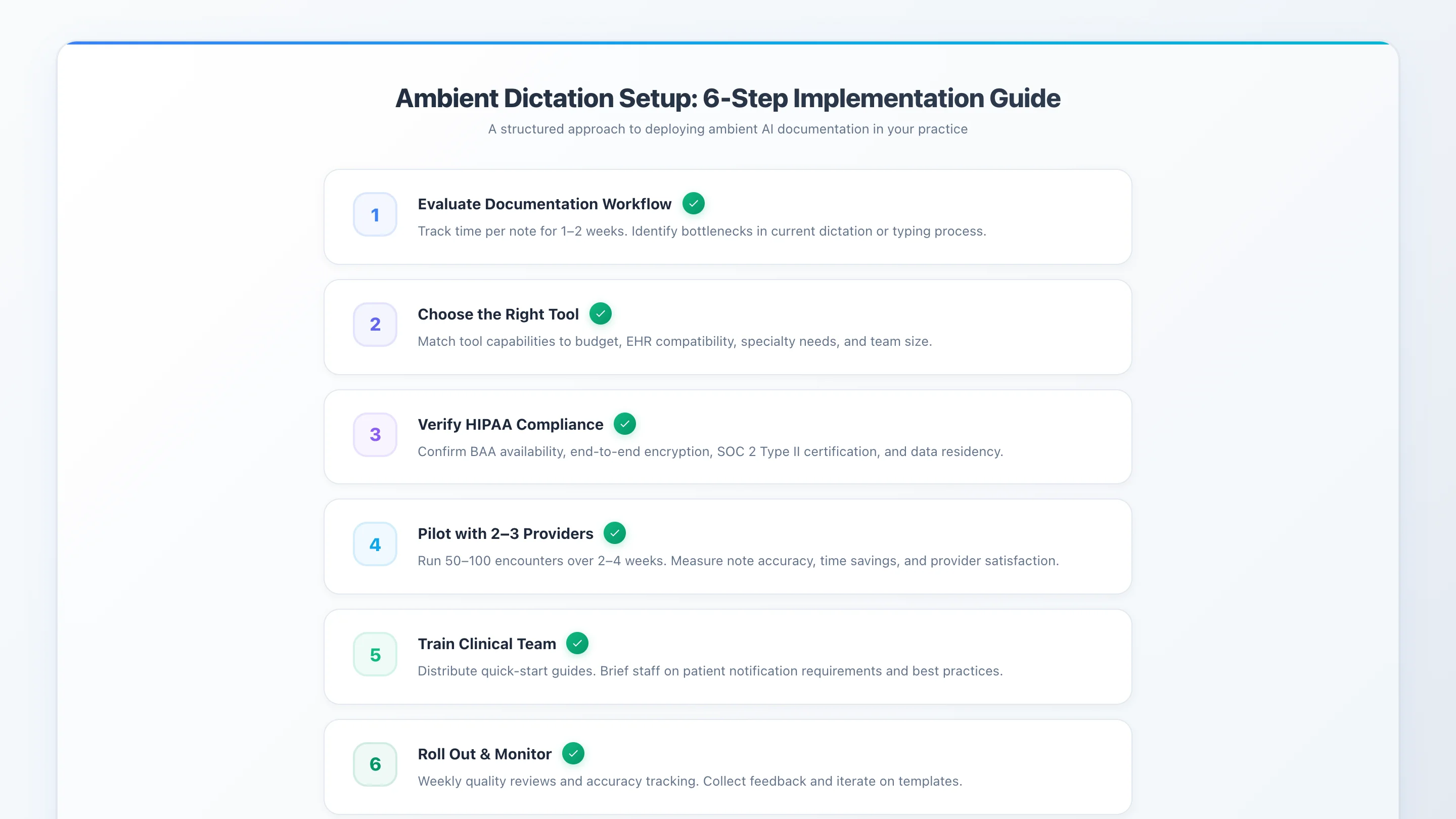 Infographic: 6-step implementation checklist for setting up ambient dictation in your practice.
Ambient Dictation by Specialty
Ambient dictation performance varies by specialty. The technology performs best in standard two-speaker outpatient encounters and faces increasing complexity with multi-speaker visits, procedure-heavy specialties, and highly specialized medical terminology. The following table summarizes performance and tool recommendations by specialty based on current capabilities in 2026.
| Specialty | Ambient Dictation Performance | Recommended Tool | Notes |
|---|---|---|---|
| Primary Care | Excellent | DeepCura or Freed AI | Standard visits captured reliably |
| Psychiatry | Good (nuanced language) | DeepCura or Heidi Health | Custom templates critical for mental health |
| Cardiology | Good | DeepCura or Suki AI | Complex terminology handled well |
| Orthopedics | Good | DeepCura | Procedure documentation needs review |
| Pediatrics | Moderate (3-way conversations) | DeepCura | Parent-child-doctor dynamics challenging |
| Oncology | Moderate | DeepScribe | Specialty-tuned AI with human QA recommended |
| Surgery | Moderate (operative reports) | Dragon Medical One | Traditional dictation may be preferred for op notes |
| Emergency Medicine | Good (high-volume) | DeepCura | Fast turnaround critical in ED settings |
Primary care and family medicine represent the sweet spot for ambient dictation. Encounters follow predictable patterns — chief complaint, history, review of systems, focused exam, assessment, plan — and the two-speaker format aligns perfectly with diarization capabilities. Most ambient dictation tools achieve 90%+ accuracy on primary care encounters with minimal post-generation editing.
Psychiatry and behavioral health present a nuanced challenge. The clinical content of a psychiatric encounter is the conversation itself — subtle language, affect descriptions, and therapeutic interactions that require careful documentation. Ambient dictation handles the factual elements well (medication management, symptom inventory) but may miss the qualitative observations that characterize strong psychiatric notes. Custom note templates tuned for mental health encounters significantly improve output quality.
Pediatrics introduces three-way conversations — parent, child, and clinician — which stress speaker diarization. Current ambient dictation tools handle this scenario adequately but not perfectly. Expect more post-generation editing in pediatric encounters, particularly when the parent provides most of the history while the child is the patient.
Surgery and procedure-heavy specialties remain the most challenging use case for ambient dictation. Operative reports require precise, sequential documentation of procedural steps that are not typically verbalized during the procedure itself. For operative reports, traditional dictation — narrating the procedure post-operatively into a microphone — may still be the most efficient approach. Ambient dictation excels at the pre-operative and post-operative encounters that surround surgical care.
For most outpatient settings, ambient dictation produces notes that are 85 to 95% complete on the first pass. The remaining 5 to 15% typically involves specialty-specific terminology, nuanced clinical reasoning, or encounter-specific details that the clinician adds during review. That review process takes one to three minutes — a fraction of the 10 to 16 minutes required to write the note from scratch. For a comprehensive overview of how AI documentation tools work across specialties, see our guide to medical transcription software and Best ChatGPT for Doctors.
Try Ambient Dictation Free — No Credit Card Required
DeepCura's ambient AI listens while you see patients. SOAP notes, EHR push, billing codes — automatically. $129/mo.
+1 (415) 549-1829Available 24/7 · Set up in seconds · No credit card required

Frequently Asked Questions
What is ambient dictation?
Ambient dictation is AI technology that passively listens to doctor-patient conversations and automatically generates structured clinical notes. Unlike traditional dictation where doctors speak into a microphone and narrate findings, ambient dictation requires no active input from the clinician. The doctor talks to the patient normally while the AI captures the encounter in the background, processes the conversation using speech recognition and natural language processing, and produces a complete clinical note — typically in SOAP, H&P, or custom format — within one to two minutes of the encounter ending.
How accurate is ambient dictation?
Most ambient dictation tools produce notes that are 85 to 95% complete for standard two-speaker outpatient encounters. Primary care and general internal medicine achieve the highest accuracy because encounters follow predictable documentation patterns. Complex specialties — oncology, surgery, multi-speaker pediatric visits — may require more post-generation editing. Accuracy improves over time as tools learn specialty-specific terminology and as clinicians optimize their template configurations. The practical standard is not perfection — it is whether reviewing an AI-generated note takes meaningfully less time than writing the note from scratch.
Is ambient dictation HIPAA compliant?
All major ambient dictation tools listed in this guide are HIPAA compliant and provide Business Associate Agreements to covered entities. However, "HIPAA compliant" is not a binary certification — it refers to a set of administrative, physical, and technical safeguards that the vendor implements. Before using any ambient dictation tool with patient encounters, verify that the vendor provides a signed BAA, encrypts audio in transit and at rest, and has completed a third-party security assessment such as SOC 2 Type II. Do not process PHI through any tool without a BAA in place.
How much does ambient dictation cost?
Ambient dictation ranges from $39/month for Freed AI's Starter plan (40 notes/month cap) to custom enterprise pricing for solutions like Nuance DAX Copilot (not publicly priced). DeepCura at $129/month per provider offers the strongest value with ambient dictation bundled alongside AI receptionist, billing automation, fax management, and native EHR integration (athenahealth, eClinicalWorks, AdvancedMD, OptiMantra, Epic, DrChrono, CharmHealth, and Cerner). Suki AI does not publish pricing for its voice-first ambient approach. Abridge uses custom enterprise pricing. When evaluating cost, factor in what each tool replaces — a $129/month platform that eliminates the need for separate scribe, receptionist, and fax services delivers better total economics than a $39/month tool that only handles notes.
What is the difference between ambient dictation and ambient clinical documentation?
They refer to the same technology. "Ambient dictation" emphasizes the passive audio capture mechanism — the AI listens to the encounter without requiring the clinician to actively dictate. "Ambient clinical documentation" emphasizes the structured output — the AI generates formatted clinical notes, not raw transcription. Both terms describe the same end-to-end workflow: passive listening during a clinical encounter that produces structured documentation automatically. Vendors, researchers, and clinicians use the terms interchangeably.
Does ambient dictation work with my EHR?
EHR integration varies significantly by tool. DeepCura offers native API integration with athenahealth, eClinicalWorks, AdvancedMD, OptiMantra, Epic, DrChrono, CharmHealth, and Cerner — allowing notes to push directly into the patient chart without copy-paste. Nuance DAX Copilot integrates deeply with Epic through Microsoft's infrastructure. Freed AI offers scraping-based EHR push on its Premier plan ($119/month), which automates copy-paste rather than writing structured data via API. Suki AI integrates with several EHR systems at varying depths. Abridge integrates with Epic and select enterprise EHRs. If your practice runs a less common EHR, verify integration compatibility before purchasing.
Can ambient dictation handle multiple speakers?
Most ambient dictation tools handle two-speaker encounters — one clinician, one patient — well, with speaker diarization accuracy above 95% in controlled clinical environments. Three-speaker encounters — such as a parent, child, and doctor in pediatrics, or an interpreter-mediated visit — are more challenging. Speaker diarization accuracy decreases as the number of speakers increases, and the AI may occasionally attribute statements to the wrong speaker. For multi-speaker encounters, expect to spend slightly more time reviewing generated notes. This is an area of active improvement across all ambient dictation vendors.
How long does it take to set up ambient dictation?
Most ambient dictation tools designed for independent practices — DeepCura, Freed AI, Suki AI — can be set up in under five minutes. Download the app, create an account, configure note template preferences, and start recording. No IT involvement is required. Enterprise solutions like Nuance DAX Copilot require substantially more deployment time — typically three to six months of IT coordination, Epic integration configuration, security review, and organizational change management. The implementation timeline correlates directly with the tool's enterprise complexity and integration depth.
Try DeepCura Free — No Credit Card Required
Ambient dictation + AI receptionist + EHR integration + billing automation. One platform, $129/mo. Join 6,000+ clinicians.
+1 (415) 549-1829Available 24/7 · Set up in seconds · No credit card required
References
[1] Sinsky, C., et al., "Allocation of Physician Time in Ambulatory Practice: A Time and Motion Study in 4 Specialties," Annals of Internal Medicine, 2016. annals.org/aim/article-abstract/2546704
[2] Shanafelt, T.D., et al., "Changes in Burnout and Satisfaction With Work-Life Integration in Physicians Over the First 2 Years of the COVID-19 Pandemic," Mayo Clinic Proceedings, 2022. mayoclinicproceedings.org
[3] U.S. Department of Health and Human Services, "HIPAA for Professionals," HHS.gov. hhs.gov/hipaa/for-professionals
[4] U.S. Department of Health and Human Services, "Business Associate Contracts — Sample BAA Provisions," HHS.gov. hhs.gov/hipaa/for-professionals/covered-entities/sample-business-associate-agreement-provisions
[5] DeepCura, "AI Medical Scribe Platform — Ambient Scribing, AI Receptionist, EHR Integration," DeepCura.com. deepcura.com
[6] Nuance Communications, "Dragon Ambient eXperience (DAX) Copilot," Nuance.com. nuance.com/healthcare/ambient-clinical-intelligence
[7] Freed AI, "AI Medical Scribe — Ambient Clinical Documentation," Freed.ai. getfreed.ai
[8] Suki AI, "Voice AI Assistant for Clinicians," Suki.ai. suki.ai
[9] Abridge, "AI-Powered Clinical Documentation," Abridge.com. abridge.com