
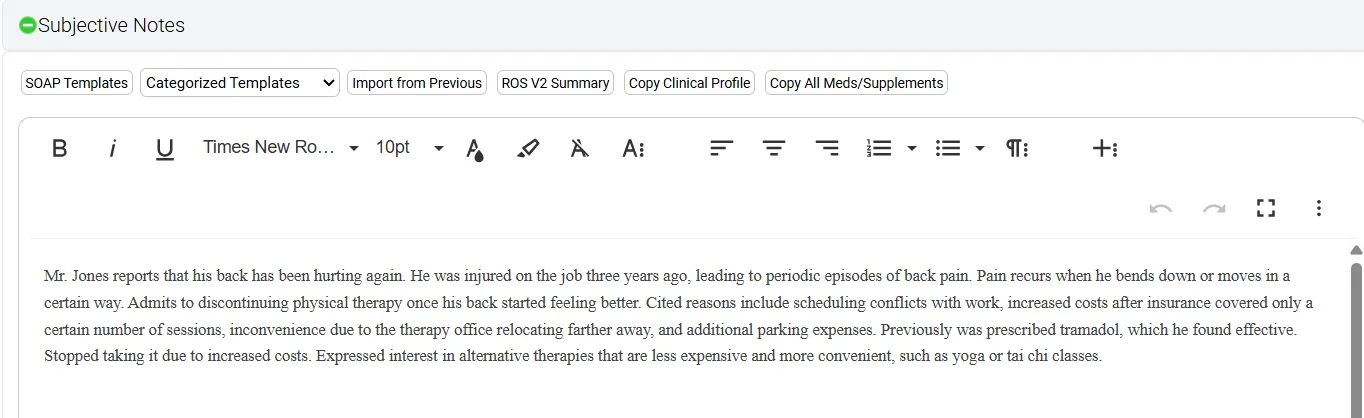
Yes — DeepCura works inside OptiMantra. It is the AI charting integration OptiMantra lists on its integrations page [2], and the round trip is three moves: Pass as context, in the AI Assistant bar of an OptiMantra visit note, sends the patient and the visit to DeepCura; you record the visit in DeepCura; Import AI Notes brings the finished note back into four charting fields — Subjective, Chart Notes, Diagnosis, and Plan & Patient Instructions. Schedules and patient lists do not sync, and orders and prescriptions stay in OptiMantra.
Since 11 November 2026 OptiMantra also sells its own AI Scribe [6], so which one fits depends on the practice:
- A SOAP draft inside the chart, cheapest, from one vendor → OptiMantra's AI Scribe: $19 per provider for up to 30 notes a billing cycle, or $59 with no note cap (OptiMantra's pricing, checked 17 November 2026).
- Notes that aren't SOAP — functional timelines, supplement protocols, injection records — written to your own template and placed in OptiMantra's fields, or the phones, faxes and inbox handled as well → DeepCura.
- A general-purpose scribe you already pay for → keep it if pasting into four fields per visit is fine; neither Freed nor Heidi is on OptiMantra's integration list.
- Charting in Cerbo, OptiMantra's sister product → no native DeepCura write-back; the note is copied in.
DeepCura publishes this guide and is the integration it describes. OptiMantra lists DeepCura and advertises a sign-up discount for it; since November 2026 it also sells a competing scribe, and this page says where that scribe fits better. Integration mechanics come from DeepCura's shipping product, its code and its Help Center; OptiMantra's side is described only as OptiMantra and that Help Center publish it. Prices were checked on 17 November 2026 or on the dates in the pricing table. Two images are real captures of OptiMantra's own screens, made for DeepCura's Help Center and homepage (the one patient shown is made up); the note image is an authored example, as captioned. No independent clinician reviewed this page.
The round trip: Pass as context, record, Import AI Notes
What OptiMantra sends when you click Pass as context
Open the patient's charting history in OptiMantra and the visit note you are working on, then click Pass as context in the AI Assistant bar [1]. OptiMantra sends DeepCura the patient's name, date of birth and address, OptiMantra's own patient ID, and whatever that visit's Subjective, Chart Notes, Diagnosis and Plan & Patient Instructions fields already hold. Nothing else travels: not the patient's other visits, not OptiMantra's structured medication, allergy or lab records, not the schedule.

Which DeepCura chart the visit lands on
DeepCura files the visit on the chart that answers to that OptiMantra patient ID. The first pass for a patient opens a chart titled with the name exactly as OptiMantra spells it; every later pass lands on the same chart — brought back if it was archived — and lifts it to the top of your patient list. A name and a birth date alone never join two charts, because two people can share both: if you already have a chart for that patient that the integration did not create (one you started by hand, or imported from a file), DeepCura opens a new chart and posts a card on the practice timeline naming both, for someone to compare and merge. So start every OptiMantra visit with Pass as context.
Recording the visit
Open the chart, choose your template and record, in the room or on a telehealth call. The passed visit sits on the chart as its own entry; select it as context and the note is written knowing what OptiMantra already held.
Back into OptiMantra: Push or auto-publish, then Import AI Notes
Click Push to Optimantra on the finished note. A conversion preview shows your note beside OptiMantra's four fields, with a fidelity score and a pencil on each field to correct the conversion before it goes. Or switch on Auto-publish new notes to Optimantra (skip preview): every new or regenerated note is then sent the moment it is generated (typed chat edits and questions never are), and the setting warns that DeepCura will not learn from edits you would have made in the preview.
In OptiMantra, open the patient's visit note, click AI Assistant → Import AI Notes, find the note by the patient's name and choose Append (adds to what the fields hold) or Overwrite (replaces it) — Append when staff have already charted vitals or intake text there. In DeepCura the button turns green, Pushed ✓ · Re-push, and a re-push asks first because it sends the note again. Sending to OptiMantra, either way, carries no credit charge.
What the integration does not do — and why your patient list starts empty
The connection is narrower than a sync:
- No patient-directory sync. Right after connecting, DeepCura's patient search finds none of your OptiMantra patients. That is normal: patients come over one at a time, when you click Pass as context. To bring a whole list in, export it from OptiMantra where your account allows and use Import & Sync … from File on DeepCura's Patients page (CSV or Excel; the label follows your terminology, such as Clients) — then expect the duplicate card described above the first time each imported patient is passed.
- No schedule sync, in either direction. OptiMantra appointments do not appear in DeepCura, and nothing booked in DeepCura appears in OptiMantra.
- No orders, prescriptions or lab requisitions. They stay in OptiMantra; a plan that says "order a GI-MAP" arrives as text.
- No billing objects. ICD-10 and CPT codes your template asks for arrive as text inside the note; DeepCura does not create OptiMantra superbills or claims.
- No edits flow back. Changes made in OptiMantra after import stay there, unless you pass that visit again.
- One DeepCura login per connection. The User ID and Security Key belong to one DeepCura account; each clinician who pushes needs their own account connected.
Connecting OptiMantra and DeepCura, step by step
DeepCura's Help Center puts setup at about ten minutes [1]:
- Create the DeepCura account — free trial with credits, no card. If you want OptiMantra's partner discount, ask OptiMantra for its DeepCura sign-up details before you subscribe.
- In DeepCura: Settings → Profile Settings → Integrations → EHR, then choose Optimantra. Copy the User ID and the Security Key with the icons beside them.
- In OptiMantra: Settings → Clinical Integrations → DeepCura. Paste both values, with no extra spaces, and save.
- Back in DeepCura: decide on auto-publish, then click Save Integration Settings.
- Build the template you will chart on (next section) — Emily, DeepCura's onboarding agent, drafts one with you on the setup call.
- Test one real visit end to end — Pass as context → record → Push → Import AI Notes — and read each OptiMantra field against the DeepCura note.
When a push fails, the message says why. Credential Mismatch: copy both values again (the refresh icon beside the key makes a new key, which OptiMantra then needs too). Setup Required: you are probably signed in to a DeepCura account that was never connected. Service Unavailable or Server Timeout: OptiMantra's side; retry shortly. A note missing under Import AI Notes is usually a name mismatch — the note carries the DeepCura chart's name, which matches OptiMantra's spelling automatically only for charts made by Pass as context.
Connect OptiMantra on a call with Emily
DeepCura's onboarding agent walks you through the connection and builds your template on the call. $129/mo · 1,000 credits/mo · free trial, no card.
+1 (415) 549-1829Available 24/7 · Set up in seconds · No credit card required
How your template's sections land in OptiMantra's four fields
A model reads the finished note and lifts it into the four fields as formatted text, lists and tables included. The default reading is SOAP — subjective content to Subjective, objective findings to Chart Notes, the assessment to Diagnosis, the plan to Plan & Patient Instructions — and each field follows a plain-language instruction (Subjective's begins "Extract the complete subjective section from the note, including all details"). When your sections do not divide cleanly into S, O, A and P, rewrite those instructions to name your sections in order, under Settings → Automation Rules → AI Gridhook (the instruction text, never the field names), and watch the next few previews.
The templates are built, not picked: DeepCura has no library of pre-built OptiMantra or specialty templates. Emily drafts one from your specialty on the setup call; Talk to Template turns a spoken description into one; Start from Sample Note reverse-engineers one from a de-identified note you paste (an OptiMantra note you like works); the Network Template Gallery holds templates other clinicians chose to share.
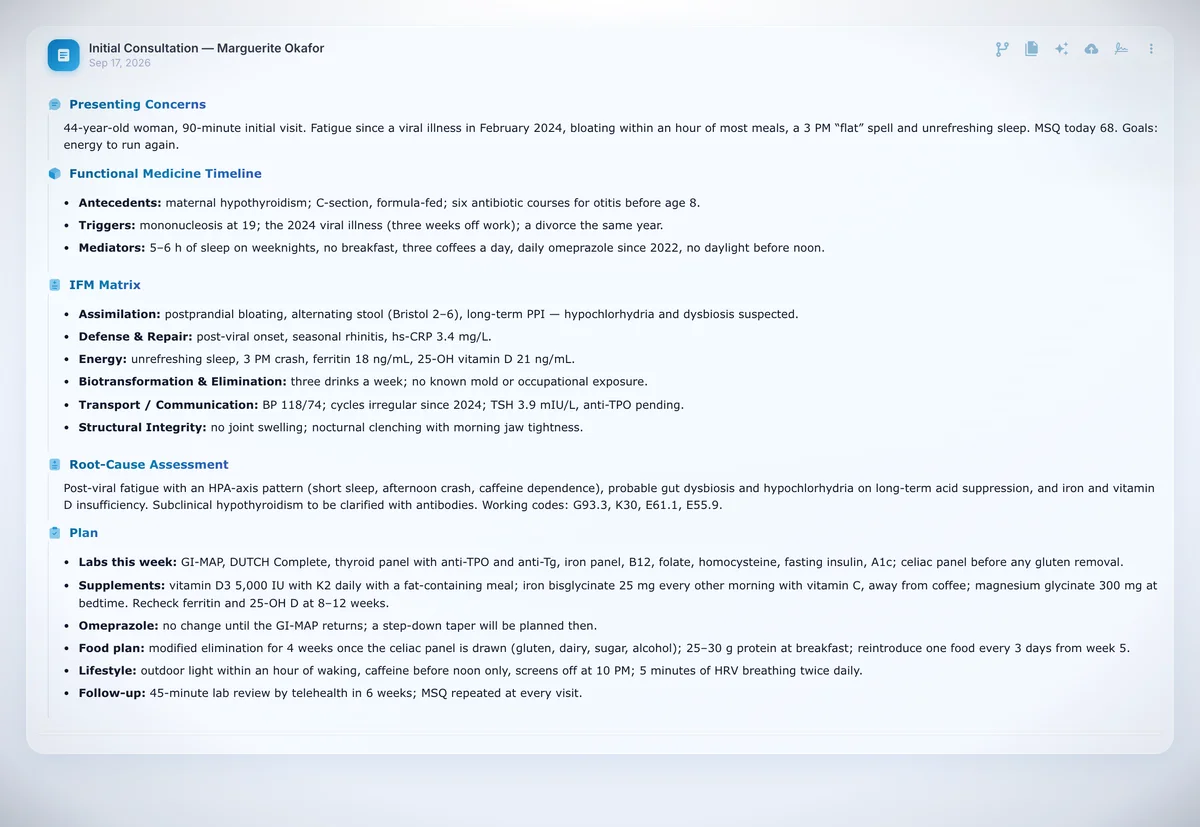
In that note, Presenting Concerns and the Functional Medicine Timeline belong in Subjective; the Root-Cause Assessment and its working codes in Diagnosis; labs, supplements, food plan, lifestyle and follow-up in Plan & Patient Instructions. The IFM Matrix is the hard case — it mixes symptoms with findings (ferritin, hs-CRP, a blood pressure), so a SOAP reading must split or place it; to keep it whole, name it in one field's instruction. A starting split for other practices OptiMantra serves:
| Practice | Subjective | Chart Notes | Diagnosis | Plan & Patient Instructions |
|---|---|---|---|---|
| Functional / integrative | Concerns, timeline, questionnaire scores | Vitals, exam, lab values reviewed | Root-cause assessment, working codes | Labs, supplements with doses, food plan, follow-up |
| Naturopathic | Chief concern, diet and lifestyle review | Vitals, exam, results | Naturopathic assessment | Botanical, nutritional or IV plan as discussed |
| Med spa / aesthetics | Goals, contraindications and consent discussed | Areas assessed; product and units per area as stated | Indication | Treatment given, aftercare, touch-up |
| Primary care / direct primary care | Chief complaint, HPI, ROS | Vitals, exam, results | Assessment per problem, ICD-10 | Plan per problem, medications, follow-up |
| Chiropractic / acupuncture | Complaint, pain scale, daily-living limits | Range of motion, orthopedic tests; tongue and pulse | Diagnoses, TCM pattern | Regions adjusted, points used, home care |
No template carries what nobody said: a lot number, a supplement brand or units per injection site reach the note only if spoken aloud — otherwise add them in OptiMantra after import. For psychiatry on OptiMantra (MSE to Chart Notes, psychiatric and substance-use history to Subjective), see the psychiatry guide's OptiMantra section; for the content of a functional-medicine note, the functional medicine scribe guide; for chiropractic, the chiropractors guide.
What an OptiMantra clinic spends in credits
DeepCura is $129 per provider per month (or $999 a year) with 1,000 credits a month across every agent. A standard note costs 1 credit, a premium reasoning model 3, the deepest tier 15; recording costs 0.1 credit when it starts and 0.1 at each auto-save, roughly every three minutes. Pass as context, the conversion preview and the push carry no credit charge of their own.
| Visit | Standard model | Premium model on the note |
|---|---|---|
| 15-minute injectables visit | ≈ 1.6 credits (1 note + 0.1 start + 5 auto-saves) | ≈ 3.6 |
| 30-minute follow-up | ≈ 2.1 | ≈ 4.1 |
| 45-minute lab review by telehealth | ≈ 2.6 | ≈ 4.6 |
| 90-minute functional-medicine intake | ≈ 4.1 | ≈ 6.1 |
A functional-medicine clinician with two 90-minute intakes and six 30-minute follow-ups a day, 20 days a month, uses about 21 credits a day — roughly 420 a month, or about 740 with a premium model on every note; both fit inside 1,000. A med-spa injector charting twenty 15-minute visits a day for 22 days uses about 700, but about 1,580 with a premium model on every note — what the $59/month add-on (1,000 → 2,000 credits) is for. The other agents draw on the same credits (an AI-read fax costs 1), so leave headroom if you switch them on.
On price: OptiMantra's integrations page says practices that sign up through OptiMantra receive $30 off DeepCura's list price [2] — about $99 a month instead of $129 — so ask OptiMantra for its sign-up details first. Groups pay $116 per seat at 3–5 seats, $110 at 6–10 and $101 at 11+. Full pricing is on the plans page.
DeepCura, OptiMantra's own AI Scribe, or a scribe you copy from
How we judged. Six criteria for an OptiMantra practice, weighted: lands in OptiMantra's fields without retyping (25%) · fits the note your specialty writes, not only SOAP (20%) · clicks and logins per visit (15%) · price per provider at your caseload (15%) · work beyond the note — phones, fax, inbox (15%) · privacy, consent and what each system keeps (10%). Evidence: for DeepCura, the shipping product, its code and Help Center; for OptiMantra's AI Scribe, OptiMantra's product page, pricing and launch announcement (we have not used it — it launched six days before this page); for Freed and Heidi, published pricing on the dates shown. With no hands-on trial of each, we publish a fit table, not scores.
| Practice situation | Strongest fit | Why | Trade-off |
|---|---|---|---|
| A SOAP draft inside the chart; one vendor, one agreement, lowest price | OptiMantra AI Scribe | Starts inside the visit note; no second app or login; consent prompt before every recording | New (November 2026); SOAP drafts; no phones, fax or inbox |
| Fewer than about 30 visits a month | OptiMantra AI Scribe, Limited tier | $19 covers up to 30 notes a billing cycle | Past 30 notes, the $59 tier |
| Non-SOAP notes — timelines, matrices, protocols, injection records — placed in OptiMantra's fields | DeepCura | Template built for your account; four-field conversion with preview and fidelity score; passed visit as context | Second app and login; credits, not an uncapped allowance; patients arrive one at a time |
| Phones, faxes and inbox are as much the problem as the note | DeepCura | AI receptionist on its own number, AI fax, preview-then-confirm inbox, one account | Bookings land on DeepCura's calendar, not OptiMantra's |
| You already pay for a general-purpose scribe and don't mind pasting | Freed AI or Heidi Health | Familiar workflow; Heidi has a free tier; Freed's Premier plan includes an EHR push | Not on OptiMantra's integration list: paste, or test how its push fills OptiMantra's four fields |
| Tool | Plans | Monthly | Included / limits | Verified |
|---|---|---|---|---|
| DeepCura | All AI agents, per provider | $129 ($83.25 billed annually) | 1,000 credits/mo; 1 credit per standard note; +$59/mo add-on raises it to 2,000; seat tiers from $101 | 2026-08-17 |
| OptiMantra AI Scribe | Limited · Unlimited | $19 · $59 | per provider per billing cycle; up to 30 notes; add-on to an OptiMantra subscription · per provider per billing cycle; no note limit; 15-day trial (or 30 notes) for new accounts | 2026-11-17 |
| Freed AI | Starter · Core · Premier | $39 · $79 · $119 ($104 billed annually) | 40 notes/mo · unlimited notes · EHR push + ICD-10/CPT; 7-day trial | 2026-09-27 |
| Heidi Health | Free · Clinician | Free · $150 ($110 billed annually) | unlimited transcription + standard templates; advanced features gated · per user; 14-day free trial; custom templates | 2026-09-27 |
Vendor prices verified on the dates shown (earliest 2026-08-17); vendors change plans — confirm with each vendor before buying. DeepCura row: current plan; competitor rows: publicly published prices.
When DeepCura is not the right pick
If a SOAP draft where you already chart is all you want, or you see fewer than about 30 patients a month, OptiMantra's AI Scribe costs less and keeps everything in one system. If one calendar is non-negotiable, DeepCura's receptionist cannot book into OptiMantra; OptiMantra's own online booking and reminders are the simpler answer. If you want the scribe to place orders, e-prescribe or build superbills, none of that crosses. If you chart in Cerbo, there is no native write-back. And if you are still choosing an EHR, our private-practice EHR comparison weighs OptiMantra against the alternatives.
DeepCura's own limitations, plainly: credits rather than an uncapped note allowance; templates built for you, not picked from a library; another login beside OptiMantra; patients come over one visit at a time; and the four-field conversion is a model's reading of your note, so check the preview until it places your sections the way you want. Wider market: the AI medical scribe ranking, the Freed AI review, the Heidi Health review.
What two OptiMantra practices said
Both quotes come from case studies OptiMantra published in mid-2025, before it launched its own scribe [4][5].
DeepCura has allowed me to save significant time charting and my visits are now primarily focused on the patient, their goals, and treatment plan. I’m so thrilled with DeepCura and the OptiMantra integration—I would not go back to manually documenting.
Mainly, I switched because my notes transfer from the AI scribe to OptiMantra in just two clicks. That kind of integration is rare and powerful.
Beyond the note: phones, fax and the inbox next to OptiMantra
The same DeepCura account answers the practice's phone with an AI receptionist on an included number, reads incoming faxes on an included fax number, and works fax, email and text messages from one inbox where a person previews and confirms every action before it runs — which is why DeepCura calls itself an Electronic Health Workforce rather than a scribe. Next to OptiMantra, mind the seams: the receptionist books into DeepCura's own calendar (which can treat a connected Google or Outlook calendar's events as busy), never into OptiMantra's appointment book, and faxed documents stay in DeepCura until someone files them in OptiMantra. If the phone is your real bottleneck, start with the AI receptionist guide.
Privacy: what crosses between the two systems
DeepCura signs a Business Associate Agreement with every customer, encrypts data in transit and at rest, and does not train models on customer data. Between the systems, clinical content travels encrypted with the Security Key the two accounts share, inside an HTTPS connection. Pass as context sends the patient's name, date of birth, address, OptiMantra patient ID and that visit's four fields. Each push sends the four converted fields with the patient's name and visit date, plus the full DeepCura note and the visit transcript it came from (both encrypted the same way) and the template's text. OptiMantra therefore receives the transcript of every visit you push.
The two scribes treat audio differently. DeepCura keeps recordings and transcripts in your account so any line of a note can be traced to the moment it was said; you can remove a transcript from your workspace, and account-level deletion requests are handled under the BAA. OptiMantra says its AI Scribe deletes audio once the transcript is made and prompts for consent before every recording [7]. With DeepCura, consent is yours to obtain under your state's law (two-party-consent states need the patient's agreement), and a Quick Phrase can document it in every note. DeepCura makes no 42 CFR Part 2 compliance claim: a Part 2 program must evaluate its own consent and segmentation duties before recording substance-use visits with any scribe [11].
Frequently Asked Questions
Does DeepCura work with OptiMantra?
Yes. DeepCura is the AI charting integration on OptiMantra's integrations page. Pass as context sends a patient's visit from OptiMantra to DeepCura; Import AI Notes brings the finished note back into four charting fields — Subjective, Chart Notes, Diagnosis, and Plan & Patient Instructions. Schedules and patient lists do not sync, and orders and prescriptions stay in OptiMantra.
Does OptiMantra have its own AI scribe?
Yes, since 11 November 2026. It starts inside the visit note, prompts for consent, and drafts a SOAP note marked “AI Populated” for the provider to review and sign. On 17 November 2026 OptiMantra priced it at $19 per provider for up to 30 notes a billing cycle, or $59 with no note cap.
Should I use OptiMantra's AI Scribe or DeepCura?
OptiMantra's AI Scribe if a SOAP draft inside the chart is enough and price and a single vendor matter most. DeepCura if your notes are not SOAP and should still land in OptiMantra's fields, or if you want the phones, faxes and inbox handled too — at the cost of a second app and login.
How does OptiMantra handle SOAP notes and AI charting?
OptiMantra charts each visit in rich-text fields with its own SOAP and categorized templates; its DeepCura connection reads and fills four of them — Subjective, Chart Notes, Diagnosis, and Plan & Patient Instructions. OptiMantra's AI Scribe drafts SOAP in the visit record; DeepCura writes the note to your template and converts it into those four fields.
Does the integration sync my OptiMantra schedule or patient list?
No. Appointments do not sync either way and the patient directory is not copied, so DeepCura's patient list starts empty: each patient arrives when you click Pass as context in their OptiMantra visit note. A whole list can be imported from a CSV or Excel export on DeepCura's Patients page.
Does DeepCura use the OptiMantra API?
Not a general one. OptiMantra built a DeepCura connection: Pass as context sends one visit to DeepCura, and DeepCura delivers finished notes back for Import AI Notes, encrypted with the Security Key the two accounts share. DeepCura reads nothing else from OptiMantra — no directory, schedule, orders or billing.
How much does DeepCura cost for OptiMantra practices?
$129 per provider per month, or $999 a year, with 1,000 credits a month across every agent; a standard note is 1 credit, and pushing to OptiMantra costs nothing extra. OptiMantra's integrations page says practices that sign up through OptiMantra get $30 off the list price. The free trial includes credits and needs no card.
Is OptiMantra a good EMR?
For the practices it is built for — integrative and functional medicine, behavioral health, direct primary care, med spas, musculoskeletal care and acupuncture — it puts scheduling, charting, telehealth, labs, payments and insurance billing in one system, from $99 a month for the first practitioner and $49 per additional one (OptiMantra's pricing, 17 November 2026). We are its integration partner, not a neutral judge. It merged with Cerbo in December 2025.
Is the DeepCura and OptiMantra integration HIPAA compliant?
DeepCura signs a BAA with every customer, encrypts data in transit and at rest, and does not train models on customer data; content passed between the two systems is encrypted with your shared Security Key. Recordings and transcripts stay in your DeepCura account, where you can remove them, and each push also sends OptiMantra the visit transcript.
References
[1] DeepCura Help Center, "OptiMantra Integration with DeepCura" (updated 14 October 2026). deepcura.zendesk.com
[2] OptiMantra, "Integrations" — the DeepCura listing and its sign-up offer, accessed 17 November 2026. optimantra.com/integrations
[3] OptiMantra blog, Lauren Vetter, "Introducing AI Charting and HIPAA-Compliant Zoom in OptiMantra," accessed 17 November 2026. optimantra.com
[4] OptiMantra case study, "How Optimal Body & Health Streamlined Patient Care with DeepCura + OptiMantra," 6 June 2025. optimantra.com
[5] OptiMantra case study, "San Juan Chiropractic Drastically Cut Charting Time with DeepCura + OptiMantra Integration," 1 July 2025. optimantra.com
[6] OptiMantra (Providi), "OptiMantra Launches AI Scribe, Bringing Native AI Charting to Independent Practices," PR Newswire, 11 November 2026. prnewswire.com
[7] OptiMantra, "AI Scribe" product page and "Pricing" page, accessed 17 November 2026. optimantra.com/ai-scribe · optimantra.com/pricing
[8] "Cerbo and OptiMantra Announce Merger Under New CEO Jeff Hindman," PR Newswire, 3 December 2025. prnewswire.com
[9] Vendor pricing pages, on the dates shown in the pricing table: getfreed.ai/pricing (Freed AI); heidihealth.com/pricing (Heidi Health).
[10] DeepCura, "Plans & Pricing" and Trust Center. deepcura.com/plans-pricing · trust.deepcura.com
[11] SAMHSA, "Confidentiality of Substance Use Disorder Patient Records — 42 CFR Part 2 Final Rule (February 2024; compliance date February 16, 2026)." samhsa.gov