Patient Recall Software That Builds Its Own List
The recall list is already in the chart. It just needs to be asked for.
Patient recall software usually means another database for your staff to maintain. DeepCura’s patient recall system works the other way around: the recall list is a plain-English query over facts the chart already holds — extracted from recorded visits and approved by a clinician. DeepCura builds the list and hands you the CSV. Your front desk makes the calls — no bulk sending, no drip sequences — and the AI receptionist answers 24/7 when patients call back.

No credit card required
Why Patient Recall Lists Are Always Out of Date
Recall doesn’t fail at the phone call. It fails months earlier, at data entry. A patient recall system is only as good as the flags somebody set: the assistant who was supposed to mark “retest in 3 months,” the front desk that was supposed to tag the lapsed patient, the spreadsheet that was current the week it was built. Clinical teams don’t skip these steps out of carelessness — they skip them because typing metadata about care competes with delivering care, and care wins.
The result is a quiet leak. The patient whose abnormal lab never got its retest. The hypertensive patient whose last blood pressure reading is fourteen months old. The regulars who simply stopped booking and were never noticed, because no field anywhere recorded that they were gone. None of this is invisible in the chart — it’s invisible in the systems built next to the chart, the ones that depend on a human remembering to copy reality into them.
DeepCura removes the copying step. The clinical facts that recall depends on — conditions, labs, vitals, medications, each with a date — are captured from the visit itself and approved by the clinician. When the facts live on the chart in coded form, “who is overdue?” stops being a maintenance project and becomes a question you can just ask.
See How the Recall List Gets Built

Ask Who’s Overdue — In Plain English
The Population Panel runs three kinds of questions over your panel: threshold (“every diabetic with a latest A1c above 9” — 28 matched of 216 scanned, on a demo panel), exists (everyone with a given condition or medication on record), and missing — the recall engine’s question: who has no qualifying value inside the window I care about? Queries run over one coded concept or a curated registry family — diabetes, hypertension, or chronic kidney disease.
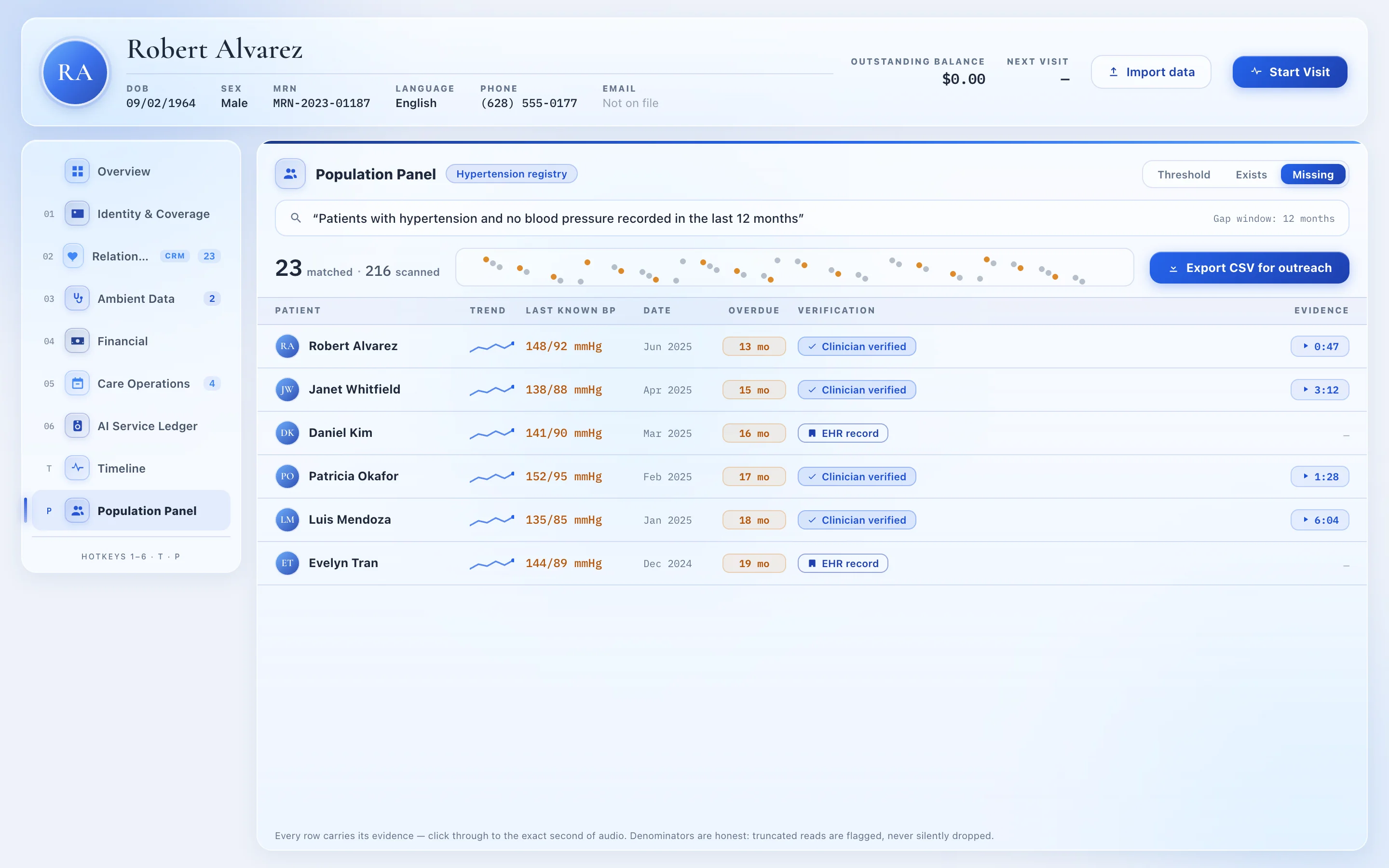
Illustrative interface with simulated patient data.
Every row keeps its receipts: the last known value, its date, and — for spoken facts — a click-through to the exact second of visit audio.
From Clinical Fact to Recall List to Phone Call
The visit builds the record
Recorded visits become coded, clinician-approved facts — diagnoses, medications, labs, vitals — each with a verbatim quote and an audio timestamp behind it.
You ask who's missing something
A missing-mode panel query turns the registry into a recall list: patients with hypertension and no blood pressure in 12 months, diabetics with no recent A1c, anyone overdue for a retest.
Export the CSV
One click exports the recall list — names, last known values, how overdue — ready for your front desk to work through, patient by patient.
Your staff calls; the AI answers the callbacks
Outreach stays human and person-to-person. When patients call back, the AI receptionist answers 24/7, verifies identity, books the appointment, and can text a confirmation or payment link during the call.
“Every clinical fact is a campaign waiting to happen.”
- ✕ No bulk SMS or email blasts
- ✕ No drip sequences or marketing automation
- ✕ No automated recall engine dialing patients for you
- ✕ No patient portal
What it does: build the list from evidence, and answer the phone when they call back.
Patient Reactivation: Finding the Patients Who Stopped Coming Back
Patient reactivation software usually tries to infer “lapsed” from appointment metadata. DeepCura’s reactivation mechanism is clinical: ask for patients with a condition on record and no qualifying value — no blood pressure, no A1c, no recorded follow-up fact — inside the window you choose. The patients who quietly drifted away surface with their last known values attached, so the person making the call knows exactly why this patient, and why now.
Worth stating plainly: there is no auto-computed “last contact date” or no-show score behind this. Lifecycle status (active, inactive, churned) is a field your team sets on the record; the reactivation list comes from the clinical facts themselves. That’s what makes it trustworthy — every name on the list is there for a reason you can see and verify.
Patient Communication in One Thread — SMS, Email, Calls, Faxes
Working a recall list means conversations, and DeepCura keeps every one of them on the patient’s chart: two-way SMS with consent gating and STOP handling, emails, call summaries from the AI receptionist, and inbound faxes paired to the right patient. Preferred contact channel and TCPA consent are visible on the record before anyone reaches out — so the person dialing knows both the clinical reason for the call and the patient’s communication preferences.
Messaging is two-way and person-to-person — never a blast. The point isn’t volume; it’s that the right person gets one well-informed call.
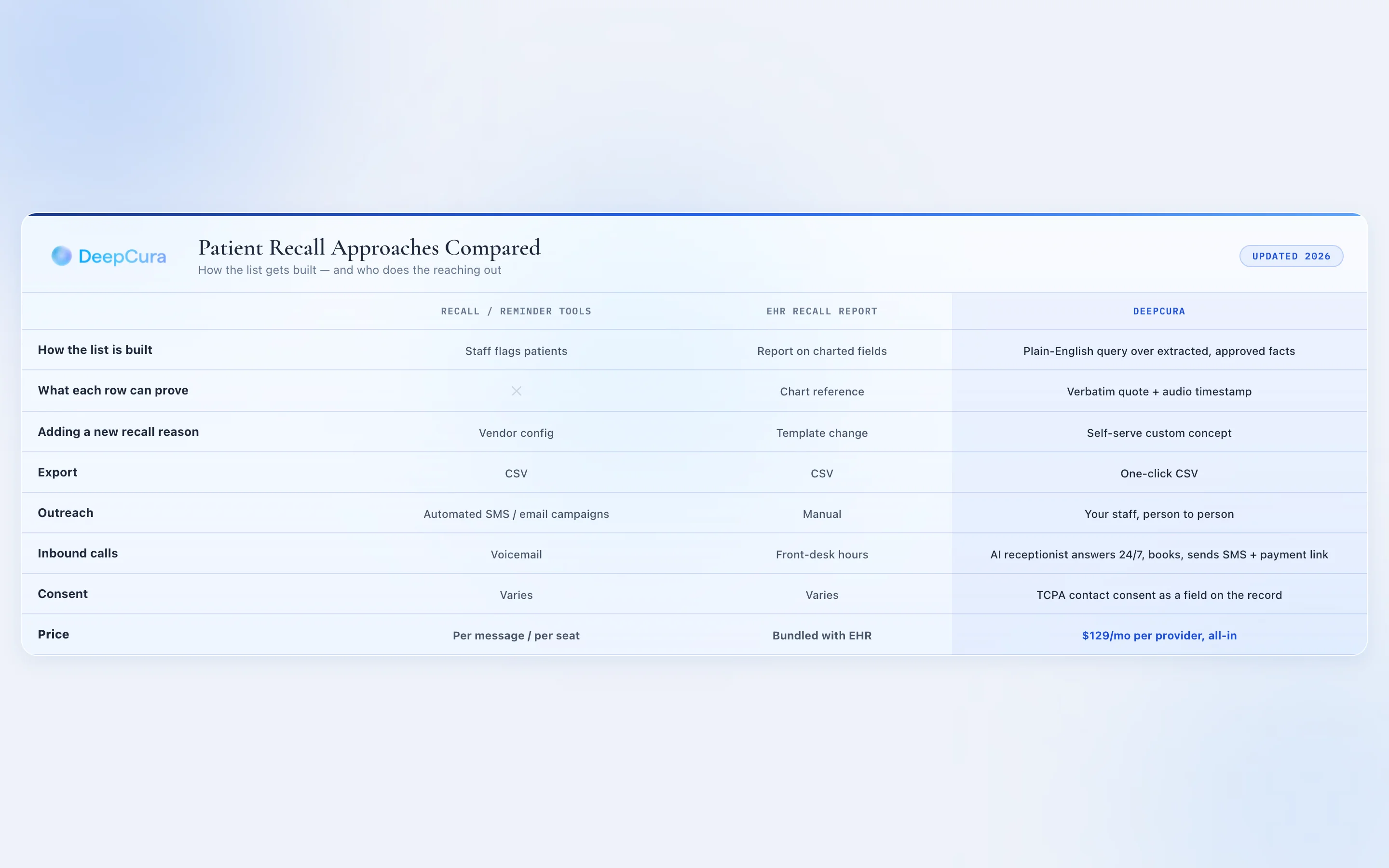
Recall Software vs. a Recall List the Chart Builds
| Recall / reminder tools | EHR recall report | DeepCura | |
|---|---|---|---|
| How the list is built | Staff flags patients | Report on charted fields | Plain-English query over extracted, approved facts |
| What each row can prove | — | Chart reference | Verbatim quote + audio timestamp |
| Adding a new recall reason | Vendor config | Template change | Self-serve custom concept |
| Export | CSV | CSV | One-click CSV |
| Outreach | Automated SMS/email campaigns | Manual | Your staff, person to person |
| Inbound calls | Voicemail | Front-desk hours | AI receptionist answers 24/7, books, sends SMS + payment link |
| Consent | Varies | Varies | TCPA contact consent as a field on the record |
| Price | Per message / per seat | Bundled with the EHR | $129/mo per provider, all-in |
Two Ways Practices Use This
Recall and reactivation
Fill the schedule from your own charts: patients overdue for follow-ups, retests, or their next visit — surfaced with the reason attached, exported in one click.
The same query is a care-gap list
A missing-mode result over your diabetes or hypertension registry is a care-gap list. Read the definitive care gaps guide for the full workflow.
$129 a Month — One Flat Price per Provider
Recall lists, the Population Panel, two-way SMS and email, the relationship record, the AI scribe, and the 24/7 AI receptionist — one price per provider.
Patient Recall Software FAQ
What is patient recall software?
Patient recall software helps a practice identify patients who are due or overdue for care — a follow-up visit, a lab retest, a screening — and organize outreach to bring them back in. Most recall systems depend on staff flagging patients or on appointment-date rules; DeepCura builds the recall list from the clinical chart itself, using coded facts that were extracted from visits and approved by a clinician.
How does DeepCura build a patient recall list?
You run a missing-mode query on the Population Panel — for example, patients with hypertension and no blood pressure recorded in the last 12 months, or diabetic patients with no A1c on file in 6 months. Queries run over one coded concept or a curated registry family (diabetes, hypertension, chronic kidney disease). The result is a recall list where every row shows the patient, their last known value, how overdue they are, and the evidence behind the data.
Does DeepCura send automated recall texts or reminder campaigns?
No. DeepCura does not send bulk texts, automated reminders, or drip campaigns. It builds the recall list and exports it as a CSV; your staff does the outreach person to person. Inbound is where the automation lives: the AI receptionist answers calls 24/7, books appointments, and can text a link or payment request during the call.
Can I export my recall list?
Yes — every panel result exports to CSV in one click, formatted for front-desk use. The export includes the matched patients and their last known values so your team can prioritize the most overdue first.
What's the difference between patient recall and patient reactivation?
Recall is bringing back patients who are due for specific care — a retest, a screening, a follow-up. Reactivation is re-engaging patients who have drifted away from the practice entirely. In DeepCura both start from the same place: a query over the chart, such as no recorded value or visit-linked fact within a chosen window, producing a list your team can act on.
Who actually calls the patients on the list?
Your team does — outreach is deliberately person-to-person. DeepCura's job is to make the list accurate and the callback easy: the chart shows each patient's preferred contact channel and TCPA consent state before anyone dials, and the AI receptionist handles the return calls around the clock.
How does DeepCura know a patient is overdue?
From the coded record. Every approved fact carries a date, so a missing-mode query can ask for patients with no qualifying value inside a window you choose (1 to 120 months). Patients whose most recent value falls outside the window appear on the list with that last known value shown for context — and the denominator is honest: incomplete reads are flagged, never silently dropped.
How much does patient recall software cost with DeepCura?
Recall is included in DeepCura's single $129/month per-provider price, along with the AI scribe, the Population Panel, the relationship record, two-way SMS and email, and the 24/7 AI receptionist. There is no separate recall module and no per-seat CRM licensing. A free trial requires no credit card.
Related Resources
Healthcare CRM Software →
The record side of the story: a CRM whose fields fill themselves from the visit.
Care Gaps in Healthcare →
The definitive guide to finding and closing care gaps — with a 30-day playbook.
Best AI Medical Receptionist →
The inbound half of recall: the AI that answers, books, and texts 24/7.
Meet Ambient Data →
The full story: the chart that fills itself — say it once, tracked forever.
References
- Federal Communications Commission, “Telephone Consumer Protection Act (TCPA) Rules,” fcc.gov. fcc.gov
- Centers for Disease Control and Prevention, “Adult Immunization Schedule,” cdc.gov. cdc.gov/vaccines
- Regenstrief Institute, “LOINC — the international standard for identifying health measurements,” loinc.org. loinc.org
- National Library of Medicine, “RxNorm,” nlm.nih.gov. nlm.nih.gov/rxnorm
- National Committee for Quality Assurance, “HEDIS and Performance Measurement,” ncqa.org. ncqa.org/hedis
- Agency for Healthcare Research and Quality, “Health Literacy Universal Precautions Toolkit,” ahrq.gov. ahrq.gov
HEDIS® is a registered trademark of the National Committee for Quality Assurance (NCQA). Mentions of third-party organizations and standards are descriptive and do not imply affiliation, endorsement, or certification.
Ask Your Chart Who to Call Next
Run your first missing-mode query, export the CSV, and hand your front desk a recall list where every name comes with its reason.
No credit card required · HIPAA compliant · BAA included